

I’m not sure I understand the question. If you have 2 or more object lists and you want to generate a single data source you can use Linq or a DataSet. Wisej can use any valid .NET data source.
Hi Andrew,
I tried to reproduce but failed. (see simple sample attached).
Are you sure that the name is set to the columns ? Sometimes the designer plays tricks on you.
Any chance to provide us with a test case ?
Thanks in advance.
Best regards
Frank
@Berat
There are many ways: save a reference to the DGV in the ContextMenu UserData, or in a local, etc.
In general, ContextMenu links the control that showed the context menu in the SourceControl property. But in the code you posted you simply use ctxMenu.Show(location) without any reference – there is no way for the ContextMenu or child MenuItem elements to know that they are being shown in relation to a specific control.
I suggest to go for one of these two options (see attached sample too):
1- Assign the ContextMenu to DataGridViewColumn.ContextMenu property.
2- Or, use ctmMenu.Show(control) to link the ContextMenu to the control showing it.
Then in menuItem_Click, retrieve the ContextMenu using menuItem.GetContextMen() and from the ContextMenu retrieve the control that showed it using contextMenu.SourceControl.
Try the attached sample app, shows both approaches.
dataGridView1_CellMouseClick:
var ctxMenu = new ContextMenu();
var menu1 = ctxMenu.MenuItems.Add(“Soruyu Gör”);
var menu2 = ctxMenu.MenuItems.Add(“Anketi Sil”);
ctxMenu.Show(Cursor.Position);
This is the method but, when i click on menu 1 i wanna change table on the same datagridview how can i add mouseclick event for that specific issue?
Thanks, good catch.
The issue in this case is that the new tab order comparer skips the inner controls since the TabControl itself has the focus. Which shows another issue which is that there is no visual indication that the tab control is focused, and a third issue that unless you click on the tab, the tab buttons don’t process the keyboard (up,down,left,right).
And this led to a new enhancements which is the support for mnemonics for tab pages as well.
WJ-8226
WJ-8225
WJ-8227
You can change the style of any cell either by changing the properties of the Style member, or assigning a new Style object or handling the CellFormatting event. To highlight or format the text inside a cell you can use html markup and set the AllowHtml property of the column to true.
See attached sample, shows two different approaches.
HTH
/Luca
There are several ways to achieve that.
One is to handle the CellFormatting event and change the Style passed in the event args. Another approach is to handle CellValueChanged and set the Style of the other cell. You can also cache and reuse DataGridViewCellStyle objects.
I have attached a small sample that shows both approaches since it answers another similar question.
HTH
Best,
Luca
Both trial licenses have been updated to 5/31/2017. It should pick up the date extension automatically. Let us know if you need to extend it further.
Hi Andrew,
WJ-8218 is also fixed in the latest Wisej release (1.3.61).
Best regards
Frank
Hi Andrew,
both issues are included in the latest Wisej release (1.3.61) that has just been uploaded.
Best regards
Frank
Hi Berat,
we tried to reproduce the problem but did not succeed so far.
Could it be that some Antivirus / Firewall is blocking http://localhost in your environment ?
The linked case is different. In your screenshot the dialog is rendered, but not the labels,
so some kind of rendering worked.
Can you please share some details about your environment and send us the test app that you are using.
Please send it to frankATiceteagroup.com.
Thanks in advance !
Best regards
Frank
https://wisej.com/support/question/visual-studio-ui-glitch same bug has been solved in this given link. Solution was to re-install the the previous version. Today, similar problem occured, column headers are not shown on the design window when i choose detail from view tab, properties section. Screenshot has been given down below.
Trial period is 30 days encountering this much problem on my trial period, i recommend extending it.
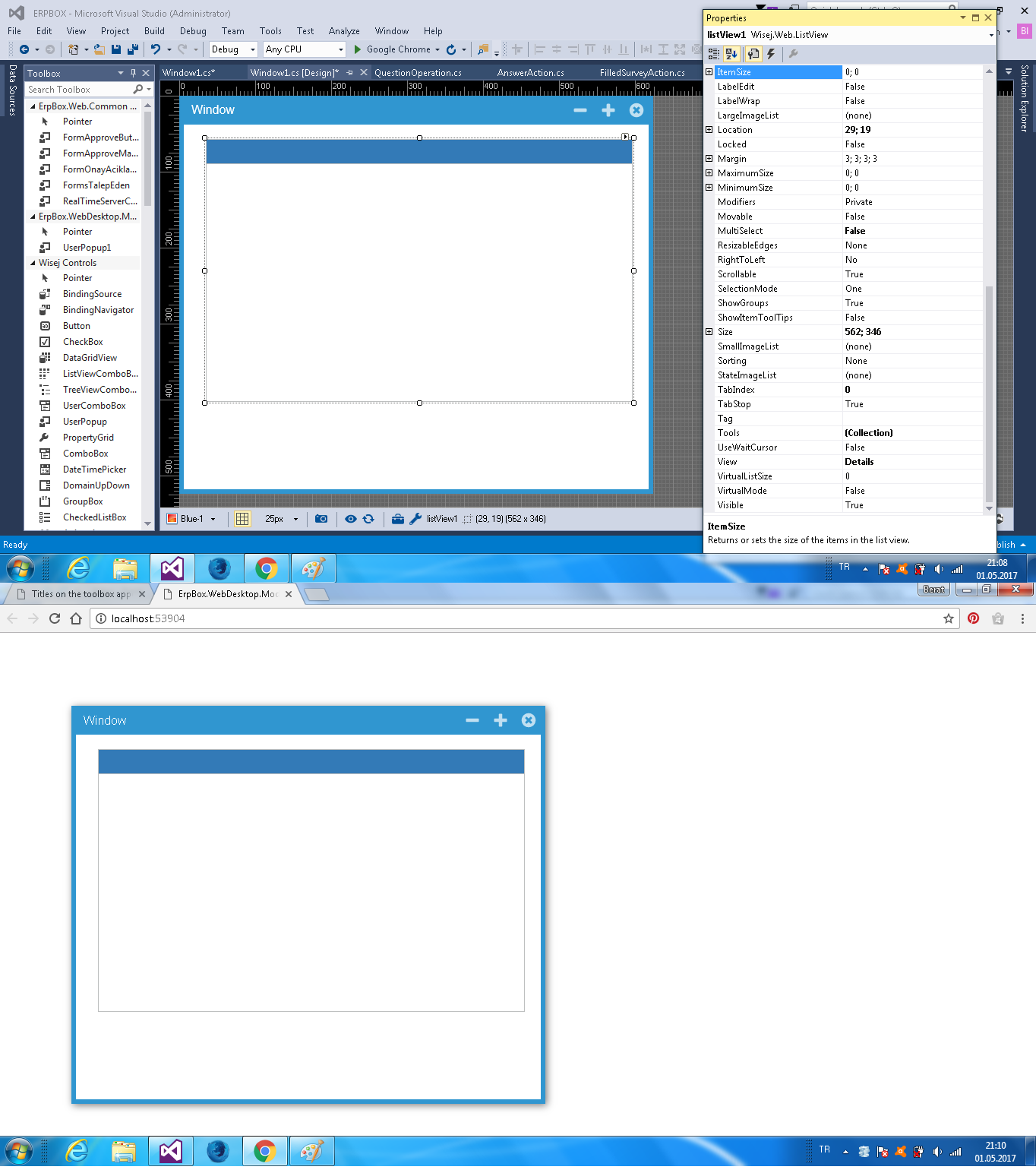
That’s strange. The dialog box is rendered correctly with title and border. Could you please send me the test app you are showing in the screen image?
Excellent. Thanks for getting those items sorted Frank 🙂
Sorry was wrong here with my last post.
It´s not the preview that´s new, but a switch to select between large and small icon view.
Anyways, you´ll see it in the next release 🙂
Best regards
Frank
Hi Andrew,
thanks a lot for your suggestions.
We followed them and added 2 enhancements (WJ-8219 and WJ-8220).
The improved ImageSource editor will include a search filter field and a preview window.
It will be available in the next release.
Best regards
Frank
Thanks Andrew.
This issue is logged as WJ-8218 and the fix will be included in the next build.
Best regards
Frank
I believe I figured this one out on my own. Somehow while using the theme designer I must have deleted the value of the “desktop” theme color. This was causing my website to barf on itself a little, and that’s why the AppearanceKey was not getting respected. Here is my code and theme change, if someone needs it in the future. Thanks.
this.htmlPanel.AppearanceKey = “hTML-panel”;
"hTML-panel":
        {
            "text": "HTML Panel",
            "inherits": "Panel",
            "states":
            {
                "default":
                {
                    "styles":
                    {
                        "width": [3, 1, 1, 1],
                        "style": ["solid", "solid", "solid", "solid"],
                        "color": "windowFrame",
                        "backgroundColor": "controlLight"
                    },
                    "properties":
                    {
                    }
                },
                "borderNone":
                {
                    "styles":
                    {
                        "width": [0, 0, 0, 0]
                    },
                    "properties":
                    {
                    }
                },
                "borderDashed":
                {
                    "styles":
                    {
                        "width": [1, 1, 1, 1],
                        "style": ["dashed", "dashed", "dashed", "dashed"]
                    },
                    "properties":
                    {
                    }
                },
                "borderDotted":
                {
                    "styles":
                    {
                        "width": [1, 1, 1, 1],
                        "style": ["dotted", "dotted", "dotted", "dotted"]
                    },
                    "properties":
                    {
                    }
                },
                "borderDouble":
                {
                    "styles":
                    {
                        "width": [3, 3, 3, 3],
                        "style": ["double", "double", "double", "double"]
                    },
                    "properties":
                    {
                    }
                }
            }
        }
Hi Andrew,
that´s by design: When in debug mode (web.config compilation debug=true), nothing is minified.
When you are in release mode, all embedded resources are minified and bundled.
Additionally Wisej “pre-minifies” and “pre-bundles” the resources into temp files so it does not have
to do it on each request. The temp files that are “pre-deflated” end in “z”.
That´s the maximum amount of optimization we could think of.
Find more information about Wisej minifaction here: https://wisej.com/docs/html/Minification.htm
Hope that helps.
Best regards
Frank
Thanks, really simple usage exactly what i was after. keep up the good work chaps!