

YouTube videos can only be played using the YouTube player which is simple to include using the IFramePanel like in any html page. Maybe we can upload a simple YouTube extension in /extensions to turn it into a Wisej component.
Otherwise the Video and Audio controls in Wisej use the html5 media tags. Try this http://demo.wisej.com/codeproject click on the Media option. The source code is linked here: https://www.codeproject.com/Articles/1208339/Wisej-The-Easy-Button-for-Enterprise-Software
If the video doesn’t show it’s probably the browser not supporting the <video> tag. You can always use custom html/javascript video players in Wisej.
The ImageIndex and ImageKey properties refer to the index or key name of the image in the associated ImageList. The TreeView can set node images at the TreeView level or the single node by referring to the TreeView.ImageList. When adding images to the ImageList, you can specify either an Image object or an ImageSource name/url/file. The ImageList also lets you normalize the size of all the included images.
OK I have worked round the Loaded issue
However I cant get images to display.
Using
node.ImageKey = “Images/Folder.gif”;
node.OpenedImageKey = “Images/Folder.gif”;
Any ideas?
Thanks
Ewan
Issue WJ-7315 was completed 20 Jun 2016.
Concerning
System.Windows.Forms.TreeNode GetNodeAt(Point pt)
If this method is needed to manage ItemDrag/DragDrop events, we have a new property DragEventArgs.DropTarget that refers to the node that is the target of a drag drop operation (unlike WinForms where you had to find it using GetNodeAt).
What is the Wise J equivalent of
private void trv_Reports_BeforeExpand(object sender, TreeViewCancelEventArgs e)
{
if (!e.Node.Loaded)
{
LoadReports(e.Node.Nodes, e.Node.Tag as string);
e.Node.Loaded = true;
}
}
Loaded does not exist
Thanks
Ewan
Hi Dino,
just tried again here and could not spot any problem:
I have dropped a toolbar on a Page and then I could drop textboxes, labels etc. from the VS toolbox onto the toolbar area of the page:
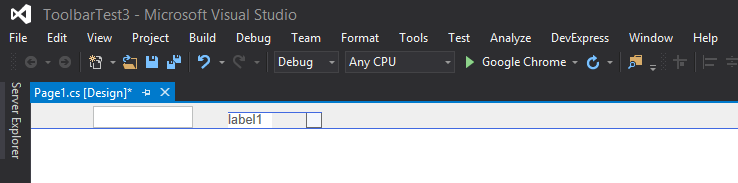
What container control are you using ?
Best regards
Frank
Hi Dino,
not sure I understand the question, but to add controls to the toolbar you simply drop them on the toolbar in the Designer.
If this does not answer your question please provide us more information.
Thanks in advance.
Best regards
Frank
Hi there,
Sorry I find the cause of the problem. It is because the web run under a “folder” “/demo6/” in IIS but run under “root” in VS Debug Mode.
And the way I handle the download ( using the url returned from “IWisejHandler.GetPostbackURL()”) have a bug so it make the function not working.
Regards,
Felix CHAN
Thanks Frank!
Hi,
I have just extended your trial till January 31st.
Best regards
Frank
Hi Markus,
unfortunately it´s delayed a bit more, Santa Claus suddenly came along 🙂
Here is an outlook of how it will look like:
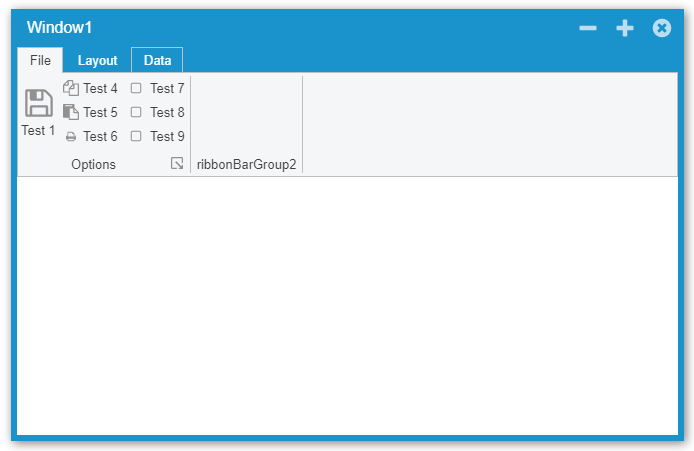
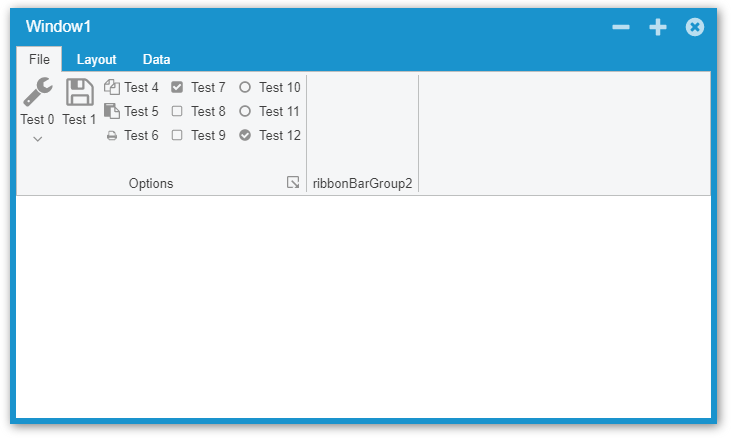
We will keep you updated during this week.
Sorry,
Frank
Hi Luca,
Thanks for your info. I can confirmed that I have added my key to the Web.config file and deployed to the IIS. And also, after reading your reply, I checked for the license file and found that the file “wisej-server.lic” exists in the web app folder.
By try and error, I finally found that the problem (“License Not Found” error message get pop-up) is caused by an incorrect theme settings in the Default.json (or Web.config).
(Case 1)
If the theme setting in Default.json is not correct (the theme setting in Web.config should get ignored): Load the web by “https://localhost/demo” from my desktop will be OK, but load by using IP Address “https://192.168.1.5/demo” by my tablet will get “Invalid Theme” error follow by “License Not Found” error.
(Case 2)
If the theme setting in Default.json is removed, and I add an invalid theme setting in the Web.config: Both localhost and IP address will pop-up an error saying “Invalid Theme” and then the browser screen become blank (empty).
(Case 3)
If the theme setting in Web.config is correct, and keeping the Default.json with no theme setting: Both localhost and IP address can be used without problem (provided that the license is valid and the file is in place).
(Case 4)
If the theme setting in Web.config is removed, and add a correct theme setting to Default.json: Result is same as Case 3.
(Case 5)
If the theme setting is removed in both Web.config and Default.json, Result is same as Case 3.
Test run under the following config:
Computer (Dev, IIS, Testing): Windows 10 Pro 64-bit, Visual Studio 2015, WiseJ 1.4.53.0, IE 11, Firefox 57.02, Chrome 63.0.3239.84.
Android Tablet (Testing): Sony Xperia Tablet Z4, Android 7.1.1, Chrome 63.0.3239.111.
Regards,
Felix CHAN
Yes, you can use gradient backgrounds anywhere with Wisej themes. See image below. The styles are gradientStart, gradientEnd, or colorStart, colorEnd, colorStartPosition, colorEndPosition, orientation: https://wisej.com/docs/html/Styles.htm
However, the gradient color is treated in css as a background image and we we used background images for table row headers to indicate the current row and other states and the theme sets the size to 16 x 16. The same for the column headers, we use the background image to set a custom image on the headers. You you’d have to remove the background size when using gradients on the column headers.
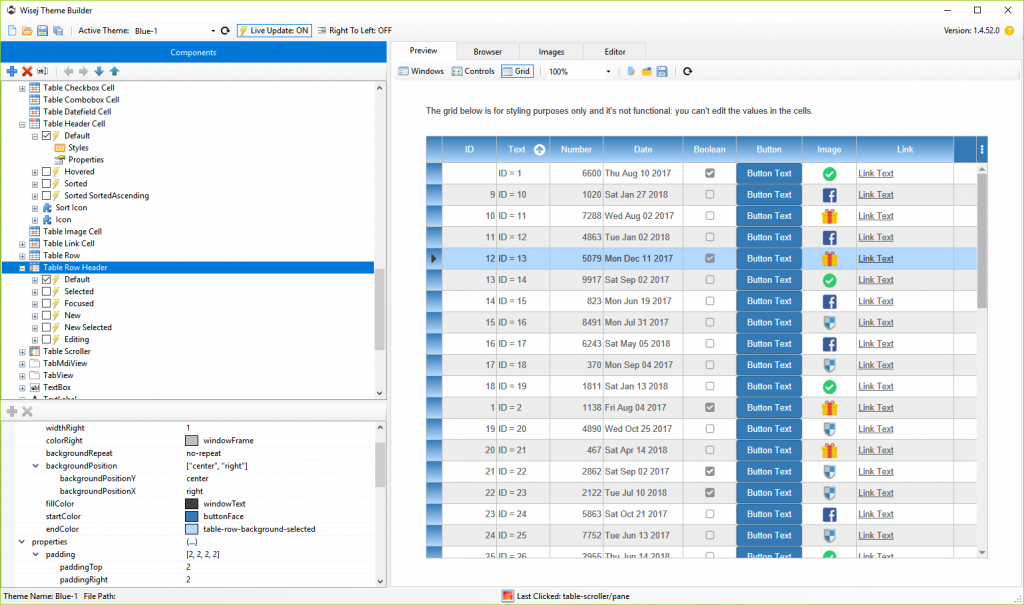
A mixin for the column header could be like this (of course you’d have to also change the “hovered” and maybe other states):
{
 "appearances": {
   "table-header-cell": {
     "inherit": "table-header-cell",
       "states": {
         "default": {
           "styles": {
              "backgroundSize": null,
              "startColor": "red",
              "endColor": "green"
            }
          }
      }
    }
  }
}
That’s relatively easy to build using Wisej panels and layouts. The problem is that a kanban board can be anything, the items need to be connected to dialogs to enter/edit the data and the data highly depends on the domain.
There are tons of cool looking kanban controls but when you look at the in detail and try to map their predefined fields and featured with a real-life app that you happen to be working with at the moment, they are always short on something. The same goes for complex calendars, in my experience. In other words I always find the eye catching samples being trivial or wanting when applied to real life apps.
Having said that, I can upload a quick sample that replicates the kanban in the screenshot. Probably after the holidays.
You can’t paint wisej controls like winforms controls, they are server-only components. They are rendered on the client as javascript widgets that create dom elements – like all javascript libraries.
However, Wisej supports custom painting in controls and cells. See the custom painted cell sample and codeproject in /examples.
InvalidateCell is not needed, but if you need an empty method for compatibility reasons, you can extend the DGV class and add a void method.
The ToolStrip set of components is not implemented in Wisej.
There is an introductory paper about migrating WinForms to Wisej here: https://wisej.com/blog/winform-to-wisej-migration-white-paper/
HTH
Wisej doesn’t check the license when using http://localhost. If you use an IP or domain name then it tries to load the license (wisej-server.lic). If it doesn’t find the activation file it tries to activate the license key in Web.config. The server either has a wisej-server.lic file or it must be able to connect to the internet. The activation is plain http over port 80.
Wisej server side runs only on Windows with the full .NET Framework.
I need to reply a DGVFilterPopUp into a Wisej project, but a most function aren’t present and can’t do it.
Example some function that need : ToolStripDropDown, ToolStripControlHost, DataGridView.GetCellDisplayRectangle(collIndex, rowIndex), DataGridView.InvalidateCell(colIndex, rowIndex), also the mthods of DataGridViewCellPaintEventArgs.
Is there any possibility to integrate it in some future?
I mean the webserver running on the Pi -so the WiseJ app runs directly on it.
Has anyone tried it ?
We don’t have it. What do you need it for?