

Hi mgmst,
The control captions will be localizable.
Regards,
Levie
Hi Poya,
you will find answers to all of your questions in our documentation.
Please make sure to check it out carefully.
You might want to read our latest blog about extended AI powered search options.
Providing code based on screenshots and just a short description goes beyond the scope of this free Wisej.NET support forum.
We also offer Professional Support. In case you´re interested please reach out to Sales AT wisej.com
Best regards
Frank
Hi mgmst,
Thank you for contacting support, we tried to reproduce the issue but unfortunately, we weren’t able to!
Would it be possible to send over a small, runnable test case?
Best,
Alaa
Hi Poya,
you can use the RowHeader for this:
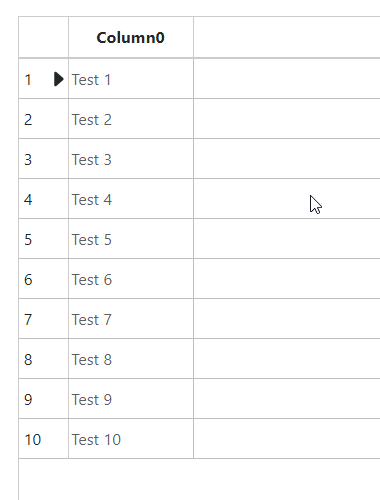
Please find a sample attached.
Best regards
Frank
Hi Sidney,
please contact us at Sales AT wisej.com with your license key.
Thanks in advance
Frank
So far I have had limited success by running this code on the touchstart or tap event for whatever control I need it to run on:
Dim jsCode As Object =
”
let elements = document.getElementsByName(“”tbScan””);
let element = elements[1];
function HideVirtualKeyboard() {
element.readOnly = true;
element.blur();
setTimeout(function() {
element.focus();
element.readOnly = false;
}, 300);
}
HideVirtualKeyboard();
”
Try
Application.Call(“eval”, jsCode)
Catch ex As Exception
Debug.WriteLine(“Errors tried to kill the metal but they FAILED!”)
End Try
This disables the keyboard and keeps focus on the textbox but requires me to add this to the touchstart or tap event of every possible control that needs this behavior. The other issue with this work around is that the keyboard appears for a split second before disappearing. I am still working on another solution but this is what I have done so far,
It is not about handling “with source code”. It is about all visual user interface elements captions to be exposed and it’s changes reflected in runtime localization model, as it is with all regular Wisej UI elements.
Best regards!
Hello,
I ran into the same problem and found the reason, so for anyone else, who might experience the same behaviour:
The order of the entries in the handlers section in web.config is important, the aspNetCore has to be first in the list:
<handlers>
<add name=”aspNetCore” path=”*” verb=”*” modules=”AspNetCoreModuleV2″ resourceType=”Unspecified” />
<add name=”json” verb=”*” path=”*.json” type=”System.Web.HttpForbiddenHandler” />
<add name=”wisej” verb=”*” path=”*.wx” type=”Wisej.Core.HttpHandler, Wisej.Framework” />
</handlers>
After changing the order of the handlers everything worked like a charm!
Hi Arthur,
this issue is fixed in Wisej.NET 3.2.3.
Best regards
Frank
Hi Chris,
I can get and set UserData of an Event without any issues. See quick & dirty sample attached.
Best regards
Frank
Sorry, I the null-coalescing operator ?? does the conditional part as I understand (relatively new to c#), but fairly sure it still needs a set?
Done a test and the fullcalendar is working with preview , thanks for quick fix, one question though, it would appear from the description as a general storage object that the events UserData should have a set and not unconditionally recreate on each get?
Could be my c# understanding, there may be a way to work with it.
// Returns a dynamic object that can be used to store custom data.
public dynamic UserData
{
get
{
dynamic obj = _userData ?? new DynamicObject();
object result = obj;
_userData = obj;
return result;
}
}
I will do some more tests on the JScharts issue and do a new post if cannot get anywhere.
Thanks
Chris
Hi Alex,
the MessageBox should already show Scrollbars when needed. Can you please send a screenshot when it does not on your end?
TIA
Frank
Hi Chris,
the issue with events not showing in the Full Calendar on .NET 7 is fixed and currently in QA.
If you want to test it before the release you can try Wisej.NET 3.2.3-preview7 on nuget.
I´m not sure I fully understand your issue with JSCharts. Any chance to wrap it up in a test case with more detailed instructions?
Thanks in advance,
Frank
Hi,
Please refer to our documentation including a video that describes all the details when deploying to Linux:
https://docs.wisej.com/deployment/targets/linux-macos
Best regards
Frank
Also, before I dig too deep, I think there may be a problem with the JSCharts extension with net 7 , as a preliminary test I set up as per the demo source, with a couple of tests, the core plot area of the chart does not seem to update, I am testing the bar with the demo code, its got 3 data sets loaded.
Looking at various ways to represent scheduling data with the extensions to showcase in company and get buy in, but have unavoidable .net 6/7 dependencies in project and using all your latest stuff on dependency injection (which is working nicely).
Ah thanks, i need to target 7 in my deployment so much appreciated and glad it is not just me.
Hi Chris,
thanks for reporting this. I can see it fail with .NET 7 but working ok with .NET 4.8.
We´ll check and get back to you.
Best regards
Frank
Hi,
only option I see is hosting the pages in subapplications in several subdirectories,
because any change in the bin folder would automatically reload the application.
OTOH having the users basically working on different versions of your application is not a smart design to be honest.
Best regards
Frank
Hi Arthur,
Thank you for reporting this issue!
A fix for this issue is currently in QA and will be released with Wisej.NET 3.2.3.
Best,
Alaa