

Thank you … very nice !!!
Helps a lot .
Regards
Hi Andrew,
thanks for bringing this to our attention. I could reproduce and logged issue WJ-8348 for it.
We´ll inform you when a fix is available.
Best regards
Frank
Hi Marcelo,
please find attached a basic sample that illustrates how to integrate SpreadJS with Wisej.
I have just added a widget to the form and defined Packages and InitScript properties with the designer.
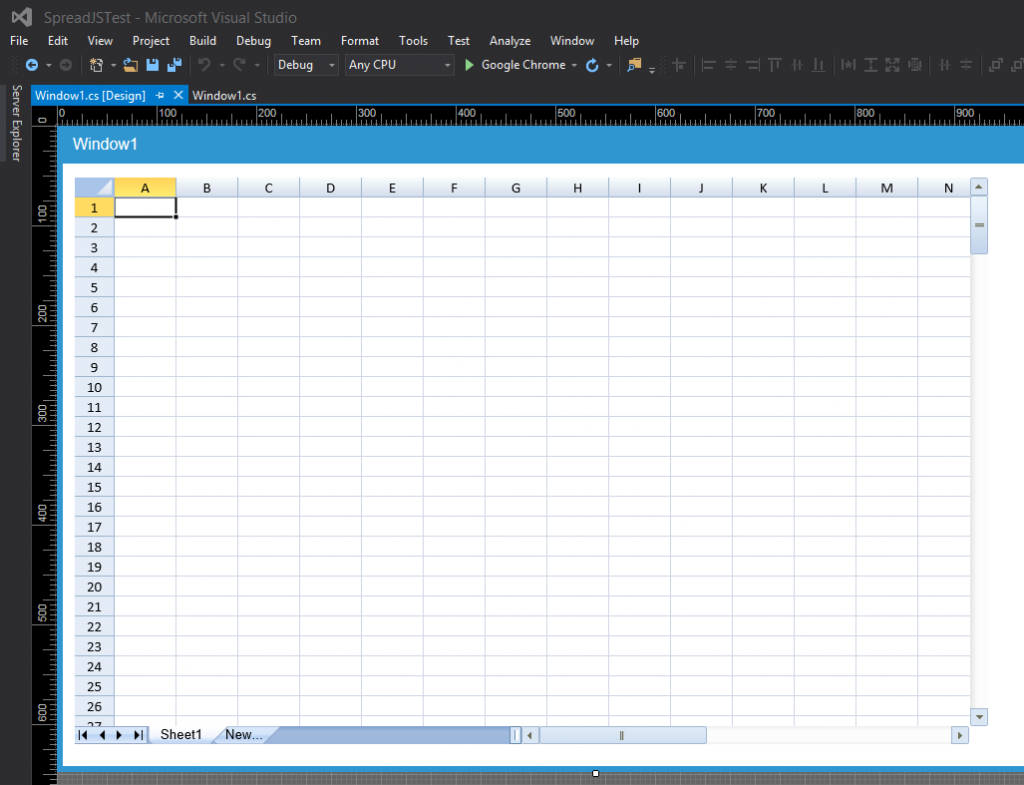
Packages:
package1.Name = “jquery-1.9.1.js”;
package1.Source = “http://code.jquery.com/jquery-1.9.1.min.js”;
package2.Name = “jquery.wijmo.wijspread.all.3.20151.16.js”;
package2.Source = “http://cdn.wijmo.com/spreadjs/jquery.wijmo.wijspread.all.3.20151.16.js”;
package3.Name = “jquery.wijmo.wijspread.3.20151.16.css”;
package3.Source = “http://cdn.wijmo.com/spreadjs/jquery.wijmo.wijspread.3.20151.16.css”;
InitScript:
this.init = function() {

    $(this.container).wijspread({
    })

}
Download the sample here: http://wisej.s3.amazonaws.com/support/attachments/SpreadJSTest.zip
Please let me know if this helps you getting started. Feel free to come back with any further questions.
Best regards
Frank
Hi Shawn,
You are correct. We found the problem in the installer.
Thanks,
Luca
Thank you, that worked.
Does this functionality not work thought the DGV designer UI in Visual Studio?
Hi Shawn,
Have you tried the following?
var CellStyle = new DataGridViewCellStyle();
CellStyle.Format = “dd/MM/yyyy”;
myDateColumn.DefaultCellStyle = CellStyle;
Best,
Alex
Hi Francis,
here is an intro guide on how to wrap DevExpress controls:
https://wisej.com/blog/integration1/
Best wishes
Thomas
Yes. I already studied then.
Bur it´s a little diferent (I guess) now:
<link rel="styleSheet" href="css/spread/gc.spread.sheets.x.xx.xxxxx.x.css" />
var spread = new GC.Spread.Sheets.Workbook(document.getElementById('ss'), { seetCount: 1 });
I will create a test case as soon as I can create a new project. My template troubles (https://wisej.com/support/answers/3648) are now preventing me from creating a new project. I now have no templates showing in visual studio 2015. I tried copying the templates from another developer’s computer but that didn’t help. I am wondering if my “My documents” settings are just that messed up since I had my network admin change the group policy settings….
Thanks,
Shawn
I am grateful for your reply, but I must disagree with you on this one.
I do not have VS2017 installed on my computer. I did not select the VS2017 checkbox on the WiseJ installer.
I could send you a video of the install process if that would be helpful.
Thanks,
Shawn
Did you read these articles?
They might be able to help you easily create a wrapper
See attached sample app. You will find in design mode a desktop control with a cool clock (top left) and a button on the task bar (bottom left). The button is anchored to the bottom left for the designer. Than at runtime the anchoring is reset, and a small javascript (2 lines) move the button to a container in the taskbar called “shortcuts” which will automatically manage the shortcut button in a VBox layout. You can add several shortcuts.
To explain better. Our Wisej.Web.Desktop control already has two inner containers, one called “shortcuts” and one called “notifications”. The shortcuts container is to the left of the window items, while the notifications container is to the right. However, adding shortcuts and notifications at design time is still not fully implemented (it will be fairly soon). This is why in this example we need those 2 javascript lines.
So, when you open the solution in design mode (design the desktop) you will see a JavaScript component. Select the button and look at the properties. You will find a JavaScript Events property. In there you will see an event “appear” and the javascript lines attached to the event.
You will also find a StartPopup control that you can fully design in the designer. That’s the semi transparent popup where you can place your tiles, menu items, buttons, and just about anything else. You can determine the size, colors, alignment as well.


HTH
Best,
Luca
Hi All,
Just a quick update for anyone else trying to solve how to drag and drop text into CKEditor.
In the attached app there’s a CKEditor, a ListBox and a HTMLPanel control inside a form. For the ListBox, there’s several names added to the list box as URLs. These names can be dragged directly from the ListBox and dropped into the CKEditor control with positional control on where the drop will occur. Since they are URLs that are being dropped then CKEditor will display them as URLs.
The HTMLPanel displays multiple text items which are actually HTML input boxes (https://www.w3schools.com/tags/tag_input.asp) with some Javascript added to each input box to simulate the selecting of the item. Each input box item is constructed in the code and added to a string builder. The contents of the string builder is then used to populate the HTMLPanel.Html property which displays each text item, giving the effect of a list of text items. The user can then drag and drop each text element from the HTMLPanel into CKEditor with positional control, just like the ListBox control that was showing the URLs.
The good thing about this is you don’t have to wire up any drag and drop events, it all gets handled automatically in the browser.
Hi Faith,
animating another control is pretty easy. See extended sample: http://wisej.s3.amazonaws.com/support/attachments/Animation2.zip
Here button4 launches animation of button5 on click. Simply define Animation for button5 as you did before.
You can leave the event empty. Then onClick of button4 call this:
this.animation1.GetAnimation(button5).Run();
Best regards
Frank
To return a value from javascript to the server you have to either 1) send an event, or 2) call a server method marked with [WebMethod].
Look at the source code of the geolocation extension to see how we did it there, or use the attached local storage component sample.
See attached local storage sample with component.
See attached local storage sample with component.
Thats right I can use call and eval functions but how could I get result value of executed script. for example localStorage.getItem(“imei”) .
To drag from listView2:
listView2.AllowDrag = true;
listView2.DragStart += listView2_DragStart;
private void listView2_DragStart(object sender, EventArgs e)
{
var listView = (ListView)sender;
var items = listView.SelectedItems.ToArray();
if (items.Length > 0)
{
listView.DoDragDrop(items, DragDropEffects.Move);
}
}
You can adapt this part in many ways. The call to DoDragDrop() saves the data to drag and drop and specified which effect is allowed.
The sample above will start dragging only if there is one or more item selected. The ListView class has an event ItemDrag that is not implemented yet, but DragStart works for all controls in Wisej and you can decide how and what to drag.
Then to drop into listView1, or into anything else actually:
listView1.AllowDrop = true;
listView1.DragEnter += listView1.DragEnter;
listView1.DragDrop += listView1.DragDrop;
private void ListView1_DragEnter(object sender, DragEventArgs e)
{
// here you can check the allowed effects specified in e decide what to respond. you can cancel drag or select the effect you want.
e.Effect = DragDropEffects.Move;
}
private void ListView1_DragDrop(object sender, DragEventArgs e)
{
// here you can handle whatever data is being dragged and dropped.
// in this case we saved an array of ListViewItem, but it can be anything.
// and can decide if to move the items, clone them, change them, log, etc.
var items = (ListViewItem[])e.Data.GetData(typeof(ListViewItem[]));
if (items != null)
{
var listView = (ListView)sender;
foreach (var item in items)
{
item.Remove();
listView.Items.Add(item);
}
}
}
HTH
/Luca
Thanks! Shouldn’t we make it “https” all the times regardless of the way the app was started?