

Hi Angelo,
WJ-8404 is fixed in Wisej release 1.4.20
Best regards
Frank
Now also included in official build 1.4.20
Best regards
Frank
Hi Tiago,
the issue # is WJ-8385 and it is fixed in Wisej 1.4.20.
Best regards
Frank
Hi Harald,
WJ-8386 is fixed in Wisej release 1.4.20.
Best regards
Frank
Hi Faith,
the new Wisej release 1.4.20 includes the fix for WJ-8387.
Best regards
Frank
Sure, we will publish a sample tomorrow.
Best wishes
Thomas
Hi Joshua,
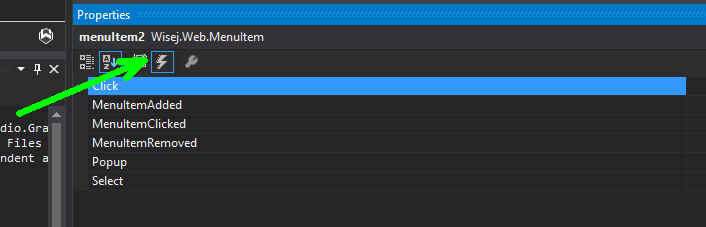
you can attach event handlers to add your code. Just switch to the events in your menu items properties
Best regards
Frank
Hi
Have you any sample yet for this topic?
Thank, will be fixed in 1.4.
I have attached a MyDateTimePicker.cs class that you can use as a temporary fix. Actually with this class you can override the parsing to fit your app.
The problem is that DateTimePicker tries to be a bit lax with the parsing of custom formats and uses, in this order, this list “d”, “D”, “T”, “t”, Custom. So when the string fits the system’s formats it’s a match before the custom format.
The correct way to do this is to force the text to match the custom format, when defined, and don’t try to match the system formats at all.
Hi Eric,
When in design mode the rotation (or css) only affects the rendering, not the bounds of the control since it needs to have the correct Location and Size properties. If the rotation causes the rendering content to be outside of the rectangle it will show at runtime but not at design time because of the clipping region.
Also, when applying css rotation by default the fulcrum of the rotation is the top left corner. I usually change it to use the center, by adding
transform-origin: 50% 50%;
HTH
/Luca
Sorry we don’t support merging headers. We can merge cells only. You can integrate any third party grid. See https://wisej.com/blog/integration1/
Hi Frank,
I used method 1 from https://wisej.com/blog/shadow_on_the_panel/ (Using a StyleSheet extender control)
With the Label “AutoSize=false” and this CSS code in the stylesheet control :
For a 90 Clockwise rotation (The designer doesn’t show the rotation) :
.vertical{
    writing-mode:vertical-lr;
}
For a 90 Anticlockwise rotation (The designer WILL show the rotation):
.rotated {
writing-mode: tb-rl;
transform: rotate(-180deg);
}
It isn’t pixel perfect (the vertical position is inexact regarding the selected TextAlign value, “Top/Bot left” being the most reliable), and you will see the rotation in the designer which permits you to create a decent layout.
Regards.
Hi Tung.
Just out of curiosity, is it possible to know the name of this third party application framework you mention?
Thanks a lot
The goal should be to have a workspace page (“default.aspx”), with native .NET controls (without Wisej). The “workspace” application is already ready.
With Wisej I would like to implement only custom forms that can be viewed through links (window1,2,3,4 …) opened by jquery (or bootstrap)
I attach a demo project (simple… very simple… 🙂 ).
Does the solution (and code) seem to you logically correct?
Hi Truong,
we tested a lot and could finally reproduce the problem. It only happens on Visual Studio 2017 community edition.
We could not reproduce it in any other environment. Are you also using the Community Edition ?
We´ll be investigating more and come up with a fix for it.
Best regards
Frank
Luca,
I didn’t knew that Z-order story, thanks for this training :).
For point 2 the solid border makes it obvious (the height of the control is the docked height !!).
Now it works like a charm 🙂
For other users interested by the case, see the remark about the placement of this.Controls.SetChildIndex(Lbl1, 0)
private void button1_Click(object sender, EventArgs e)
{
Label Lbl1 = new Wisej.Web.Label();
Lbl1.Text = BtnIdx.ToString();
Lbl1.BorderStyle = BorderStyle.Solid;
Lbl1.Dock = DockStyle.Left;
this.Controls.Add(Lbl1);
//Needs to be ordered AFTER adding to avoid error ‘child’ is not a child control of this parent.
this.Controls.SetChildIndex(Lbl1, 0);BtnIdx += 1;
}Thanks… Super support, super product, long life to both.
Hi Eric,
there are several ways to get a vertical label. Either use CSS via the StyleSheetExtender or use Animation or Rotation extender.
With the Rotation extender you simply have to set RotateZ to -90 degrees:
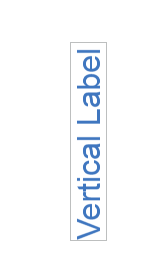
Please note that this rotation is a client side operation, so it might become a bit tricky with the designer which keeps the label at its original size and location possibly making it appear truncated.
Hope that helps.
Best regards
Frank
Hi Eric,
I run the sample and it looks correct. You can try the same in WinForms. This is what happens:
HTH
/Luca
I don’t understand what you are trying to do, if you want to share a small solution maybe I can give you more detailed into. In general, Wisej is a framework, it’s not a set of controls for ASP.NET. You can use any asp.net control in wisej or any asp.net page. You can use a Wisej application in an iframe in asp.net.
If the asp.net control is used from wisej then the entire wisej system is available to asp.net using the Wisej.Web.Application class.
However, if Wisej is loaded from ASP.NET it will not have access to ASP.NET session object becasue Wisej uses the session-less IHttpHandler interface.
See this for more information: https://wisej.com/support/question/httpcontext-current-session-is-null
The properties are all there but they are not supported on the client yet. I should be able to give you an ETA after we release 1.4 in few days.