

Hi Matthew,
I had to do something similar and ended up using a timer control on a form with a 10ms interval that would refresh the progress bar each tick. Probably not the cleanest work around but it works.
Hi Frank,
I’m using German versions … OS (Windows 8.1), Browsers (Chrome, Internet Explorer, Firefox – newest versions).
I’m not sure but I think that this behaviour of the date time picker is quite new.
Best regards,
Harald
Hi Luca,
thank you for your reply.
I modified your example a little bit … you can see the differences when you
Best regards,
Harald
I downloaded this and tried it as well. Something seems to be bogging down the browser – even after all rows are rendered I cant even use the scrollbars on the window.
Hi Tim,
I have created a simple sample in Alex thread: https://wisej.com/support/question/datagridview-hierarchical-rows
Please let me know if you need more or some other sample.
Thanks in advance.
Best regards
Frank
Hello Luca,
From what I experimented, it seems that the browser doesn’t really plays a role. I tested with the 3 major ones, IE, FF, Chrome, and the rows creations is around 0.3 secs for 10 rows for all of them.
More rows added, more time it takes to render them and worthier gets the responsiveness of the browser interface.
May be the reflow is ok, and it’s due to the browser latency because of the many text rotations. I did them using a stylesheet control.
I also don’t see a real speed increase being on the Dev environment or on the full power of the deployed Server.
I did a self-contained test app which I tried to not de-structure too much so we keep a similar code structure.
Regards.
Hi Chris,
we have added an additional parameter to AlertBox.Show where you can pass an onclose handler like this:
AlertBox.Show(“This is an alert !”, onclose: () => { AlertBoxClosed(); } ) ;
Please find a simple sample attached.
Best regards
Frank
Hi Harald,
can you please check your browsers language settings ? I could exactly reproduce the behavior when I tried on a german OS with en-US locale in Chrome.
Best regards
Frank
Maybe you consider additional functionality in the Theme Builder for the future.
In my opinion I would be great if I could save all modification (changes/additions) to a theme as a mixin theme using theme builder.
In addition I think it would make sense when editing a mixin theme all the other properties would be displayed. Maybe they should be marked/bolded to easily see the changes which have been made…
Do you use a custom format?
I have attached a small test case that I just used but cannot reproduce. I added ?lang=de to make the session use the de-DE locale.
Chrome? Would you be able to put together a sample app that creates a similar structure? The problem seems to be the browser rendering and reflow.
After update to Wisej-1.4.24, the invalid license popup show again, please kindly help, thank you.
— previous problem —
When I publish web site to IIS on a Server 2012R2, the machine cannot access the internet, I have copy the wisej-server.lic to the project root directory which same location as web.config and it show below error message. Could you please help to take a look. Thanks!
— previous problem —
Thanks, Frank!
I’ll have a look at your sample tomorrow, but I suppose the sorting will do the trick. Now I don’t know what will happen if the user tries to reorder the grid by clicking on column headers….
And don’t worry about point 3… It turns out that my column was too narrow, and as you push the values of the children rows to the right for indentation, they were pushed beyond the column right edge and they were invisible…
Best,
Alex
I was finally able to replicate the problem in a separate VB project (see attached zip).
This example is essentially what happens in the main project I’m working on. User chooses a template to load which is supposed to display the template text inside the CKEditor control with the draggable fields in the HtmlPanel which are contained within a UserControl. The UserControl is added to a tab page on the form. The tab page and UserControl are created at runtime. This works as expected in IE and Firefox but will hang in Chrome. As mentioned previously, this was working before latest update so if I need to tweak something to get this working again then please let me know.
Hi Alex,
I have put together a (simple) sample, that for sure does not reflect the complexity of your real application.
But maybe it gives you the right pointers.
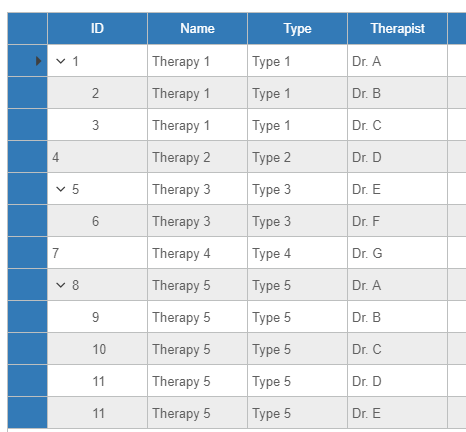
I have simplified the data into a single DataTable. When populating the grid you need to make sure (by sorting) that you have the correct sequence between parents and children. That way you avoid errors like you have mentioned in point 2.
I can´t reproduce Point 3 as you can see in my screenshot. Maybe you can share more details ?
Sample is attached.
Hope that helps.
Best regards
Frank
Hi Andrew, did you recompile the user controls? Looks like a binding error when the signature of a method cannot be resolved by .NET. The rightToLeft default argument of MessageBox,Show() has changed to RightToLeft. Checking the second problem.
Thanks. It’s caused by a fix for an old bug in the theme system. It happens when the third party widgets changes state, it gets “focused” for example. We’ll send you a dev build directly to verify with your app. Sorry about this.
with the doc as pdf file
with the doc as pdf file
The menu items in Wisej have an icon on the left (or icon space), the label, an optional keyboard shortcut, and the arrow to show the submenu. The label is only one component of the menu widget. It’s more than just a <div>.
However, like most things in Wisej, you can override the default wisej.web.MenuItem javascript class and make the whole widget become an <a> link. See the project attached here:
It contains a new MenuItem class that has a new HRef property.