

This is an interesting article on DI: https://www.codeproject.com/Articles/860532/Dependency-Injection-in-NET
Anything for .NET works for Wisej.
Bootstrap themes are just css. There are html templates but they don’t change the layout of widgets. The cool screenshots you see around are developed by someone.
The TreeView control in Wisej can be themed using the ThemeBuilder. The one in the screenshot is a combination of a mixin theme and layout changes to move the open button to the right. I will upload a sample project with a standard themed TreeView and the “advanced” themed TreeView you see in the screenshot.
The widget enforces a minimum size to avoid truncation. If you have vertical buttons they will force the container to be tall enough. If you remove the vertical buttons you will be able to reduce the height. Also, vertical buttons without a menu still leave enough space at the bottom for the down arrow to line up with other vertical buttons with the arrow, otherwise you’ll get this:
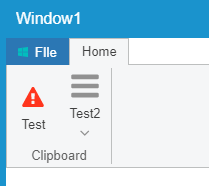
It would be easy to change the wisej.web.ribbonBar.ItemButton.js code to remove the arrow from the layout to let the ribbon shrink vertically. In _createItem comment out // item.getChildControl(“arrow”).hide(); and in _applyShowArrow under “vertical” change hide() to exclude().
The layout manager considers hidden widgets to still occupy their layout space. Only excluded widgets are both hidden and not occupying the space.
Hi Matthew,
this can be accomplished by using the role property and handling the MouseClick event.
Simply add a role attribute to the HTML hyperlink and query it as e.Role in your MouseClick event handler.
Please note that the Click event handle does not have any arguments, so you need to use MouseClick or MouseDown.
With using different role properties you could also have multiple links in a label and handle each link separately.
Hope that helps.
Best regards
Frank
Looked at the obfuscated assembly you sent to support (JustDecompile – Telerik, it’s free). The problem is that the class Program (Program.Main) is missing from the assembly. The obfuscator you are using may have removed it because it’s not referenced. It’s used as the startup method through reflection.
The problem is that the browser’s cookies are case-sensitive for the URL. The server will not receive the session cookie at all when the URL is different. It’s not a Wisej issue.
You can force the URL to be always case sensitive by using the IIS URL Rewrite feature. We could add this also as a configuration option in Default.json.
If you plan to have the same session open on multiple tabs I’d suggest to turn on the “refreshActiveTab”:true option in Default.json. It automatically causes a refresh when a second tab/browser becomes active and another tab/browser has changed the state of the same session. Otherwise you risk a situation where the same session is out of sync in different tabs.
HTH
try this: https://developer.mozilla.org/en-US/docs/Web/API/Screen/lockOrientation
but it’s limited to installed web apps and full screen.
Hi Bogdan,
thanks for your interest in Wisej.
A developer license is calculated per developer so you can install it on multiple devices.
It includes one free server license.
Additional server licenses can be purchased from us.
Find more information here:
Best regards
Frank
Hi Bogdan,
We faced a similar problem. We had a couple of production applications written in VWG and the demise of Gizmox left us with a problem. We have since transistioned both applications to WiseJ, one is in production and one is still under construction. In both cases the migration was pretty straight forward – more or less replacing the references to VWG with the references to WiseJ. There was some re-engineering needed but it was nowhere near as bad as I had feared and for us revolved mainly around some of the custom controls we had created for VWG and some of the VWG extensions such as charts and gauges. The resulting applications were actually much better looking, more responsive and actually use less resource when running so we were pretty happy with the changes.
Having done the actual conversion we also took the time to “modernise” the look and feel of our applications which has also greatly improved our user satisfaction. Again this was pretty simple in WiseJ – we chose a different theme and updated our icon sets to use the pre-packaged sets in WiseJ.
So in summary – definitely not too hard to do and definitely worth doing IMO.
HTH
Nic
Hi Bogdan,
As one could expect, there are a few differences. I prefer the approach, the choices and the speed of Wisej over VWG.
A good starting point would be the Migration guides.
It’s the same in WinForms, the wheel changes the NumericUpDown when the mouse point is over the control, it doesn’t have to be focused since the wheel events are dispatched to the control under the mouse.
Checked DevExpress ASPNET Ajax controls and Sencha ExtJS and there it’s different, the wheel changes the value only if it has the focus.
Looks like it’s an implementation choice. I’ll see if we can add an option or change it to behave like ExtJS.
Removing a cookie from the Cookies collection only removes it from the collection, not from the client. You need to set the expiration date to remove it from the client as in ASP.NET.
https://msdn.microsoft.com/en-us/library/ms178195.aspx
We’ll add a remarks section in our docs as well.
Hi again Ewan,
For a Desktop with mutiple applications, have a look at the CodeProject sample.
Hi Luca,
I checked Frank’s recommendationabout websocket, and found it’s enabled on my Server, but the sample still made partial reporting.
But using the sample “Wisej.BackgroundTasks2”, it was reporting properly.
Now I understand why I couldn’t find why 🙂
So that It effectively must be the ProgressCircle.
Yes it’s a regression related to the ProgressCircle component and websocket.
Looks like we may have a regression in dev build .59 regarding out of sync updates.
I’d say that Pages and Windows are not alternative to each other. It depends on the design of your app. For a new app I’d use either a Page for the main screen and windows for modal dialogs. Or a maximized mdi (not closable or resizable) with mdi children.
I don’t understand the question about user controls being constructed using pages or windows. A user control is a control that can be used anywhere.
This is an example of a landing Page

Followed by a themed Mdi with mdi children

You can have a look at UI Containers sample in Examples.
I have been able to duplicate the problem by using Chrome’s Dev tools and clicking on the Toogle device icon.
The iPad mode doesn’t let me click the checkbox (or click into an integer field to edit).
If I click out of Device mode the checkbox (and integer field) both work.
Hi Ewan,
As a personal note I would say it’s your choice. I made a few sample applications you can see and run on WinForms/Wisej Samples. I had the same question. As the main application workspace, on some of the samples I used Page while on others I used a maximized unmovable Window.
On CslaSample I have two versions, one for each scenario. Anyway what I have on the main application workspace is a panel where I load controls. You can load controls directly without a panel, but that’s an MVVM thing, well… Caliburn.Micro’s to be more precise. This can be done with either Page or Window. No differences here.
There is a 3rd scenario – use a desktop with several applications. In this case, applications should be Window applications because that’s easier to handle. And I think this answers my question. For multiple applications, I would use a desktop. For a simgle application I would use a Page application because it’s cleaner and I see no pros on having a maximized unmovable window.
Provided your application workspace is just a host for controls, this is a design decision you can change later, as you don’t need to change the controls. Changing from one scenario to the other is just a question of adapting the Window to the Page or vv.