

Hi Edgar,
You might also want to check if your server is running WebSockets.
Best regards
Frank
Hi Edgar,
I think this thread might be of interest to you.
You have to think of Wisej always in terms of request and response. Until there is a response sent back to the client, you can change anything but nothing is updated on the client. If the app is connected using WebSocket you can push the updates at any time by calling Application.Update(this).
Or you can attach a javascript event to the button, call this.showLoader() on click and let the server code only set ShowLoader = false.
Or you can set ShowLoader = true, start a background task (Application.StartTask) and se ShowLoader = false at the end of the task.
Hi Frank,
the treeGrid contains a Gantt Control that I need to use in my project. I declared [assembly: WisejResources] in the AssemblyInfo.cs and put all required files & folders into the Resources folder. It still comes up with the same message.
What I try to achieve is a widget that I can drop into a form and then get the layout and data from a database to populate the gantt in e.g. the load event of the form or if the user changes the selection criteria.
I have attached two projects:
Best Regards
Rudy
The attached sample shows how to use Wisej.Web.Widget and events back from the client. It’s very simple. You can extend it and turn it into a class. Look at similar extensions in /extensions.
Web methods are exposed automatically on top level controls (Desktop, Page, Form) and in the main application static class (Program). The methods on controls are instance methods, while the web methods in Program as static and accessible using the “App.” object in javascript.
The override you mention is correct and registers web methods on singe controls.
However, the code you are showing seems to be circular. Eval(“this.test(this.Button1.getLabel())”). It’s returning the label to the server by calling back a server methods when the server is calling the client. It seems that you want to read the label property from Button1 because it was changed from the client without a call to the server?
There are a number of properties in Wisej widgets that are automatically wired back – when they change on the client they also change on the server. Specifically: size, location, value, … depending on the widget. The label is not since it’s not a value that typically changes outside of the server control.
However, you can subscribe to the “changeLabel” event like this:
Override OnWebRender (as you did) and add this:
config.wiredEvents.Add(“changeLabel(Text)”);
Override OnWebEvent and add a case:
case “changeLabel”:
this.Text = e.Parameters.Text; break;
Now every time the label changes wisej will fire an event to the server.
You can also fire your own events using:
this.fireEvent(“myEventName”);
config.wiredEvents.Add(“myEventName”);
or
this.fireDataEvent(“myEventWithData”), {name:’test’, something: 12});
config.wiredEvents.Add(“myEventNameWithData(DataMember)”);
The data is assigned to the named property in parenthesis, whatever you name it (only one). Then on the server you will find it in e.Parameters.DataMember (or whatever you named it). It’s a dynamic property. So in the case above you will have:
e.Parameters.DataMember.name; // it’s “test”
e.Parameters.DataMember.something; // it’s 12
HTH. And this is all internal stuff and how all Wisej controls are built. Using a highly optimized JSON serializer, diffing engine, and dynamic objects all wired through events and callbacks.
We don’t add grab handles or a special border since it heavily depends on the app. The resizable feature is the basic implementation and allows for simple splitters when controls are docked, to create dashboard floating/movable panels, etc.
You can add any type of overlay either using CSS (StyleSheet extender) and assign a class to movable objects, or adding a transparent panel with grab handles. see below:
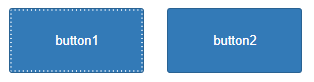
I added this css to a StyleSheet
.resizable::before
{
    content:'';
    position:absolute;
    width:100%;
    height:100%;
    box-sizing:border-box;
    border: 2px dotted rgba(255,255,255,.8)

}
and assigned “resizable” to button1.CssClass in the designer.
Wisej.Web.Forms use the same MMovable mixin. But they also have the LiveResize property (which is always on for controls). Forms can either live resize or show a resize border while being resized (the default). The resize border can be customized in the theme using the “resize-frame” appearance key name.
Hi Jens,
IIS settings are not handled by Wisej and setting a higher session timeout in Wisej than in IIS is a wrong configuration.
So I think it´s better to fix that configuration instead.
Best regards
Frank
Thats good news ,im glad to hear that.
Thank you for your time.
Hi Arda,
the filter panel is in final testing and will be published right after our next Wisej release, i.e. end of March latest.
Sorry for the delay.
Best regards
Frank
Hi Shawn,
no problem at all. That´s normal behavior.
Usually a lot messages are logged to help developers diagnose issues.
There are virtually hundreds of theme states and key combinations that are not defined, simply because they are using the default or are inherited.
Best regards
Frank
PS: See also here: https://wisej.com/support/question/how-to-hide-missing-appearance-browser-warnings
Thanks Frank – I had not spotted that important detail. I’ll find another component.
The WiseJ component does not work for me because you cannot control the ability of the user to print or download the PDF.
Thanks again
Nic
ok solved, I have do this override
Protected Overrides Sub OnWebRender(<Dynamic> ByVal config As Object)
MyBase.OnWebRender(CObj(config))
config.webMethods = {“test”}
End Sub
create the test sub
<Wisej.Core.WebMethod>
Public Sub test(testo As String)
AlertBox.Show(testo)
End Sub
and call with this
Eval(“this.test(this.Button1.getLabel())”)
bye
Cristian
Beacause i’m old in desktop programming but I’m very newbie about javascript I have not total understand…
example: if with javascript I change a button label with:
this.setLabel(“FOO”);
how I comunicate this to my vb app?
thanks
Cristian
I have created a widget and import the js, but I don’t understant how create the inizializzation script
Cristian
I’m interessed me too, for a small tutorial how import darkroom javascript
thank you
Cristian
Hi Nic,
your code is perfectly fine but SyncFusion´s PDF viewer simply does not support loading a PDF directly:
https://www.syncfusion.com/forums/132064/loading-pdf-from-nodejs-backend
While I like many of SyncFusions controls, I would recommend to use a different component to Load/View PDF files
that better integrates with Wisej. (or simply use the Wisej.PdfViewer).
Hope that helps.
Best regards
Frank
Hi Bogdan,
Desktop and Page are different approaches to your web application.
A Desktop might be the prefered approach if your web solution is composed of independent modules. Say you are designing the an Office product, with a spreadsheet module, a word processor module, the lot. Then Desktop should be your choice. Have a look at Wisej.CodeProject demo.
Page is the classical approach for the also classical web application.
Hi Luca,
Any update on this issue, I am using version 1.4.50.0
Alex Berze