

Hi Valeriano,
sorry, the property NameFillWeight is not yet rolled out. It will be included in the next Wisej release.
As a temporary solution you could use:
var grid = ((DataGridView)propertyGrid1.Controls[0].Controls[0].Controls[0]);
grid.Columns[0].AutoSizeMode = DataGridViewAutoSizeColumnMode.None;
grid.Columns[0].Width = 200;
Best regards
Frank
Hi,
thanls, I try it.
Best regards,
Valeriano Simeone
Hi James,
After completion of one year, if i am not upgrade the license for latest updates, then my development will continue with old build or not?
Thanking you,
Hi,
yes, i refer to vertical splitter.
But I can not find the property “NameFillWeight”. Where is?
thanks,
valeriano
Hi Valeriano,
usually this is done with TypeConverters (as in Winforms).
Wisej adds a PropertyValueFormatting event that you can use:
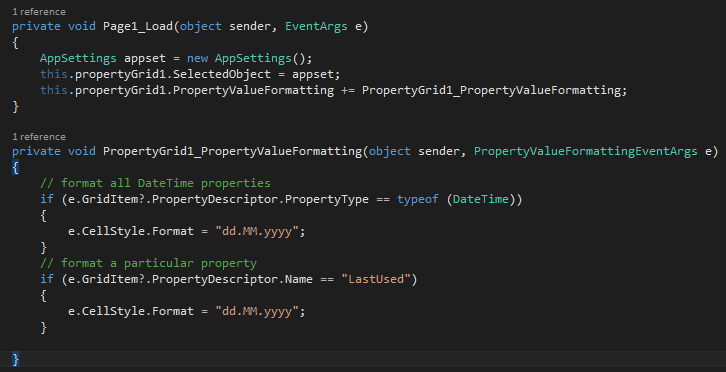
This shows 2 options, either format all DateTime properties in the PG or just a particular one (that is called “LastUsed” in this sample.
Hope that helps.
Best regards
Frank
I can show the showLoader from javaScript but how to stop it from code c #.
This just started working again. Things I tried:
5 or 6 did it, seemingly.
WebcSocket is not used
Hi Edgar,
is your server running on WebSocket ?
Did those hints not help you yet ? https://wisej.com/support/question/showing-a-loading-spinner#sabai-entity-content-5403
Best regards
Frank
Hi Frank
The code I'm using to get a showLoader displayed on a button is this one.
Not all the buttons work as you like, sometimes it appears sometimes does not appear.

this.Button.call("showLoader");
Application.Update(this);

Thanks
Hi Edgar,
can you please describe what you want to achieve with the ShowLoader ?
Maybe a code snippet will help us to better understand your requirements.
Thanks in advance.
Best regards
Frank
Thanks Frank!!
I remain pending… Best Regards
Hello Rob,
I ran your sample and I get the scrollbars in the browser and can both scroll with my mouse wheel as well as using the vertical scroll bar
PS: If you want to control the column size you can use the property NameFillWeight.
Just in case you´re referring to the vertical “splitter” between the 2 columns.
Best regards
Frank
Hi Valeriano,
it´s not yet directly exposed. You can use the following code
((SplitContainer)propertyGrid1.Controls[0]).SplitterDistance = 50;
Hope that helps.
Best regards
Frank
Any help on this issue?
Frank
The email is on it’s way.
I added the images using the designer which put them into the resources.
Alex
Hi Carina,
we just uncovered a problem with the DateTimePicker control and its validation.
It´s logged as WJ-8839 and we are currently testing a possible fix.
I´ll inform you when it´s available. Then you can use the Validating event to react on invalid data that has been entered.
Best regards
Frank
Hi Alex,
can you isolate the problem in a test case ?
You can also send code from your app that causes problems to frankATiceteagroup.com
Could it be that you used Image instead of ImageSource for the images that are not showing ?
Best regards
Frank