

Hi again Kevin,
Please have a look at https://github.com/iceteagroup/wisej-examples/tree/master/HtmlJsonAndMain/
The MultiHtml project uses sub-applications (json files) in the root of the project and in folders. Some json files use “startup” while other use “mainWindow”. Some buttons use html relative address while others navigate to the relative path, without any extension (/folder/page.html vs /folder/page). So I can confirm the json setting “mainWindow” is working all right in release 1.4.99.
The ChangedNames project was re-tested, and the Readme.txt file corrected. In a nutshell:
This was tested under release 1.4.99.
If you feel that something is not working as described, please send a sample.
Hi Kevin
Please have a look at the GitHub ChangedNames example
I hope it helps to clarify the Html, Json and Main relationships.
Quote Readme.txt filein the ChangedNames project
Removed as inaccurate.
Hi again!
It worked. But when log into Web application (lekodar.com) can’t use chat. Chat message send field constantly loses focus. And impossible to type a message.
If there is a form on the page (form or message) chat works. But if there is no form on the page message field loses focus.
QUOTE: (fromTiago information)
The Default.json file on this projects looks like this:
{
“url”: “ChangedNames.html”,
“startup”: “ChangedNames.Startup.Main, ChangedNames`
}
Now Wisej knows it must show ChangedNames.html. This is very important, since browsers need an HTML file and Wisej needs the browser to load and execute wisej.wx
The second piece of information Wisej gets from the json file is the startup method, in this case
– method ChangedNames.Startup.Main
– assembly ChangedNames
Please note that the “startup” setting in the json file is optional, you can use the “mainWindow” setting instead.
Response:
This is not the way the current version behaves, so maybe this is still a bug? Changing the url setting to the page with the script, does not work unless the json file is exactly the same. Also, calling mainWindow also failed in my case.
Sample Test: Default.json file with url setting set to ktrax.html (see original question) still fails with blank page.
As mentioned before, this is either something that changed between versions, was maybe a bug in a previous version (no idea what the original version was), but the behaviour has changed somewhere in between. So, until 100% tested, I cannot see why people shouldn’t just add the json file for each html file? Besides that already gives me a huge bit of flexibility I didn’t know I had before.
Hi Kevin,
Sorry to hear about your troubles.
I’m not sure I understood your scenario.
Wisej supports the scenario of using more than one HTML file. An example will be added shortly to Wisej-Examples.
Say you want to use a different URL for application administration. On Visual Studio, you should right click on the project and
Add => New Item
On the Add New Item form, select Wisej on the left side and choose Application. Set the Name (say Administration) and click Add.
Wisej creates 3 files:
You will notice that Administration.json will look like this
Snippet
{
	"url" : "Administration.html",
	"startup": "<ProjectName>.Administration.Main, <ProjectName>"
}
This json file instructs Wisej to show the Administration.html file and execute Administration.Main method on startup.
Note that Administration.html also loads wisej.wx
You may alseo notice that, in this new (sub-)application, the Administration.Main method is the startup method. Use this method to set the Application:MainPage or whatever you want to show on the adminsitration part of you application.
Last, in case you want to set up an Administration button, you can navigate to the Administration (sub-)application like this
Snippet
Application.Navigate("Administration");
Sub-applications are different entry points in your application, independent URL you can use for whatever purpose you decide. On a brand new project, by default Wisej creates:
When you create a new Application, Wisej uses the same base name for all three files. Of course you can change these names; you just need to also change the json file.
Hi again Orel,
Please have a look at Session documentation.
When the user closes the browser, or shuts down the computer, or loses power, or loses the connection, the result for Wisej is the same: it stops receiving keep-alive messages from the client. When that happens, the session expiration timer starts to tick and after the specified timeout (which is the value specified in Default.json or the default) times 2, Wisej drops the session and disposes all the associated object.
After closing the browser, Wisej will wait 2 x 120 seconds (if you didn’t change sessionTimeout on the json file). Then the application exits and session counter is decreased.
You can use the debugger or a logger like NLog to see what’s happening and when it’s happening.
Hi
As Tiago mentions, only primitive types are supported. A JSON serialiser (I personally use Newtonsoft) can be used to take your object to a string, then you store the string in local storage. Retrieving is just the opposite, retrieve the string, then “de”serialise back to the original object. Works like a charm.
This configuration has worked for me and is in production with customers (not clean and neat, but functional – And before you knock my code style, please remember that I was brand new to coding in C# when this was originally written):
Notes: Even though there are later versions I keep my Crystal at version 13 across sites (since I still have VB sites and VS2013 developed systems out there)
Hope this helps someone.
Couldn’t attach so code for report.aspx.cs below:
using System;
using System.Data;
using CrystalDecisions.Web;
using CrystalDecisions.CrystalReports.Engine;

namespace MyApp {
    public partial class report : System.Web.UI.Page {
        ReportDocument viewerSource = null;

        protected void Page_Load(object sender, EventArgs e) {

            string qsXmlFilename = Request.QueryString["xfn"];
            string qsViewerSource = Request.QueryString["vs"];

            Type t = Type.GetType(qsViewerSource);

            viewerSource = (ReportDocument)Activator.CreateInstance(t);

            clsReporting.printSetViewer(viewerSource, qsXmlFilename);

            crystalReportViewer.ReportSource = viewerSource;
            crystalReportViewer.DisplayStatusbar = false;
            crystalReportViewer.DisplayToolbar = true;
            crystalReportViewer.EnableDrillDown = false;
            crystalReportViewer.EnableDatabaseLogonPrompt = false;
            crystalReportViewer.EnableParameterPrompt = false;
            crystalReportViewer.EnableToolTips = false;
            crystalReportViewer.HasCrystalLogo = false;
            crystalReportViewer.HasDrilldownTabs = false;
            crystalReportViewer.HasDrillUpButton = false;
            crystalReportViewer.HasPageNavigationButtons = true;
            crystalReportViewer.HasToggleGroupTreeButton = false;
            crystalReportViewer.HasToggleParameterPanelButton = false;
            crystalReportViewer.PrintMode = CrystalDecisions.Web.PrintMode.Pdf;
            crystalReportViewer.SeparatePages = false;
            crystalReportViewer.ShowAllPageIds = false;
            crystalReportViewer.ToolPanelView = CrystalDecisions.Web.ToolPanelViewType.None;
        }

    // Usually this would be somewhere else in your project, not in the report.aspx.cs code behind
        public static void printSetViewer(ReportDocument objReport, string tmpFile) {

            string tmpPath += "~\tempreports";

            DataSet ds = new DataSet();
            ds.ReadXml(tmpPath + @"\" + tmpFile + ".xml"); //Temp XML file is created on server by another process

            objReport.Load(objReport.FileName.ToString());
            objReport.SetDatabaseLogon("", "", tmpFile, ds.DataSetName.ToString());
            objReport.SetDataSource(ds);

            ConnectionInfo crConnInfo = new ConnectionInfo();
            crConnInfo.ServerName = tmpFile;
            crConnInfo.DatabaseName = ds.DataSetName.ToString();
            crConnInfo.UserID = "";
            crConnInfo.Password = "";
            crConnInfo.Type = ConnectionInfoType.MetaData;

            TableLogOnInfo tblTempLogonInfo = new TableLogOnInfo();
            // This prevent the frustrating Database Login Errors
            foreach (Table tbl in objReport.Database.Tables)
            {
                tblTempLogonInfo = tbl.LogOnInfo;
                tblTempLogonInfo.ConnectionInfo = crConnInfo;
                tblTempLogonInfo.TableName = tbl.Name;
                tblTempLogonInfo.ReportName = objReport.Name;
                tbl.ApplyLogOnInfo(tblTempLogonInfo);
                tbl.Location = tbl.Name;
                tbl.SetDataSource(ds.Tables[tbl.ToString()]);
            }
    }
}
Hi Orel,
Authentication and online users are application concepts. So that’s up to your application to solve.
Neverthless Wisej can tell you how many sessions are active:
Snippet
Application.SessionCount
[Edit]
To help you keep track of users that didn’t logout but are no longer online (closed the browser, etc) you have the event
Snippet
Application.ApplicationExit
SOLVED
But still a bug that didn’t exist previously.
Explanation:
When calling <script src=”wisej.wx”></script> from ANY other html file, the script fails to load correctly (and call the Program.Main). ONLY Default.html file can have the script tag and have it work. Since my application called a new html file after calling Default.html, the script failed to load trigger the Program.Main().
Resolution:
Create a .json configuration file for ANY html file that contains the <script src=”wisej.wx”></script> and configure the entry point and html file name accordingly in that file. NB json file MUST be named exactly as the html file (eg: Bob.html must have corresponding Bob.json)
Hope this helps someone else in the future, cos that is 6 hours of my life I won’t get back 😀
Hi,
What about using the DataGridView control with VirtualMode? You can also build up a tree structure with this control and have the power to only show the visible nodes on client.
Jens
Thanks Frank.
I may also have another issue … unless I’m doing something wrong!
Per the code above, “Schedule” is a UserControl which I have now added a FlowPanel with DockStyle.Bottom, however it renders incorrectly. See attached.
Cheers,
Neil
In the past I used AuthorizeNet C# SDK (a few times). It depends on the provider. Most providers have C#, Java, Python SDKs. The ones that require you to navigate to their site are usually a mess to manage. Authenticating and charging a credit card from the server side is much simpler. You send a request and get a response. What you do with customer data is up to you. Our web site now uses paypal professional but the charge is done in php on our server.
Load only 1 level, set the node to ShowLoader true and IsParent true and load the child nodes only on demand when the node is expanded. Try the Wisej.Web.FileOpenDialog component. You can also set VirtualScroll to true on the TreeView (which is experimental and has some issues). In general 5000 nodes result in 50,000 elements in the browser.
Thanks Neil.
Logged as WJ-9036. We´ll inform you when it´s fixed.
Best regards
Frank
PS: as a workaround you can set ShowItemToolTips to false until the fix is available. 😉
Hi,
if you choose ChartType Bar and set both axes to Stacked = true, you can easily achieve this:
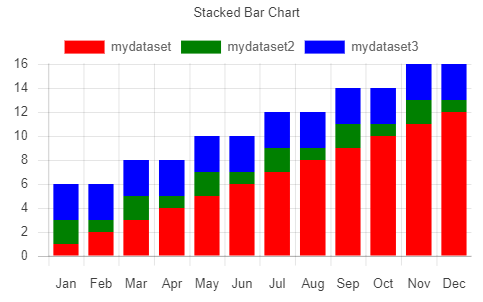
Best regards
Frank
Hi John,
I´m not sure about your specific application infrastructure, but maybe you could handle the time out event individually in your code ?
See here: https://wisej.com/support/question/session-time-out
Hope that helps.
Best regards
Frank
Hi Edmond,
we could reproduce and logged that issue as WJ-9034.
We´ll inform you when a fix is available.
Best regards
Frank