

Hi Angelo,
the interop is just like a kind of interface. To make it working on your server, you must install office.
But I think there could be a licence issue, when you install and use office on a webserver.
To answer you question: Yes it is possible with Wisej (see your local machine tests), but not recommended on a WebServer, because of possible licence issues.
Best,
Jens
Hi Ewan,
you can query the value like this.
var value = this.dataGridView1.Rows[1].Cells[0].Value;
Hope that helps.
Best regards
Frank
Hi Frank
Thanks that works, however what’s the best way of returning the selected value back to the underlying DGV Cell?
Ewan
Hi Johann,
one approach could be the usage of Lazy Loading panels with forms inside.
See here: https://wisej.com/support/question/lazy-loading-panel
Further you could wait for a new extension that will be published soon.
It adds the DataRepeater control to Wisej that some might already know from WinForms.
Hope that helps.
Best regards
Frank
Hi Frank
Thanks for the update.
My name is Ken. I logged the support request but our company account was created for Meagon, our admin resource, hence the name change.
I have changed our account profile to show my name so their is no confusion around identity 🙂
Hi Edmond,
can you try to remove the tooltip from the button and check if this issue still exists?
Can you check, if you have the same version of Wisej Client sources like you’ve on the server (see attached image, there you can check which client side version your Wisej has).
Best,
Jens
Drop a Wisej.Web.Widget on a page, size it big enough, then click on the InitScript and use this:
this.init = function(options) {

    var script = document.createElement("script");
    script.src = "https://telegram.org/js/telegram-widget.js?5";
    script.setAttribute("data-telegram-post", "telegram/83");
    script.setAttribute("data-width", "100%");
    script.setAttribute("data-userpic", "true");
    this.container.appendChild(script);

}

You can't use the string you posted because browser do not execute scripts added after the page is loaded.
You will not see WebSocket requests in there. You can catch only the first request that switches to web socket, then you can select it and see the frames. You need to refresh after opening the network tab in chrome dev tools. See attached.
Any IWisejComponent will work. All it needs is a reference to find the session and it will flush all the updates on all components back to the client.
You can also save the application instance Application.Current and use that reference when calling Application.Update(component);
Try this: http://demo.wisej.com/uploadfiles
The code is here: https://github.com/iceteagroup/wisej-examples/tree/1.5/UploadFiles
If you have a hidden upload button and try to trigger it by using javascript the browser will block it. Check if you have javascript errors. Otherwise you may a chrome extension installed that blocks the upload control.
Hi Andrew,
thanks for reporting this. You can use the following workaround to temporarily fix it:
<style>
.cke_reset_all {
position: relative !important;
z-index: 10000;
}
</style>
It´s logged as #1778 and will be fixed in the next Wisej release.
Best regards
Frank
Hi Ewan,
here is the sample that shows how to add a custom column with a custom cell:
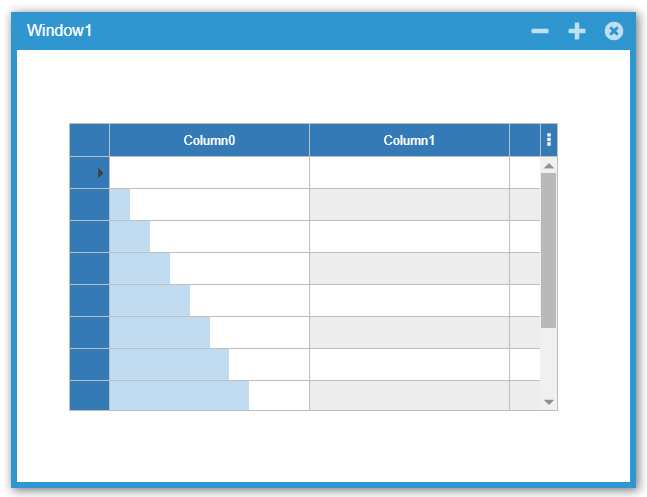
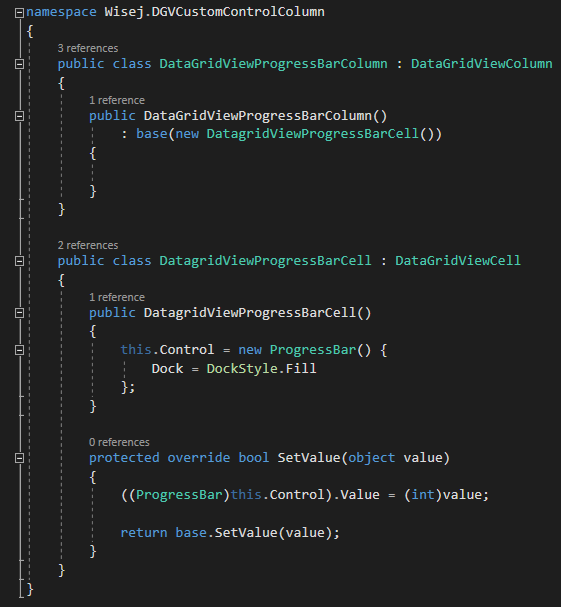
Download here:
http://wisej.s3.amazonaws.com/support/attachments/Wisej.DGVCustomControlColumn.zip
Best regards
Frank
Hi Matthew,
thanks. We could reproduce and fixed in the extension.
Please update from GitHub.
Best regards
Frank
Hi Meagon,
thanks for reporting this.
We logged this issue as #1777 and will inform you when a fix is available.
Best regards
Frank
The CellFormatting event is the wrong place. It can be fired hundreds of times when rendering the grid, editing, etc. You can end up re-creating the cell control multiple times while the grid is getting the data from the server.
We’ll upload a sample for a custom control column shortly.
Keep getting the attached error.
The Grid does not want to display custom cells, but will do if the size of the grid is modified.
Editing a Date cell causes all the existing custom cells to go blank
Clicking on the header Row to save changes causes DGV to redisplay Properly
Edmond,
I have tried to reproduce this in a test case but failed so far.
Any chance to strip down your code and wrap up a test app for us ?
Best regards
Frank
This Code works but it is unstable. The Grid Keeps hiding the user controls.
How do I get the Added user controls to inherit the grid back ground colour?
if (dgvOfficeStaff[e.ColumnIndex, e.RowIndex] is DataGridViewDateTimePickerCell)
{
((DataGridViewDateTimePickerCell)dgvOfficeStaff[e.ColumnIndex, e.RowIndex]).Format = DateTimePickerFormat.Short;
}
else
{
dgvOfficeStaff[e.ColumnIndex, e.RowIndex].Control = new MultiColumnComboBox();
dgvOfficeStaff[e.ColumnIndex, e.RowIndex].Control.Dock = DockStyle.Fill;
((MultiColumnComboBox)dgvOfficeStaff[e.ColumnIndex, e.RowIndex].Control).BorderStyle = Wisej.Web.BorderStyle.None;
Its also appearing in another odd place now – see new screenshot.
Sorry, I see this property is available to be set at runtime, but not designtime.