

Hi Frank,
think of a desktop wisej application and imagine there are many “applications”.
example
application1: invoice management
application2: calculator
applicaizone3: cms
… and many others.
if just one of the applications shows a form with showdialog… all other applications will be locked.
I need that if an application shows a modal form, it is still possible to use other applications. This is what i need.
If I use TopMost, the parent form it is still focusable, and do not receive DialogResult, and other application can’t go over it.
regards
Cristian
Hi Mark,
thanks for providing that sample.
I have logged issue #1988 and am happy to inform you that in the next Wisej build
a call to animation.ResetAnimation() will also stop a running animation
(either if it´s a css or javascript animation).
As a workaround until the new build is available you can now use this code for your sample:
this.pictureBox1.Eval(“this.getContentElement().getDomElement().style.animation = ””);
Best regards
Frank
Hi Cristian,
reading this
“I need to emulate showdialog, without freeze all opened forms”
wouldn´t it be the easiest option to just use the TopMost property and set it to true for that window ?
Or maybe I misunderstood what you´re trying to achieve ?
Can you please clarify in that case ?
Thanks in advance.
Best regards
Frank
Hi Huynh,
good news:
The next Wisej release will contain an easy to use Application.RequestFullScreen() implementation
that you can use in your ToolbarButton.Click event without any additional wiring of events or coding.
I´ll inform you when it´s available.
Best regards
Frank
Here is a sample app with a composite grid and sync’d columns. See DataGridViewWithBottomRows.InitScript and CssStyle proeprties. You can use the same approach to add rows at the top or any child control to make up a composite grid.
Hi Frank,
I tried your suggestion, no effect I’m afriad (unless less I’m doing something wrong).
Attached a simple sample, with the rotation anim in.
Regards,
Mark
I attach a demo project
Hi Mark,
have you tried this.animation.ResetAnimation(this.PictureBox) to remove the animation?
If it does not work, could you please wrap up a small test case ?
Thanks in advance.
Best regards
Frank
Hi Alexandru,
thanks, logged as issue #1983.
Best regards
Frank
We have to support frozen rows (top and bottom) on our todo list. Don’t have a date yet.
However, the Wisej DataGridView is also a container, you can drop other controls to it and use the Dock property to create a composite grid – and you can make them resizable (ResizableEdges) to act as it there was a splitter: i.e. toolbar, detail grid, navigation tree, etc.
You could add a second grid to the bottom without the column header and without the vertical scrollbar (see ScrollBars property) and then sync the column resize, move and horizontal scrolling on the client. You can also decide where to show the horizontal scrollbar.
We did this in our other framework for the Gupta/SQLWindows to Web migration and I can attach the javascript to sync the grids if you like the solution. You’d have to create the second grid with the same columns – could use the column.Clone() method for that.
Hi HSoft,
you can achive this with the Movable and ResizableEdges properties. I built a small example, which shows you this features.
For the Form I added a ComponentTool (Windows logo), when you click on it, it will allow you the move and resize all Controls in the Forms ControlCollection.
When a control was moved the Move event is executed, where you can save the new location. The same happens for the Resize event.
You can save now for each control the new values wherever you want and restore it in Form Load event.
Best,
Jens
Huynh,
please find extended sample where the FullScreen mode is toggled by a ToolbarButton.
Best regards
Frank
Huynh,
I modified your sample to use a ClientEvent, see attachment.
Best regards
Frank
Hi Sushma,
Best regards
Frank
Hi Huynh,
you have to call it on the client and connect it to a user event.
See attached sample.
Best regards
Frank
Hi Frank,
Can you help me to see my demo?
How to use Application.Call JavaScript to FullScreen?
Thank you so much.
Hi Antonio,
This isn’t really a Wisej-specific issue, but you might find this information helpful:
https://docs.microsoft.com/en-us/previous-versions/windows/it-pro/windows-server-2008-R2-and-2008/cc753195(v=ws.10)?redirectedfrom=MSDN
If you want it to be public-facing you’ll need to buy a domain name from somewhere like godaddy.com and set it up through their site.
If there’s anything Wisej-related I can help with let me know!
Best regards,
Levie
Hi,All.
Late to the party, but I’m starting to convert some VWG apps that use ReportViewer to WiseJ. Most important, also trying to convert a Winforms app that uses C1.Flexgrid…
So would anyone be willing to provide simple but fully working example, or at least a production code sample that would speed up the process for me.
If I can get these working in WiseJ, I will contribute my converted VWG reporting functionality that parses the report RDL file and dynamically creates and fills parameter controls and main report datasets without having to hard code anything.
Basically a generic local mode reporting control that replaces the parameter panel in a server based report.
Thanks
Geoff Sorensen
Hi Huynh,
you can query if your Application is running in FullScreenMode by reading the
Application.Browser.IsFullScreen
To change it into FullScreenMode you have to attach to a client side event
(e.g. a button click).
An easy way is to use the ClientEvents collection and add a client event like this:
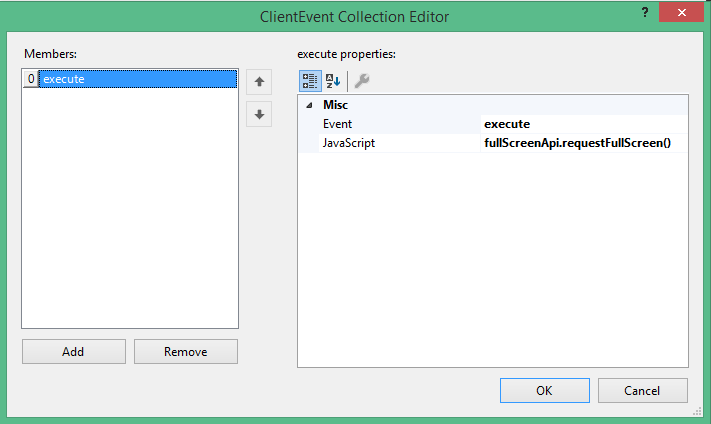
This enters the FullScreenMode. If you want to cancel it, add a client event with
fullScreenApi.cancelFullScreen()
Best regards,
Frank
Thank you Luca, the resource.wx approach works perfectly! (thanks for the explanation)
Regards,
Mark