

Hi Frank,
thank you for making this available so quick.
So far this is looking good. However we noticed one bug with this feature:
The application then crashes completely, because it’s stuck in an endless loop. As far as we can tell this is only happening when using the Internet Explorer.
Thanks and regards
Markus
Dmitry,
should be fixed now in our latest Wisej release (2.1.60).
Best regards
Frank
Also use this guide:
https://wisej.com/docs/2.1/html/ThemeBuilder.htm
Under Structure https://wisej.com/docs/2.1/html/ThemeStructure.htm You will find the available styles (they are all documented since they are limited to the available decorators that transform the style values to CSS), under properties you will find the most common properties. Properties in Wisej and the theme are unlimited and dynamic since they are themeable javascript properties.
Hi Adrian,
the theme settings are stored in a dynamic object so unfortunately there is no IntelliSense help available
A good approach is to use the ThemeBuilder and the Preview window to mark the element you are going
to theme. (You can also use the Browse button and theme your existing application live).
Then you can switch to the Editor window and it should have synched to the theme definition.
Here you can see the structure and start building your code from there.
It may require a bit of training to find the right spots and definitions but I´m sure you´ll love the
flexibility and power of Wisej´s theming system.
If you are stuck, just ask for help here and I am sure you will find help quickly.
Best regards
Frank
Hi Dino,
thanks for providing further information and a test case.
I have enhanced the column filter to handle null DateTime values.
Please update from https://github.com/iceteagroup/wisej-extensions
It will also be included in the next Wisej release.
Best regards
Frank
Thank you, that’s perfect.
Regarding that “pseudo-problem”, one of the most powerful part of Visual Studio is context help. What’s not so good right now with wisej. For example, in my case:
Nevertheless, your help here in forum is excellent and I really appreciate that!
Hi Frank,
please find attached sample.
Please note that this error is raised when there is NULL value in the column that you are trying to filter, I was expecting that his rows will be ignored / filtered by default.
Regards,
Dino
Hi Dino,
can you please wrap up a small test case ?
You can either post it here or send it to frankATiceteagroup.com
Thanks in advance.
Best regards
Frank
Adrian,
you can use the ThemeBuilder to either change an existing Theme or create a custom Theme or create a Theme Mixin.
Just add a property textColor to the Hovered state of a Button:
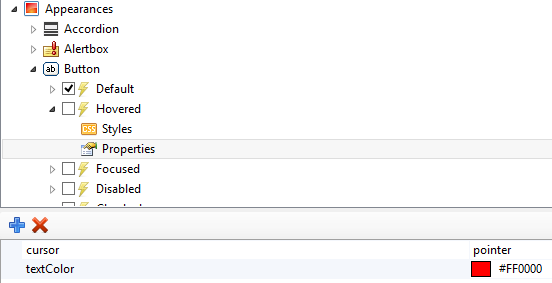
Or you can add this color in your code:
Application.Theme.Appearances.button.states.hovered.properties.textColor = System.Drawing.Color.Red;
Best regards
Frank
Hi
Here I adjunt the example with the validations made in wisej
Wisej use another control, maskedTextbox, with the equivalent functionality used in winform for a texbox.
In more complex scenarios, like email and numbers with letters, the better aproeach is use regular expressiones.
You can use textBox or maskedTextbox with regular expressions
I hope to be helpfud.
Hi,
sorry for misunderstanding. I need something like Validator of TextBox in VWG and when I set the validator, it prevents user from input incorrect characters. Please see the attachment VWG with textbox, which allows only characters from a-z and 5-9.
Page
Hi Ulisses,
Can you please test the latest build (2.1.58) and see if the issue still persists for you?
Let me know!
Best regards,
Levie
Thanks for the feedback, Kizaemon!
Levie
Maybe he refer to this… (see imagen)
Here left you a small sample with the same textbox validation, in webgui and wisej.
Please send a small sample VWG app showing how you use the TextBoxValidator.
Hi, everyone. Looks like problem still exists.
Hi Glenn,
here are my 3 package definitions for InitializeComponent (you can remove packages4,5 and 6):
package1.Name = “jquery.js”;
package1.Source = “https://code.jquery.com/jquery-3.1.0.min.js”;
package2.Name = “jszip.js”;
package2.Source = “https://cdnjs.cloudflare.com/ajax/libs/jszip/3.1.3/jszip.min.js”;
package3.Name = “dxall.js”;
package3.Source = “https://cdn3.devexpress.com/jslib/19.2.7/js/dx.all.js”;
Hope that helps.
Best regards,
Frank
I have tested it and modified the link to use the latest dx.all.js, it’s the same, the error says “$(…).dxTreeList is not a function”.
Hi Glenn,
the sample uses an old version of DevExtreme (16.2.6) that does not seem to include the dxTreeList.
Try upgrading the package to
https://cdn3.devexpress.com/jslib/19.2.7/js/dx.all.js
See here: https://js.devexpress.com/Documentation/Guide/Getting_Started/Installation/CDN_Services/
Best regards
Frank