

Hi Andrew,
we just worked on an issue in WiseJ themes regarding the push states of toolbar buttons. This should be fixed in the next build.
Can you upload or send a small test case for the other problem you describe?
Thanks
Thomas
Hi Thomas,
Thanks for the sample but it’s always stop at “debugger;” line, please refer to attached file, is it anything I do wrong ?
Ben
You might want to update the date and time for the extension so people know it has been updated.
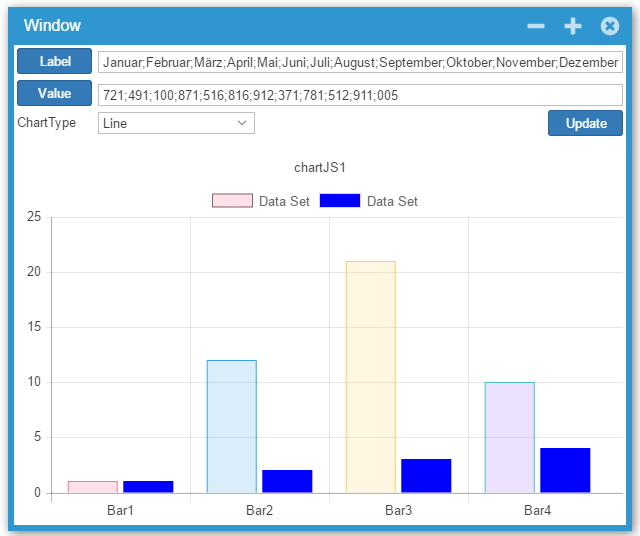
ChartJS uses the first color of the BackgroundColor array set in the DataSet. See screenshot below (seems to work only at runtime).
We have also updated the ChartJS extension to support BorderColor, BorderWidth, HoverBackgroundColor and to use a single color for all the data points when the array only contains 1 color. You can download the updated extension in the downloads/extensions page.
HTH
Hi Thomas,
Thanks for your sample code.
By implementing the IWisejHandler.ProcessRequest(HttpContext context) I am managed to create a file download solution I need:
— File storage is not under the web app folder,
— use HttpRespone.OutputStream, and
— create the Zip on the fly without create any temp file.
I modified the sample code a little bit to remove the use of a MemoryStream (as the size of my zip file can be as big as 500Mb), as below:
  void IWisejHandler.ProcessRequest(HttpContext context)
  {
   //// create a ZIP file in memory
   //var memStream = new MemoryStream();
   //using (var zip = new ZipArchive(memStream, ZipArchiveMode.Create, true))
   //{
   //    zip.CreateEntryFromFile(Path.Combine(Application.StartupPath, "Wisej-Datasheet-V2.2.pdf"), "TestFile.pdf", CompressionLevel.Fastest);
   //}

   //// reset the position in the stream
   //memStream.Position = 0;

   // now that we have the ZIP, handle the request individually
   var response = context.Response;
   response.AddHeader("Content-Type", "application/zip");
   response.AppendHeader("Content-Disposition",
    new ContentDisposition()
    {
     // provide a filename to use
     FileName = "test.zip",
     // DispositionType can be "inline" or "attachment"
     DispositionType = "inline"
    }.ToString());

   //// now copy the stream with our ZIP file to the response output
   //memStream.CopyTo(response.OutputStream);

   using (PositionWrapperStream outputStream = new PositionWrapperStream(response.OutputStream))
   {
    using (var zip = new ZipArchive(outputStream, ZipArchiveMode.Create, true))
    {
     zip.CreateEntryFromFile(Path.Combine(Application.StartupPath, "Wisej-Datasheet-V2.2.pdf"), "TestFile.pdf", CompressionLevel.Fastest);
    }
   }
 }
Regards,
Felix CHAN
Hi Luca,
Thank you for your answer.
For some reason the example you mentioned did not work initially like it is shown in the screencast.
Ctrl+C was not recognized, maybe this is a problem while running in a VirtualBox environment.
I have a click action in the UserControl where the data is finally gathered and then send to the clipboard. After that I was able to get the text with Wisej.Core.copy().
Solution:
Clipboard.SetClientText(“<text>”);
Eval(String.Format(@”Wisej.Core.copy();”));
Thank you.
Regards
Gerald.
Hi Luca,
Your code works though there is another issue I noticed. Anyway, I will just wait and see the fixes and enhancements in your next build.
Thanks.
Hi Gerald,
The clipboard cannot be updated directly unless the update is initiated by a user action. VWG’s clipboard code doesn’t work with modern browsers – in chrome I always get “ReferenceError: cliboardData is not defined”. Didn’t try with other browsers after looking at the code in VWG referencing non-existing components and referring to Java applets…
Wisej’s Cliboard class works on the server side and it can transfer data to the client using Clipboard.SetClientText(“hello”). Clipboard.SetClientText() saves the text to a temporary storage. Then you must have the user click something and use javascript in response to the user action to copy the clipboard content to the browser’s clipboard calling Wisej.Core.copy(). This is a common and widely used technique, probably the only one that works.
You can find an example here. There is a screencast too here.
And a ton of posts around using clipboard.js, zeroclipboard, etc. – all not working when trying to access the clipboard processing an ajax request. It only works with a user initiated action in all modern browsers.
HTH
Best,
Luca
Hi Cris,
Got the issues. There are a bunch. In your sample code you set Visible to false otherwise the DGV is also displayed in the form because you add it to the form’s control collection. The UserComboBox removes the drop down control from the collection, but it does it when it’s created. Which is before the Load event fires. If you change the code like this it works:
this.Load += delegate (object sender, EventArgs e)
{
ucGLCodesDGV ucGLCodesDGV = new ucGLCodesDGV();
ucGLCodesDGV.Size = new System.Drawing.Size(500, 320);
// ucGLCodesDGV.Location = new System.Drawing.Point(497, 92);
// ucGLCodesDGV.Visible = true;
// this.Controls.Add(ucGLCodesDGV);
ucGLCodesDGV.CreateControl();
userComboBoxAtRuntime.DropDownControl = ucGLCodesDGV;
};
The Tab and Enter key are a different problem. The wrapper handles those keys to automatically close the drop down.
Anyway, there are a number of fixes and enhancements that are needed when dropping down a composite panel rather than a list or treeview. The fixes are simple and will most likely be included in the current dev build.
Thanks!
/Luca
Yes but there is no argument to pass. You can use a closure and have unlimited values stored in context. Internally Wisej uses Task.Run.
Yes, this problem very important , on mobile or tablet big problem , please a solution
Unfortunately for a browser there is no difference between closing the browser, closing the tab, refreshing or navigating.
Wisej has a keepalive system that will detect a dead session and kill it. You can handle Application.ApplicationExit to know that the session has been disposed. You cannot really do much in ApplicationExit since the session is already gone. The wisej objects (windows, controls, etc) are available , but if you change them the changes are lost.
You can also handle Application.SessionTimeout which occurs right before removing the session. In SessionTimeout you can still handle objects in that session.
Hi Felix,
I put together a small sample that illustrates the different options for providing downloads with Wisej. It also shows how to build a ZIP file in memory and send back the stream to the browser without having to save to disk. Basically an example of how to to use the powerful IWisejHandler interface.
Hope this helps!
Best wishes
Thomas
Hi Ben,
I put together a little sample that allows you to view, add and edit calendar entries – see attached.
Happy coding & best wishes
Thomas
Hi Luca,
That’s it, your AppearenceKey method did the trick! So I added in my mixing the “readonly-checkbox”, “readonly-textbox” etc, and a ReadOnly property to my control container, which, when set to true loops over the controls and makes their Enabled = false and sets the appropriate AppearenceKey for each control type. Very nice method, and once more, respect for the flexibility and clarity of Wisej.
During this exercise a few questions came up.
And two features I saw:
Thanks,
Alex
Hi Luca,
Thanks for your explanation. I fully understand what is the reason behind.
For Download stream, as below:
Wisej saves the entire stream content to a temporary file, then when processing the download callback gives the temp path to the web server and deletes the temp file.
I am concerning is there any performance issue when I need to implement a DownloadAsZipStream(List<FileInfo> listOfFilesToBeIncludedInTheZipStream), which allow me to create a zip file on the fly. My ERP allows users to select multiple files (or select all) from a ListView control and then download them as one zip file. Currently my implementation (not WiseJ) will not create the zip file on the hard disk. Instead, I open a output stream on the HttpResponse (is a ZipStream) and add those selected files to it one by one on the fly.
If the total size of all files in the List<FileInfo> is large, let say over 200 JPGs and size is around 500Mb, or more, WiseJ internally will copy my ZipStream to a temp file ?
Or I have to create the zip file and place it under a folder under the web app and call Application.Download(filePath)? Also, when I have to delete that zip file ?
Regards,
Felix CHAN
Hi Kay,
thanks for your detailed explanation and information.
Will check the additional problems you send to us.
Regarding #2 and thinking some more about it, it´s intendend behavior.
Locking Column 3 actually looks the first 3 columns. If you want toexclude columns from locking you need to move them after column 3 before locking the column.
Best regards
Frank
You are not missing anything, this is the constant with the image types:
private const string IMAGE_TYPES = “.svg|,png|.gif|.jpg|.jpeg”;
Spot the bug? 🙂
Hi Felix,
No worries about the English. We are all from all over the world here. 🙂
You are correct that we could do that, but there is a difference internally in the implementation of Download file and Download stream. When you use Download file, wisej simply generated the download url callback, then when processing the callback passes the path of the original file to the web server and lets the server handle it.
When you use Download stream, Wisej saves the entire stream content to a temporary file, then when processing the download callback gives the temp path to the web server and deletes the temp file. So using Download file eliminates one step.
Best,
Luca
Hi Alex,
Got it. Another option is to create a new key for disabled but not grayed controls. You can create something like “readonly-checkbox”, “readonly-textbox”, … inherit from the respective keys and now use the Enabled property. Assign the key to the control’s AppearanceKey property. Something like this, in a mixin:
“appearances”: {
“readonly-checkbox”: {
“inherit”:”checkbox”,
“states”: {
“disabled”: {
“styles”: {
// put styles for the disabled state.
},
“properties”: {
// put styles for the disabled state.
}
}
}
}
}
I haven’t tried this, and you may need to tweak it a bit.
Best,
Luca