

Language: c#
VS version: VS2015/VS2017
report control: Stimulsoft
orm: LinqToSql and little bit of datasets/datareader against Azure SQL
mvvm/mvc: Not using them at all however I want to start looking at one
Additional UI libraries: Nothing else at the moment
Hosting: Azure on VM’s
We started with the Material theme and then customized it with some of our our colors and fonts and icons from flaticon.com
Really nice!
Which theme have you used?
Keep up the good work.
Alex
Very nice. If it is possible, can you share info about technologies and components used ?
(e.g.: Wisej of course 🙂 , c#/vb.net, VS version, report control, orm, mvvm/mvc, additional UI libraries, etc… ?)
thanks for videos and info,
dp
What a wonderful product and video! We are working with Wisej too and it is an amazing tool.
Hi,
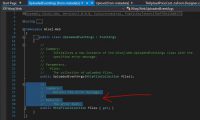
Just find an minor issue, the documentations for the property UploadedEventArgs.Files is wrong.
It say “The error text.“, it should be something like “The collection of uploaded files.”
Thanks and regards,
Felix CHAN
var lastCtrl = BladeHost.Controls.Cast<Control>().LastOrDefault();
if (lastCtrl == null)
{
return;
}
this.ActiveControl = lastCtrl;
BladeHost.ScrollControlIntoView(lastCtrl);
BladeHost.HorizontalScroll.Value = this.BladeHost.Width;
Hi Angelo,
I didn’t test it but the VB version should be
Imports Wisej.Web
Public Class UserPopupEx
Inherits UserPopup
Public Overloads Sub ShowPopup(ByVal column As DataGridViewColumn)
Show()
CreateControl()
Eval(String.Format(“this.showPopup(Wisej.Core.getComponent(‘{0}’).getHeaderWidget())”, (CType(column, Wisej.Core.IWisejComponent)).Id))
End Sub
End Class
Luca,
My application is in VB. I tried your solution by converting from CSharp to VB but it does not seem to work.
I probably made some mistake in converting (I’m not very practical about Csharp). Could you give me the VB code version?
Thank you
Hi,
I am also trying to convert a application from VWG to WiseJ and I find that the property DataGridView.SelectedCells is not available (yet).
I noticed that this question is first post here by other developer since June, 2016. I want to know, will it be implemented finally ? And is there any time table for that ?
I use DataGridView to show the room rate, availability, cancel penalty, etc… for administrators to input and modify data, with name of room on y-axis and date on x-axis. It is hardly (and nearly not possible) to do without DataGridView.SelectedCells.
I am waiting for those missing features (that have no workaround) in order to continue trying WiseJ.
Thanks a lot.
Regards,
Felix CHAN
Hi Luca,
I’m not sure about your answer. I’ll run some tests and report back.
Hi Harald,
Wisej DataGridView is just like WinForms DataGridView. Whatever you usually do on WinForms DGV you can and should do on Wisej DGV.
Regarding the validation and error icon, there are several ways of doing it.
Have a look here (MSDN/TechNet) or here (StackOverflow) or even here (CodeProject).
You can also implement IDataErrorInfo on your business object, add an ErrorProvider to your Form and set its DataSource to the same DataSource of the DataGridView. A BindingSource will be ok. It’s explained here (very interesting StackOverflow discussion).
Hi Andrew,
IE10 is supported. I have been able to reproduce the problem you have described and it’s caused by a strange but simple issue related to the way IE10 (or IE10 emulation) fire the script.onload event when the script is already in the cache. Basically it caused the qx,js to be loaded twice causing the pointerdown to be fired twice.
Will log and fix and should be able to include it in this overdue release.
Thank you.
/Luca
Could it be added to the Panel or FlowLayout panel as well?
Our application adds new UserControls to a Flowlayout panel and then we are doing this after we add a new control.
var totalWidth = Blades.Sum(n => n.Width); /Total width of all added controls
BladeHost.Call(“scrollToX”, totalWidth); /Scroll to the far right (BladeHost is a flowlayout panel)
scrollTop and scrollLeft are low level properties of the <textarea> DOM element while Wisej widgets are javascript widgets. You’d have to retrieve the DOM element to manipulate it directly. Also, most Wisej widgets are composite widgets. In the case of the TextBox, it’s actually a container because it supports tool buttons on the left and the right of the inner text field.
Wisej (qooxdoo) provides an intermediate object, called the content element, that abstracts browser specific features. So in this case, you can call scrollToX and scrollToY:
this.textBox1.Eval(“this.getChildControl(‘textfield’).getContentElement().scrollToY(10)”);
this.textBox1.Eval(“this.getChildControl(‘textfield’).getContentElement().scrollToX(10)”);
The line above retrieves the inner textfield, then it gets the content element implementation, and calls either scrollToY() or scrollToX(). http://www.qooxdoo.org/current/api/#qx.html.Element~scrollToY!method_public
I will also log an enhancement to add ScrollToX and ScrollToY methods to the TextArea control. The result is the same, just simpler syntax.
Best,
Luca
Hi Tiago,
Thank you for the excellent test app. We’ll use it for more data binding tests.
About the BindingContextChanged count, the result of 2,2,1 (dgv, list, tree) is correct. The event is fired when the BindingContext is first created and then it’s fired again when the control is created the first time when made visible in order to update the bindings.
In your winforms sample the count is 1,1,1 only because there is an InitLayout overload that forces the creation of the winforms handle, which results in a premature call to CreateControl before the InitializeComponent is finished, which results in the BindingContext being created too soon. If you comment out the WinSDK call that forces the handle creation you get the same 2,2,1.
This is the function in the winforms sample that forces the handle creation by calling ShowScrollBar() when the control is not yet created.
protected override void InitLayout()
{
base.InitLayout();
ShowScrollBar(Handle, SbHorz, false);
}
Best,
Luca
Hi Tiago,
for the null reference exception I have logged WJ-8366 and as Luca already mentioned it will be fixed in the next release.
Thanks,
Frank
Control.Update() marks only the single control as dirty. To force all children (and children of children) as dirty, use Control.Invalidate(true).
However, when Wisej collects all changes at the end of the request (or when calling Application.Update()) it will diff the changes with the last rendering and will send back to the client only the diff’d changes as a json package. It is usually not necessary to call Update on a control unless a visual property that affects the client has actually changed.
If I did Control.Update on a Panel does it flag all the child controls as dirty as well or would I need to flag them manually?
Hi Tung,
MvvmFx includes a bound controls library that provides proper data binding for TreeView and ListView.
Debugging the BoundListView for Wisej I also noticed there is no grouping on Wisej ListView.
To make it crystal clear, BoundListView for Wisej does not implement grouping.