

that worked, thanks for your help
Sounds good thanks.
You can do it in many ways, depends on what you need. I tried the textBox.BackgroundImage and it works, but it’s what it is, a background image. It probably shouldn’t be used on a textbox unless you want some fancy background.
You can also use the Tools property to add a clickable small toolbutton inside the textbox either on the left or on the right. You can have multiple tools. The Tools collection is present on most editable controls and many others.
Or you can use css. Add a stylesheet extender and use this:
.search input
{
    background-size: 16px;
    background-repeat:no-repeat;
    background-image:url(Ok-24.png);
    background-position: left center;
    padding-left: 20px;
}
Then in the textBox CssClass property put “search”.
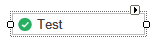
See below:
That’s strange, I checked the installer and the templates are complete. There is a known issue with VS 2017 Community Edition that somehow doesn’t recognize the templates.
You can find all the item and project templates here: http://setup.wisej.com/CSharpTemplates.zip
Depending on the installation:
Restart VS and let me know.
Sorry, by both types I mean Web application and Desktop Web application
*Edit – using VS 2015 Enterprise
C# and occurs on both project types.
VB.NET or C# and which project type?
Kind of works but the problem is that the owner element captures some low level event and closes the menu. If you tap on the menu item and keep it down for a bit longer you’ll see that it works. I’ll have a better solution for this, will update this post.
That’s good, I noticed you added those touch events and hope to look at them soon. I agree HREF would be the best way to launch these client-side links. Yes I checked the quotes, unfortunately I can’t get mailto: or sms: links working on Android, despite many attempts. I’ve tested it on Android 5.0.1 and also Android 6.0.1.
Attached is a test case for mailto, sms, and tel: links
I tried this on an iphone:
this.menuItem1.Text = “<a style=’color:inherit;text-decoration:inherit’ href=\’sms:test\’>menuItem1</a>”;
It works. Make sure you are using the straight single quotes. When copying from/to wordpress they are changed.
onclick doesn’t seem to work on mobile devices, ontouchstart does. We have it easy with the qooxdoo framework since it normalizes all the tap, touch, roll, mouse, pointer events on all devices. But if you use javascript the browser (at least iOS does) will block you and ask for permissions.
The best and safest way is to use href.
Cool, I forgot about using HTML in the .Text property. Is there anything else that has to be done? I couldn’t get any of these examples to work.
Me.mnuShareGmail.Text = “<span onclick=’window.open(“”mailto:blah@blah.com”)’>Send Email</a></span>”
Me.mnuShareGmail.AllowHtml = True
Me.mnuShareTextMsg.Text = “<span onclick=’window.open(” + Chr(34) + “sms:?body=testbody” + Chr(34) + “)’>Text Message</a></span>”
‘Me.mnuShareTextMsg.Text = “<a href=’sms:?body=testbody’>Text Message</a>”
Me.mnuShareTextMsg.AllowHtml = True
The HTML I am comparing it to is below. All these links work on Android 5.0.1
<a href=”sms:?body=testbody”>Android SMS</a>
<br>
<a href=’mailto:blah@blah.com’>Email with address filled</a>
<br>
<a href=’mailto:’>Email blank address</a>
<br>
<a href=’mailto:someone@example.com?subject=Suggestions&body=Your’>Email all fields pre-filled</a>
<br>
<a href=’mailto:?subject=Suggestions&body=Your’>Email no recipient body pre-filled</a>
The event is fired at the Desktop level. Look for Desktop.ItemClick and Desktop.ItemClick. Usually child components that are not “designable” directly fire an even at the container level.
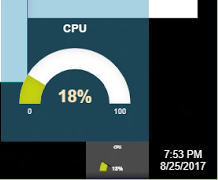
You can also try also the DesktopTaskBarItemControl:
The control should disappear from the desktop and be incorporated in the taskbar item. If it gives you problems, simply close the Desktop from design mode end reopen it.
When a control is imported in the taskbar you can handle the events on the control itself. See screenshot below. It’s a justgage control in the taskbar.
You can attach all sorts of client action using the JavaScript extender, but in this case it won’t work since it doesn’t extend menu items. I’ll add an enhancement request for this.
In any case, with Wisej you can always resort to HTML (VWG could display html content). You can do it with href (in this case you’d need to a <style> tag or a css file that styles the href elements, or with a <span>.
menuItem.Text=”<a href=’mailto:test@test.com’>Send Email</a>”; // you can add a style attribute or a add a<style> section to Default.html , or add a css file to Default.html.
or
menuItem.Text=”<span onclick=’window.open(\”mailto:test@test.com\”)’>Send Email</a>”;
In onclick you can put pretty much anything. Set AllowHtml to true to show the html.
If you referenced the “micosoft.sharepoint.dll” (standard microsoft DLL https://files.fm/u/2ym8gkfx)
http://xxx/resource.wx/init?_sc=1504036697531
return empty string… and after a js error 🙂
I don’t remember what the problem with subfolder was, I have to check and let you know.
What kind of incorrect display of forms?
Wisej is not the one loading the dlls, it’s IIS. If there was any loading error after the system is initialized then you’d get the error on the client. You can also check Chrome’s console for the log. You can turn on a more detailed client log but it’s probably not the issue.
Thank you for the reply.
I think the limit is too restrictive.
Especially in migration cases (or sharepoint context), subfolders are essential. Do you plan to introduce them in the upcoming releases? it could be an initialization parameter, for example in the “Main” program.
The goal would be to include “wisej.wx” in the pages in subfolders.
It would be great that it was configurable runtime, when initializing the application (both html and json)
The event is “resize” and the handler is __onPaneResize and the resize method is __updateHtmlSize. The “resize” event is fired by the inner “pane” which is the scrollable container that contains the custom html in a wisej.web.ScrollableHtmlPanel javascript class.
You need to have the instance reference to the wisej.web.ScrollableHtmlPanel widget to invoke a resize. But you have it in “this” you can do:
this.__updateHtmlSize();
If you know where it is, lets say it’s a control in the MainPane, you can do this:
App.MainPage.htmlPanel1.__updateHtmlSize();
Your entire control object model available by name and hierarchy in the browser under App. So if htmlPanel1 is a child of panel1, you have to refer to it as:
App.MainPanel.panel1.htmlPanel1.__updateHtmlSize();
You can explore the object model easily with F12 and type App.
Also, the entire source code for all Wisej widgets is available in clear when running in debug mode at http://localhost/resource.wx/wisej.js and http://localhost/resource.wx/qx.js. You can step in, debug it, and even change it.
No, it’s like web.config. Subfolders are used by the application for content.
But, withj Wisej you can have sub-applications: see https://wisej.com/docs/html/Configuration.htm Last section, OK we can write a bit mora about it 🙂
Practically, you can have additional .json and html files in the same project or the same folder. Each json file is an application. For example:
\Default.json and Default.html => http:\\localhost
\Admin.json and Admin.html => http:\\localhost\admin
and so on.
In Admin.json you can setup a different startup method (i.e. Admin.Main) or reuse an existing one. Or you can setup a different main window. Or you can simply change the startup url, you can reuse Default.html and maybe add an argument, or use a different one like Admin.html.
This is how we manage the demo server. We simply upload using ftpzilla a new MyCoolDemo.json/MyCoolDemo.html and /bin/MyCoolDemo.dll. And that’s it. The server will automatically respond to http://server/MyCoolDemo
HTH
Responsive code has be coded, it’s either css under media or a combination of css and javascript in response to responsive breaks. Usually web pages use ready made themes that have hundred and hundreds of css lines in there.
Also usually the continuous resizing in a responsive layout is done only by “us” to see what happens. In normal usage you can’t turn a desktop monitor into an iphone and you can’t resize an ipad. The responsive break should fire once at loading or when rotating.
In fact when I play with the responsive layouts in ready made wordpress themes or bootstrap I invariably end up in an unusable state and have to refresh the browser to reload the page.
However, you are correct that the continuous re-layout of the controls in Wisej is clunkier than web pages or javascript frameworks. It is possible to implement client-side only javascript code that re-arranges the controls, but it’s a lot of extra work.