

Yes, look at the Role property of the click event. If you add the role attribute to your HTML it will come back to the server.
Your cell can be something like this:
<img role='edit' src='....'/><img role='view' src='....'/>, etc.
To line them up you can add a css class name or a style attribute changing the display to inline-block. You can add a css file to Default.html. When you click on the img you’ll get e CellClick event (or CellDoubleClick, CellMouseDown, etc…) with the Role property set to the value from the HTML.
We use this internally to detect clicks on the checkbox inside a checkbox cell and on the open/close button for hierarchical rows.
I tried a small sample, see below:
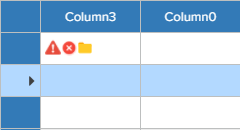
Used this in Default.html
<style>
 .cell-image {
    display:inline-block;
    width:16px;
    height: 16px;
 }
 </style>
This in the cell:
"<img role='test' src='Images/Error-26.png' class='cell-image'/><img src='Images/Error-42.png' class='cell-image'/><img src='Images/Folder-32.png' class='cell-image'/>";
One other thing I’d like to add. When a responsive web application/site runs on a table or phone, and you rotate the device – it will resize to the new layout.
Can we accomplish this with WiseJ in its current release ?
Hi Sergio,
you´re right, overriding mixins in referenced assemblies it´s not yet possible due to an issue we logged as WJ-8421.
Before it´s fixed, you can try using the BubbleNotification source code and apply your changes there.
In any case, we´ll inform you when WJ-8421 is fixed.
Best regards
Frank
Hi Sergio,
sorry for the late reply. While there is currently no explicit rating control on our Wisej roadmap,
you could quite easily integrate one of many available javascript rating controls.
We have put together a sample that integrates this jQuery Bar Rating: http://antenna.io/demo/jquery-bar-rating/examples/
In our sample we used a Wisej widget and defined the following packages through the designer:

Then we only need to add the following InitScript:
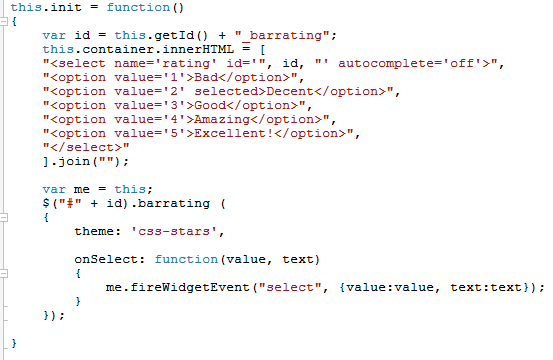
The rating control then looks like this:

Please also note the handler for the Select event that fires an event on the server that displays an alert box of the selected value:

Demo source code is attached.
Hope that helps.
Best regards
Frank
It’s about 70% done, ETA 2-3 weeks. We can send you an early build directly in few days if you’d like to give us early feedback.
It’s probably a web.config problem or the /api routing configuration not working with the domain change. I’m not an expert in WebApi so I can’t help much. But I don’t think that Wisej is interfering.
Can you send a small sample app? I have included the dll in an existing project but don’t get any error.
Hi, the RightToLeft Property , still not working after upgrading the wisej version to 1.4.2
any ideas??
Thanks,
Orel
hi, it’s happened to me as well and after download c# Templates the problem was solved.
Orel,
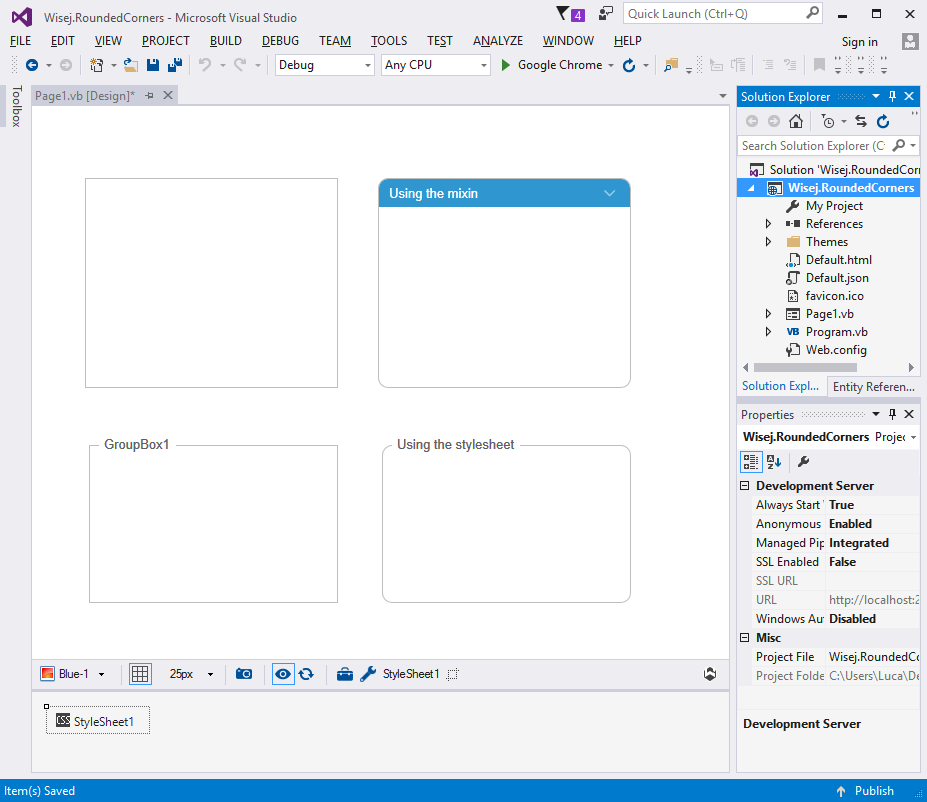
Yes. You can use the stylesheet extender to add a css class to any control. And/or use a mixin theme to set the radius style. See attached sample with both approaches.
When using CSS instead of the theme you have to be aware of the html composition of the widget you are styling. CSS styles need to be applied to the specifi element. For the groupbox there is an internal frame in order to have the title overlap the border. You can see the selector in the styleSheet1 extender.
You can use ExcelLibrary.dll from https://code.google.com/archive/p/excellibrary/downloads
and use code to export .xls file
string filename = HttpContext.Current.Server.MapPath(“export.xls”);
DataTable dt = new DataTable();
foreach (DataGridViewColumn col in dataGridView1.Columns)
{
dt.Columns.Add(col.HeaderText);
}
foreach (DataGridViewRow row in dataGridView1.Rows)
{
DataRow dRow = dt.NewRow();
foreach (DataGridViewCell cell in row.Cells)
{
if (cell.Value != null)
{
dRow[cell.ColumnIndex] = cell.Value.ToString();
}else
{
dRow[cell.ColumnIndex] = “”;
}
}
dt.Rows.Add(dRow);
}
DataSet ds1 = new DataSet();
ds1.Tables.Add(dt);
ds1.Locale = System.Threading.Thread.CurrentThread.CurrentCulture;
//Here’s the easy part. Create the Excel worksheet from the data set
ExcelLibrary.DataSetHelper.CreateWorkbook(filename, ds1);
Application.Download(filename);
ขอบคุณครับ
Hi! Sadly it doesn’t works. Tested with 1.4.22
But works if I set in default.json : “enableWebSocket”: false
Maybe something doesn’t fall back to http protocol?
Client and server support websocket, but some strange in the middle of proxy / firewall could still be failing
See attached image (browser console)
Thanks in advance!
Just installed VS 2017 Community here and getting this error. Are the VB templates available?
Hi Sergio,
Wisej is supposed to fall back from websockets to http if the server (or client) does not support websocket or the connection is closed by the server.
We added some extra code to Wisej to eventually cover the situation you have observed.
I will send you a test build to verify that the issue with your proxy server is resolved.
Best regards
Frank
It was possible in early builds. We had a system of tags, like <div data-wisej=”myApp.form1, myApp.dll”/> to let non wisej apps pull in any wisej control or container inside an element but dropped it because it wasn’t complete and we thought it would give the wrong impression that wisej is a control library that can be pulled in other javascript-only system.
Another problem is that the core javascript library (qooxdoo) always creates a “root” element that acts as a surface for everything else, so html elements in Default.html are covered by the root element and cannot receive pointer input. One change we are looking at is to use the body as the root.
For elements created by a Wisej form it is possible since we have an inline root, which used for the datagrid cells when they pull in a control.
So, technically yes it is possible but the current implementation would make unusable because of the fact that if it’s below the “root” element in the z-order of the browser it cannot receive pointer events. Have logged as a new feature: WJ-8416.
Hi Edmond,
thanks for reporting this. We identified it as a display problem that does not affect Wisej´s or the AutoUpdater´s functionality.
It´s been caused by a redesign of some parts of the license code and the AutoUpdater is using the old license reading code.
The fix for AutoUpdater will be included in the next release.
Best regards
Frank
I’m implementing this inside a Widget, so I have a reference to the Widget in the InitScript. This also allows me to access the HtmlPanel.
Calling __updateHtmlSize() in the wisej.utils.Loader.load callback appears to work. Thanks!
Hi Andrew,
I am not a Facebook expert, but I think you need to turn on the location services in your FB app to avoid that additional prompt.
Hope that helps.
Best regards
Frank