

Hi Sank,
does this happen at design time or runtime ?
Do you have any theme-related setting in default.json ?
Can you please send web.config and default.json to me –> frankATiceteagroup.com
Thanks in advance !
Best regards
Frank
I figured out what is going on, see attached screen shot. It appears that even with the style in your example added to default html – the size of the “font” icon is very large. When i stretched the cell wider – you can see how large it is. How can I set the size of the font ? Is this done in the Style as well ?
Sorry – coming from VWG we are not used to mixing HTML and C# to do this -although I see how powerful it is !
Got it. Thanks for the quick reply and the offer. The enhancement is probably not necessary… I’ll probably use a Unicode character or .png file.
You cant in a html. Wisej theme images are preloaded and cached, when they are svg they are cached as xml/svg document, and when assigned to a widget they are updated to use the correct fill color. They are also updated when the state of the widget changes. It’s not just a url. However, I can add an enhancement to let the resource.wx handler return a theme image.
Code snippet attached with the HTML string
Hi,
I discovered that you have to call the Application using the Dev PC IP. I tested this by deploying the App to the local IIS (on the Dev PC), then go to the App using the PC IP like http://192.168.0.1/MyFirstApp ==> this will generate the wisej-server.lic in the ProgramData\IceTeaGroup\Wisej folder.
Copy it to the root of the production App deployed on the production IIS behind the firewall.
Regards.
If you are talking about the left hand side it is just a FlowLayoutPanel set to TopDown. Then each menu item is just a usercontrol with a picturebox and a label with some text and we set different appearance keys if it is selected or not. When we add the usercontrol we set the width of the usercontrol to the same as the Flowlayout panel.
hi, can you tell me please with what technology(component,library) you have created the navigation panel?
Orel
So back to step 2 that solved the issue.
I’m afraid there is no way to download just the sample. Furthermore the sample depends on other repository projects (it’s easier for testing purposes).
I’ll upload to this thread a WinForms/Wisej self contained solution of ActionExtenderSample.
I’ll also upload a WinForms/Wisej self contained solution of ProjectTracker THE Csla reference sample.
🙂 found it, but it’s at the root. cannot download only the ActionExtenderSample?
Got it – makes sense to just have the HTML because there can be thousands of records.
Will the Cell Click event also give me the current row that was clicked ?
Green button on the right
Hi Tiago, I can’t find a way to download the project as a zip or all the files together. I’m a bit behind when it comes to github.
It’s better to use the html approach, otherwise you’d be creating hundreds of controls. The “control in the cell” feature is meant to be used to create super cool grid panels.
To add tooltips simply add the title=”tooltip text” attribute to the <img> tag.
Any advantage/disadvantage to either approach ?
The datagrid may have a few thousand records (15k, 20k ?) at times.
Also – it would be nice to have tool tips when the user hovers over the icons – can this be done as well ?
Hi,
this error is due to a misspelled class name in the preview script of the ThemeBuilder.
It´s fixed and will be rolled out with the next Wisej release.
The error should not affect ThemeBuilder´s functionality.
Best regards
Frank
Hi Edmond,
do you think about something like this ?
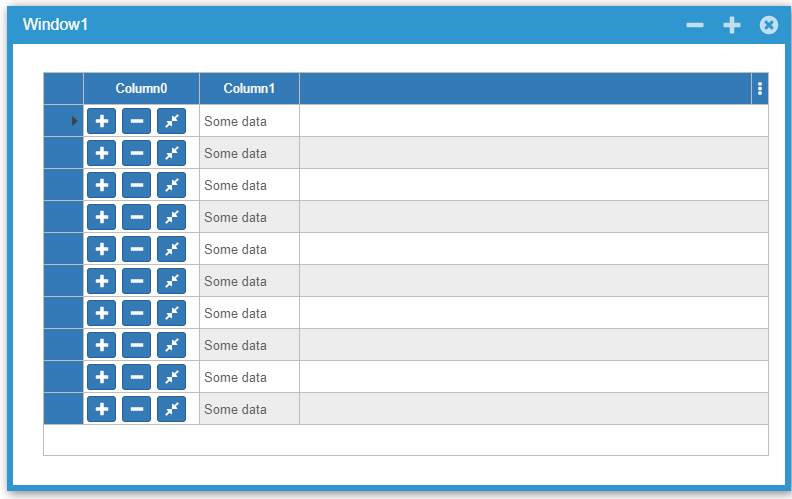
It can be achieved quite easily by using a panel with some buttons that are used as Control in each cell.
Please let me know if you need some sample code to get started.
Best regards
Frank
Yes you can detect the change of orientation too. It’s just another break.
https://wisej.com/docs/html/T_Wisej_Core_ClientProfile.htm
This is the built-in ClientProfiles.json:
http://s3.amazonaws.com/wisej/downloads/Examples/ClientProfiles.json
You can override it by placing your ClientProfiles.json in the root of the project.
The breaks are evaluated from the top down, the first match will fire the Application.ResponsiveProfileChanged event. You can also detect a specific device using the userAgent regular expression.
Awesome – thanks for the quick response! I’ll give it a try.