

The event is Wisej.Web.ToolBar.ButtonDropDown. All child component (not directly in designable, like a TreeNode for example) fire their events on the parent container.
We have extended the TreeNode class and the ToolBarButton class (and others) to replicate the event at the class level to allow for easy class extension. But the ToolBarButton class only reflects the Click event. Will probably enhance it to reflect ButtonDropDown as well.
The Wisej.Web.Form control is a floating window and it’s not part of a layout container (unless you make it a child of a control).
Child controls, like the UserControl, Panel, etc, can keep their relative position by setting the Anchor property to None.
You can force the location of the window and adjust it the screen (the browser) every time it changes by adding this code:
public Window1()
{
  InitializeComponent();

  this.Disposed += Window1_Disposed;
  Application.BeginRequest += Application_BeginRequest;
}

private void Window1_Disposed(object sender, EventArgs e)
{
  // Application.BeginRequest is a static event and needs to be detached on dispose.
  Application.BeginRequest -= Application_BeginRequest;
}

private void Application_BeginRequest(object sender, EventArgs e)
{
  // Use BeginInvoke to execute the call at the end of the request so we have the updated browser size.
  BeginInvoke((Action)this.CenterToScreen);
}

/**
    For some reason this method is missing from our class. It will be added to Wisej.Web.Form.
    We'll also add Control.CenterToParent().
*/

/// <summary>
/// Centers the window on the current browser size.
/// </summary>
protected void CenterToScreen()
{
  if (this.TopLevel)
  {
    var mySize = this.Size;
    var parentSize = Application.Browser.Size;

    this.Location = new System.Drawing.Point(
      (parentSize.Width - mySize.Width) / 2,
      (parentSize.Height - mySize.Height) / 2
    );
  }
}
The code above simply centers the forms when the browser size changes.
To disable the “move” cursor from the caption bar you need a mixin theme. Every Wisej application should have a/Themes/Application.mixin.theme since at one point or another you’ll need a custom style without having to replicate a whole theme and you want the custom change to be compatible with any theme. Which is what mixins do. The other way is to use css files, but Wisej themes are more flexible.
Use this mixin:
{
  "appearances": {
    "fixed-window": {
      "inherit": "window",
      "components": {
        "captionbar": {
          "states": {
            "default": {
              "properties": {
                "cursor": "default"
              }
            }
          }
        }
      }
    }
  }
}
As you can see this mixin changes only the cursor of the window/captionbar.
The set the appearance key of the fixed window in the constructor or InitializeComponent to:
this.AppearanceKey = "fixed-window";
HTH
Best,
Luca
Awesome, thanks Luca.
It’s not really possible on the server. We’d have to run a hidden browser and pass back all the HTML from the client, including image links, session, etc.
It can be done on the client and send the image back, so the call DrawToBitmap() would have an async callback that receives the image from the client. This is probably better in an extension. A new library that does’t require to install any extension on the browser is this one: https://html2canvas.hertzen.com/ but it’s in beta and they say it’s still a bit limited.
Another way would be to use phantomjs but you’d need to spoof the session.
Another way is the new getUserMedia() but it needs a flag to be enabled on the browser.
So, it’s not an easy task.
Unfortunately yes but the issue is different. We created a GoDaddy Plesk account and are testing it. You can set the project directory as writable and get the activation work. The problem is that Wisej is also trying to create the \ProgramData directory when it shouldn’t. We should have this working right with GoDaddy plesk with this upcoming release.
Thanks Edmond.
I could reproduce and logged issue # WJ-8427 for it.
We´ll inform you when a fix is available.
Best regards
Frank
Hi Sertan,
I´m not sure I understood the structure where you´re trying to call the method.
Can you please provide us with a sample code showing what you´re intending to do ?
If you prefer you can also send it to frankATiceteagroup.com
Thanks in advance !
Best regards
Frank
Ok.
I’ve tried it directly with the ThemeBuilder Editor. When I add the structure with style, components eg. it seems that it could work.
The Buttons in the component window doesn’t work as I thought.
Thank you,
Repair fixed my problem.
Hi Shawn,
please make sure that you´re setting the VS 2015 option during the Wisej installer.
In case a reinstall does not help, please follow the tips here:
https://wisej.com/support/question/vs2015-toolbox-missing-controls
Best regards
Frank
Hi Jin,
the download works ok here. I have sent you the localization sample by private mail.
Best regards
Frank
Hi Frank,
Wisej document about Localization example link is broken
http://s3.amazonaws.com/Wisej/downloads/Examples/Localization.zip
Hi Edmond,
I tried the snippet you sent like this:
this.dataGridView1.Columns[3].AllowHtml = true;
 this.dataGridView1[3, 0].Value = "<img role='test' src='resource.wx/Wisej.Ext.ElegantIcons/archive-box.svg' class='cell-image'/><img src='Images/Error-42.png' class='cell-image'/><img src='Images/Folder-32.png' class='cell-image'/>";
in Default.html I have:
<head>
 <meta charset="utf-8" />
 <script src="wisej.wx"></script>
 <style>
 .cell-image {

display:inline-block;
 width:32px;
 height: 32px;
 }
 </style>
 </head>
I get this:
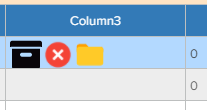
SVG icons need the size because they are vectorial and usually designed on a large canvas, like 800×800. Setting the size on the img element directly or through css must work, it’s part of the browser. I also tried IE11 and FireFox.
Best,
Luca
We were thinking more of a single desktop but allow the application use a custom class to reflect different user preferences, or permissions, or configuration, etc. It’s not like a Windows desktop or Linux desktop, it’s meant to be an application’s desktop.
If Wisej didn’t automatically “transfer” all open forms to the new desktop (or page) and an application needed to change the active desktop because of user settings (or permissions, or any other feature) then all the windows would be lost without a way to recover them. Basically the active desktop or active page are a “surface” that the application can use.
The code can always hide/show/close the open forms.
Best,
Luca
I think I got it working I added a new function to the customdatetimepicker like this.
public void SetValue(DateTime startTime, TimeZoneInfo originalTimeZone)
{
var diff = (originalTimeZone.BaseUtcOffset.TotalMinutes – Application.Browser.TimezoneOffset) – originalTimeZone.BaseUtcOffset.TotalMinutes;
startTime = startTime.AddMinutes(diff * -1);
startTime = DateTime.SpecifyKind(startTime, DateTimeKind.Utc);
this.Value = startTime;
}
You need to set the timezone on the DateTimePicker?
Dates are always managed using UTC since the server and the client may very well be in different time zones. When the date arrives at the server, it is converted to local time using the timezone of the client for that specific session/thread. For example, a user in NY using a server in California would always have the dates using the NY timezone.
Looks like the image won’t resize even though the style specifies the cell image as 16px X 16px
Good morning, wanted to check in and see if there was progress on this, or if an issue had been logged in Gemini.
Hi Bernhard,
thanks for your question.
While we can bypass default.json it won´t really help.
OWIN is just an interface specification implemented by Katana (Microsoft´s web server implementing OWIN).
We use Katana/OWIN and added 2 of our OWIN middleware: Wisej and ASP.NET.
The ASP.NET middleware instantiates the System.Web host which runs in a separate AppDomain and can only load assemblies from the /bin subdirectory.
Wisej needs the System.Web subsystem to process requests/responses/websocket etc.
Plus our implementation also supports all ASP.NET code, controls, pages, webforms, handlers etc.
There is obviously no other implementation that does it currently.
Coming back to your question:
One way to pack it all in one EXE would be to use an app virtualization packager, but it may not work with the System.Web application host
and real .NET packagers are hard to find. Xenocode was one but it does not seem to exist anymore.
Hope that helps .
Best regards
Frank
Hi Jin,
at runtime, Wisej supports all locales that are installed on the server.
At design time we reuse as many .NET localized labels as possible which should include Chinese) plus en, de and pt labels.
We´d be happy to provide you with an excel file that can be used to localize the Wisej design time labels.
Please contact me at frankATiceteagroup.com so I have your contact details ?
Thanks in advance !
Best regards
Frank