

Hi Andrew,
I think I gave you the wrong info via email. It’s not possible to modify the meta tags using javascript simply because the facebook “scraper” doesn’t run the javascript in the pages it scrapes. It reads the html as-is. The only way to modify the meta tags dynamically is to dynamically create the html page itself.
Which is possible also with Wisej. It’s enough to use an aspx pages instead of an html page and change the meta tags using aspx inline tags. Something like this:
<head>
 <title>Wisej.DynamicFacebookMeta</title>
 <meta charset="utf-8" />
 <link rel="stylesheet" href="StyleSheets/StyleSheet1.css" />
 <script src="wisej.wx"></script>
 <script src="JavaScript/JavaScript.js"></script>
 <%FacebookInfo info = Program.GetFacebookInfo(); %>
 <meta property="og:url" content="<%=info.Url%>" />
 <meta property="og:type" content="<%=info.Type%>" />
 <meta property="og:title" content="<%=info.Title%>" />
 <meta property="og:description" content="<%=info.Description%>" />
 <meta property="og:image" content="<%=info.Image%>" />
</head>
I have attached a sample application that can share 3 options of the same URL.
HTH
Best,
Luca
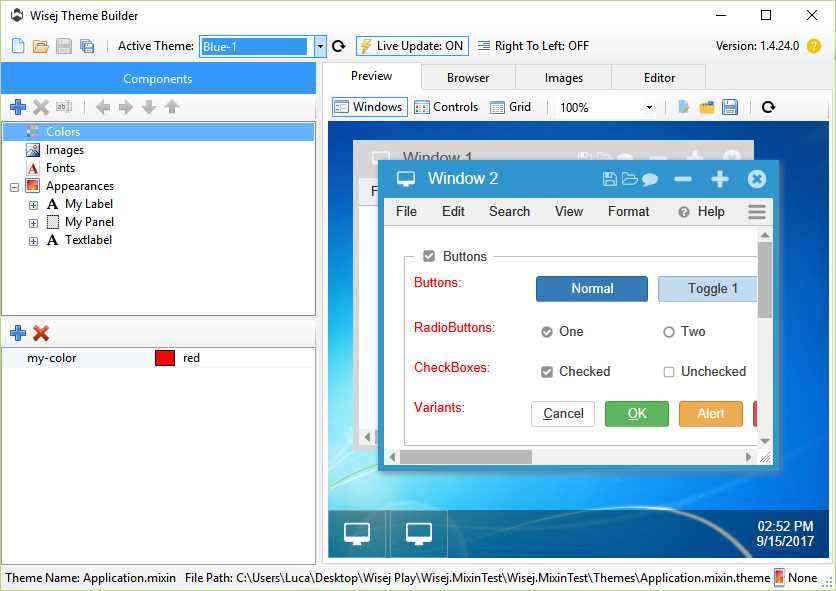
Yes you can. But you have to work on the mixin file by itself, there is no automatic diff. When you open a .mixin.theme file (one of the file options in the open dialog) with the ThemeBuilder it recognizes that it’s a mixin and it will only load the items from the mixin in the nodes but in the preview it will also load the base theme.
While editing the mixin you can also change the base theme using the drop down at the top -it will show any theme that was loaded previously.
I looked at this some more, and came across something that maybe should have been more obvious. These links, defined as
MenuItem.Text = “<a href=””>Link Text</a>”
only apply the A HREF to the text part of the menu item, and not the entire rectangle area of the MenuItem. In order to activate the link, you have to click on the text part of the Menu item. Clicking the background area triggers nothing.
Is there a way to get the A HREF to apply to the entire area of the MenuItem?
I seem to be getting it when closing a modal form hence my interest in what it is. I suspect that it maybe because I’m running in a debugger and my debugging is causing the session to timeout.
Thanks for clarifying
Nic
Thanks Tobias.
I could reproduce in Firefox 55.0.3 and logged issue #WJ-8439 for it.
We´ll inform you when it is fixed.
Best regards
Frank
Does it make it the client or do you see in Visual Studio with the Debug->Extensions settings on?
It is thrown when a session is terminated while in a modal loop and it shouldn’t show on the client since the session is terminated. For example, a user starts a modal dialog and walks away, or closes the browser, or the code behind the dialog terminates the application before closing the dialog. Wisej detects the that session is invalid and exits the modal state.
The exception interrupts the execution flow, otherwise the app would execute the code waiting for the modal to end on a session that is terminated.
MessageBox.Show("I'm about to format C:\");
// the user goes home and lets the session expire.
// the modal state is interrupted and the line below is not executed.
File.Format("C:\");
If you see the exception on the client its a bug.
The ActionExtenderSample WinForms/Wisej sample is attached. The sample is self contained and is quite easy to run – no need to attach the database.
Just follow the instructions in How to run.txt
The ProjectTracker sample was a bit more difficult. I had to change the ApplicationContextManager since it was using HttpContext; now it uses Wisej.Base.ApplicationBase.
ProjectTracker is the reference CSLA .NET sample. It uses authetication and authorization, as well as some busness rules.
It’s self-cotained and very easy to run – no need to setup the databases as the project uses LocalDB.
Hi all,
this issue is fixed in the latest Wisej release (1.4.24).
Best regards
Frank
Hi Edmond
I attach a sample that helps to better understand UI containers (desktop/page/form).
[Edit]
I didn’t notice the sample was already published. No need to attach it.
I suppose one workaround would be:
I’m trying the 2nd method without luck. I placed it first in the form’s method, and even moved it right up to Main() in Program.vb.
With breakpoints set, I’m not even seeing it get hit by Facebook. (Even after forcing a refresh by clicking on “Refresh Share Attachment”)
‘attempt to inject meta tag
Dim strDesc As String = Chr(34) + “View issue ” + intIssueToLoad.ToString + Chr(34)
Application.Eval(“$(‘head’).append(‘<meta property=””og:description”” content=” + strDesc + “>’);”
Perhaps the Meta tags are being used by Facebook before the body is even parsed, and WiseJ loaded. When the tags are present in Default.html, they do alter the preview of the share attachment.
I wouldn’t put the code in the href. You should have js file with your FB code added to Default.html and use the functions by name:
<a href=”#” onclick=”MyFB.share(…)”></a>
Or something like that. It makes it a lot easier to deal with the js syntax and with testing since you can call those functions directly.
/Luca
Hi Andrew,
Yes it’s possible but it’s not Wisej code. The Default.html page is a standard HTML page (you can also use an aspx page or any other dynamic page). Wisej doesn’t prevent any type of javascript code from manipulating the dom.
You can:
Basically it’s exactly the same as any web system would have to do. Wisej gives the additional possibility of processing the request on the server first and calling the client from the server.
/Luca
Hi Tobias,
the cursor issue is logged as WJ-8435 and is fixed in the latest Wisej release (1.4.24).
Best regards
Frank
Hi Chris,
this should be fixed with the latest release (1.4.24). Can you please verify in your environment ?
Best regards
Frank
Hi Sergio,
WJ-8421 is fixed in the latest Wisej release (1.4.24).
Best regards
Frank
Thanks for your answer Luca. I’ll give it a try.
I thought the cursor topic may be a bug because I don’t see any reason for displaying a move cursor when the popupwindow should be unmovable !?
Wisej loads embedded resources only when the [assembly: WisejResources] attribute is set in AssemblyInfo. When that attribute is present all embedded .js files in /Resources and /Platform are bundled with wisej.js and minified (when not in debug mode), all embedded .css files in /Resources and /Platform are bundled with wisej.css and minified (when not in debug mode) and all embedded .mixin.theme files in /Themes are loaded and mixed in the current theme.
Wisej does this for all assemblies loaded by the application, including the core assemblies, extensions, etc.
Mixins are also loaded directly from the /Themes folder to let you change the theme without having to recompile the app. So you can either 1) deploy /Themes or 2) uncomment the WisejResources attribute.
See this post for a downloadable example with mixins. However it looks like you already used the mixin correctly.
https://wisej.com/support/question/themebuilder-usercontrol
I will also add an enhancement request to see if we can load the embedded mixins from the application’s assembly without having to add that attribute. Plus I noticed that the page “Embedded Resources” is not deployed in in the /docs.
HTH
Please try the attached sample. It shows how to set the theme for all labels, specific labels, in panels, flow panels, etc.