

Hi Nic,
most likely yes. The problem was not directly related to a specific locale but to entering the value directly inside the DateTimePicker control.
Please contact me at frankATiceteagroup.com if you want to have a prerelease to verify the fix prior to the next release.
Best regards
Frank
Hi Frank / Luca,
I think I have a similar issue to this using UK browser locale. Any attempt to manually enter a time into the datetime picker results in an invalid value being returned.
Is this the same issue as described by Harald?
Thanks
Nic
Hi,
Thanks Frank for your quick response, it works successfully now 🙂
The BarCode is just a simple exemple and test to start defining new widgets from external librairies, actually I think I’ll not used it in my app.
Regards
Romaric
That was it! Thank you Luca. My dev machine is still Win7 so I don’t think websockets is running by default.
My hosting company has support for Websockets and so I deployed the test project there and it worked perfectly. I ended up coding in a timer which I enable only if websockets are not active as a sort of backup, in case the code runs in an environment where that is the case.
So I’m all set – thanks for the assist Luca and Andrew.
Matthew
Hi Edmond,
after digging deeper it´s rather a limitation than a bug.
Let me explain the reason and workaround:
SVG images without a size cannot be displayed correctly in the designer.
This is due to a limitation in Internet Explorer 11 that we use internally to render at design time.
You can work around this if you add an empty image list to your form, set it´s size (e.g. to 16×16)
and assign that image list to your label.
It will then be rendered using the correct layout alignment. Alternatively you can use a PNG file.
Hope that helps.
Best regards
Frank
Hi Harald,
thanks again for getting back on this. We rechecked and could finally reproduce.
The bug is logged as WJ-8455 and a fix will be included in the next Wisej release.
We´ll inform you when it´s available.
Best regards
Frank
At what point do you check Application.IsWebSocket? If it’s in Program.Main it will always be false since the first load is http. If you check inside the task and it’s still false then it means that it’s not enabled on your server. Wisej always uses WebSocket mode if available on the client browser and the server.
If you are debugging with IIS Express and VS, WebSocket is enabled by default starting from Windows 8 (I think). IIS needs the WebSocket module enabled using the Windows features installer.
/Luca
So Application.IsWebSocket is returning False.
I do not have the default of true for enableWebSocket overridden in Json.default, so I thought it would be using websocket mode by default. Is there something I need to do to get the app to switch to WebSocket mode?
I can make this work ok w/ the timer, but I’d rather have a more elegant solution.
Thanks in advance for the assistance…
Hi Romaric.
you are pretty close, there is just one thing missing:
Several components of SyncFusion need to have an ID to operate in a proper way.
So to make your sample work, please add the highlighted line:
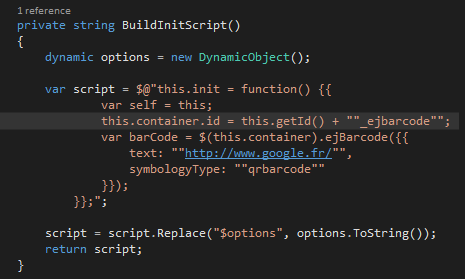
We will add an auto Id to have Wisej assign an automatic ID without any init code. Logged as enhancement WJ-8454.
Please also note that we have a quite powerful Barcode extension available as a free extension download:
Best regards
Frank
Hi Matthew,
Application.Update() can push the updates only in WebSocket mode. Otherwise you need a timer or another event to trigger a browser request.
We have a demo with code here: https://wisej.com/blog/progress/
Check if you are in WebSocket mode using Application.IsWebSocket. It’s always false when first loading the app in Program.Main since the first load is necessarily http.
The behavior you described is exactly what would happen with WebSocket off.
HTH
/Luca
Hi Edmond,
thanks. I have logged WJ-8451 and we´ll inform you when it´s fixed.
Best regards
Frank
Hi Shawn,
after you copy the Theme to your projects Themes folder, you can select the theme to be used in the designer with the combobox to the bottom left:
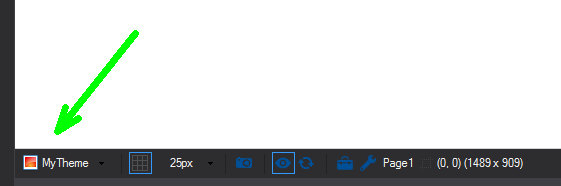
The last theme used in the designer is also stored in the registry.
Hope that helps.
Best regards
Frank
Hi Orel,
it appears to me that your approach is a bit too complicated.
Please find attached a sample that shows how a login page can be implemented.
It´s based on some information that can be found here: https://wisej.com/support/question/how-to-show-a-logout-page-after-application-exit
Basically it´s a combination of handling Wisej.onExit event (see default.html) and setting the LoginPage as start page (see default.json).
What you observe that the tab is closed on Application.Exit () is called, only happens when the browser is started by Visual Studio in debug mode.
As a side note, while not really needed here, you can remove the Header of a form by setting ControlBox = false and the Text to “”.
Hope that helps.
Best regards
Frank
Hi David,
thanks, I have logged WJ-8450 for that issue. We´ll check and inform you when a fix is available.
Best regards
Frank
The slow down is caused by reflows triggered by reading offsetWidth repeatedly. We tracked it down to the way the user control is setup in our javascript library and it should be easy to fix. I will have more details with a dev build and possibly a quicker workaround soon.
I saw that sample but I am trying to show the 2 different classes joined together not just records from the same class.
Hi,
I checked the latest version 1.4.25 and it looks good, but there is still problem with the ListView, the column are still
in LeftToright alignment

Orel.
Thank you for your answer.
The problem you described with the AppDomain is not a problem since it’s a single dll anyway and gets injected by your WisejHost. And I still don’t see a reason why it should not work.
But despite your answer I was still trying to continue. And I have the feeling that there is some progress. I think I’m able to start initializing a WiseJ application. But it stuck on initializing. If I check the requests it seems quite promising.
http://localhost:9000/wisej.wx
http://localhost:9000/resource.wx/init?_sc=1505743791040
http://localhost:9000/app.wx?_sc=1505743791411
http://localhost:9000/resource.wx/init?_sc=1505743791812
http://localhost:9000/app.wx?_sc=1505743792150
http://localhost:9000/resource.wx/init?_sc=1505743792646
http://localhost:9000/app.wx?_sc=1505743793061
http://localhost:9000/resource.wx/init?_sc=1505743793601
…
But as you can see the application restarts with init after the app.wx call. Do you have any idea about that behavior?
I attached my demo project and a screenshot with the partly initialized application.
I modified the WisejHost.cs and added the method CurrentDomain_AssemblyResolve to bypass the required Wisej.Web.dll because it is merged anyway. The WisejHost also uses the EmbeddedResourceFileSystem to serve the default.html.
I merge the assemblies with merge.bat
It would be very nice if this would we possible.
best regards
Bernhard
Hi,
Just to mention, I tried removing the StyleSheet control from the user-control doing all the small vertical texts.
The creation time stays quiet the same, the rendering time delay also, but there seems to be a slight amelioration on the reactivity using the scrollbars.