

Hi Matthew,
DayDoubleClick event (WJ-8457) is now available in Wisej release 1.4.32.
Best regards
Frank
Hi Edmond,
Abort method (WJ-8467) is now available in the latest Wisej release 1.4.32.
Best regards
Frank
Hi Shawn,
WJ-8478 is fixed in the latest Wisej release (1.4.32).
Best regards
Frank
Hi Matthew,
thanks ! This non-websocket scenario seems to have “slipped” through our testings.
We are constantly improving that so we will make sure to cover it better for the next releases.
We have replaced 1.4.31 with 1.4.32 now that fixes the problem with modal dialogs being non blocking when not using web sockets.
The new build has just been uploaded.
Best regards
Frank
Thanks Tim !
We could now reproduce, fixed it and decided to upload a fresh Wisej release 1.4.32 that includes the fix.
Best regards
Frank
I have set the AllowUsersToAddRows. I have attached a sample one grid with no records and the other with on record in a data table.
Thanks,
Tim
Hi Tim,
have you tried setting AllowUserToAddRows to true ?
Best regards
Frank
Hi Frank – just to follow up on this – I did take the time to update to version 1.4.31 and can confirm that the issue I was having with dynamically created tabs is completely fixed.
Thanks so much for putting out a great product and doing a great job at support and maintenance.
Thanks,
Matthew
Hi Tim,
here is the sample as promised before:
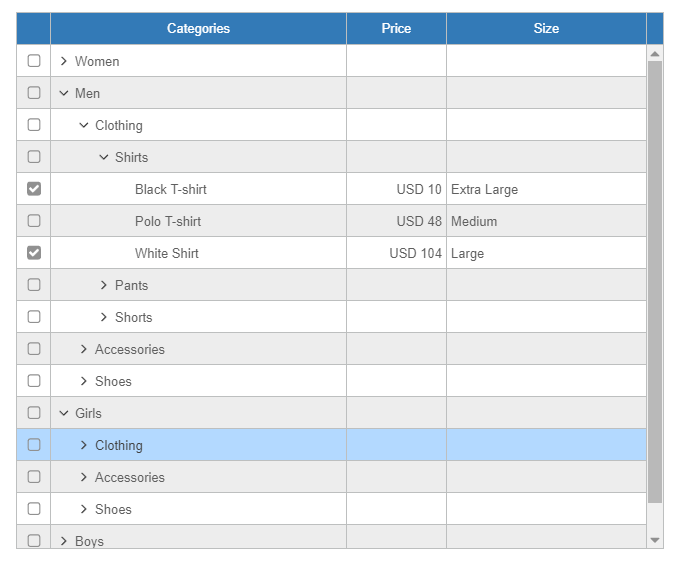
Download from here: http://wisej.s3.amazonaws.com/support/attachments/Wisej.TreeGridDemo.zip
Please download the latest Wisej release (1.4.31) to use it.
Best regards
Frank
Hi Eric,
I have logged enhancement request WJ-8485 to allow adding panels to ListViews.
We´ll keep you informed about this request.
Best regards
Frank
Thanks Matthew,
there have been quite a lot of fixes and enhancements since 1.3.44. Also to the tab control.
So if you find some time, I´d be glad to hear your feedback on a more recent build.
Best regards
Frank
Hi Frank – thanks for the response and help. I do have an older version (I’ve been delaying updating as I also need to fix issues and deploy another project and have been trying to avoid a general regression testing of the other project – but perhaps its time to bite the bullet on that).
I have 1.3.44.0. Were there updates to TabControl along the way?
Thanks,
Matthew
Hi Matthew,
thanks your report and sample.
I have tested with the latest Wisej code base and could not reproduce the problems that you have described.
Can you please tell me which Wisej version you are using ?
If you want to test with a prerelease, please contact me at frankATiceteagroup.com, so you can verify it yourself, too.
Best regards
Frank
Bootstrap applies the line-height to the body tag. When using an HtmlPanel the html is in the same document and if the css changes element types it can override any wisej or application style. When the css is applied to the HtmlPanel through wisej, all the rules are encapsulated and isolated to work only on the elements in the panel.
In this case the Bootstrap css changes the line-height of the body. If you change your Default.html like below it should work:
<body style=”line-height:1.2″>
It’s possible that the timer fires when the color has been changed again and is not in sync. Remember that you can change the color several times but the code is running on the server and the client is update only after all the events have been processed. If you press the button and timer fires very close to the pressing then the color changes twice and you see only the result in the client.
If I understood the requirement, keep the timer disabled, when the button is pressed change the color and start (stop and start to make sure it starts from 0) the times (so you know the 2 seconds start more or less from there). When the time ticks, change the color and stop the timer.
Hi
Some way to allow other types inside wisej extension? Or another approach/advice?
I trying to make a extension that uses url inside embeded css like:
…/resource.wx/Wisej.Web.Ext.Foo/WiseJ.Web.Ext.Foo.FontAwesome.otf
But some resources doesnt work, like embeded resource fonts or others embeded files like PDF
pdf, eot, otf, ttf, woff, woff2 etc…
Thanks in advance!
Hi Nic,
thanks for renewing the license 😉
We´ll check our cart system to see if we can fix that issue. Thanks for letting us know !
Best regards
Frank
The PropertyGrid supports all (most) of the System.ComponentModel classes and patterns so you can use the TypeDescriptor classes to filter or change anything on any class. System.ComponentModel is quite a large subsystem in .NET but there are many examples available. I can give you a starting point:
This creates a custom type descriptor provider and a custom type descriptor inheriting from the default one for the object selected. So in this case, this code won’t change anything, but you can add your code to filter or change any property. Custom type descriptors don’t have to inherit and can be “blank”.
public class MyProvider : TypeDescriptionProvider
{
   public MyProvider(object instance)
         : base(TypeDescriptor.GetProvider(instance))
   {
   }

   public override ICustomTypeDescriptor GetTypeDescriptor(Type objectType, object instance)
   {
      return new MyDescriptor(base.GetTypeDescriptor(objectType, instance));
   }
}

public class MyDescriptor : CustomTypeDescriptor
{
  public MyDescriptor(ICustomTypeDescriptor parent)
       : base(parent)
  {
  }

  public override PropertyDescriptorCollection GetProperties(Attribute[] attributes)
  {
     // this is where you'd filter the properties.
     return base.GetProperties(attributes);
  }
}
The usage would be:
TypeDescriptor.AddProvider(new MyProvider(obj), obj);
From now on, any code anywhere asking for the properties of obj will go through MyDescriptor. You can also do that at the Type level. Be careful because TypeDescriptor keeps static collections so you have to do this registration only once for types and also only once for object instances.
While using the TypeDescriptor is extremely flexible since you can even add properties that don’t exist, change various attributes, add descriptions, etc. it can also get complex quickly.
Another way, which can be simpler and more manageable, is to simply create a wrapper class and expose only the properties you want to edit and simply use it as a proxy.
We could extend the PropertyGrid with a filter method, but the problem with filtering properties is that you can’t just pass one property and you need to create and pass a path array because properties are nested into other properties and the PropertyDescriptor class doesn’t have a Parent relation.
HTH
/Luca
Hi Orel,
You are very close. It’s actually a lot simpler. I have attached the modified project. This one also fires an event on the server “CountTerminated” when it is finished counting and I added the Duration property. It works also at design time.
The main piece missing was the [assembly:WisejResource] property in AssemblyInfo.cs.
The event that I added uses a different syntax, instead of declaring the event as a field which takes memory even when not used, it uses the Events collection which adds the event handler only if the application subscribes to it.
If you look at the updated code I’m sure you’ll appreciate the simplicity and will be able to add the other properties that will let you configure the widget using the additional features..
HTH
Best,
Luca
Subscribe to Application.BeginRequest in Form.Load and remember to unsubscribe in Form.Disposed since it’s static event and will hold on the reference preventing GC.
You may also handle Application.SessionTimeout instead. It will fire after a period of inactivity and before the session is actually teminated. If you set e.Handled = true Wisej will not show the built-in form and you can show your own.