

It appears to be a bug/feature of Firefox. Most (all?) browsers bubble up pointer events from disabled. Firefox doesn’t and simply drops the events. Try adding this to Default.html in <head> or in a css file if you are using one for the app (without <style>)
<style>
input[disabled] {
pointer-events:none;
}
</style>
VWG was mixing forms with panels. We don’t have a ShowPopup method but we a UserPopup control. See also https://wisej.com/support?keywords=userpopup&sort=active&keywords=userpopup&category=0
It has several additional features specific for a popup that lets you decide how it aligns or self adjusts its alignment and more.
HTH
Could you double-check?
I just tried 1.4.32 and the bug appears to still be present. If I click on the border, or maybe 1 or 2 pixels inside of the textbox, then it works, but if I click in the middle of the area where you would type, then it doesn’t appear to propagate the Click up to the parent.
Thank you very much for your kind reply, I will review the attached project and if I have any problems, I will let you know. Good day. regards
For some reason VS doesn’t like the name “UserControl” for the directory in the item templates. I don’t know when and how it started and I’m pretty sure it used to be fine.
If you go to \Documents\Visual Studio 2013\Templates\ItemTemplates\Visual Basic\Wisej\ and
It works.
We’ll change it on our end too and in the downloadable zip files.
The Wisej extension uses the Calendar class to create the calendar and save the reference. Otherwise it would have to go through the jquery wrapper all the times. When jquery calls $(“.fc”).fullCalendar(‘option’, ‘locale’) it first retrieves the element (or elements) with the class “fc” by name, then tries to retrieve the data using the name “fullCalendar” (same as $(“.fc”).data(“fullCalendar”)) then it looks for the function named “options”. There is also the problem of having more than 1 calendar in the same browser page, using “.fc” in jquery operates on all the calendars at once.
Since the widget has already created the full calendar and it needs to interact with the options dynamically, we create the full calendar class and save it in this.calendar. So you can:
this.calendar.option(“locale”) // if the script is running in the context of the wisej widget and this == wisej widget.
or:
App.Window1.fullCalendar1.calendar.option(“locale”); // using the fully qualified path.
There are other ways to get to the widget, but it all depends on the context. You can also use the id of the widget. In any case, the widget object has a field “calendar” which is an instance of the $.fullCalendar.Calendar class.
HTH
I didn’t knew that the DataGridView accepted controls, other then the one proposed by the IDE, that’s cool 🙂
I successfully experimented with the progressbar, then wanted to give it a try using a user control, so I made UC with a label, Textbox and CheckBox.
The UC appeared properly in the DataGrid, could focus into the textbox but couldn’t type anything ??? The Checkbox inside the UC can be toggled.
Is it me which is missing something ??
DataGridView1.Columns.Add(“Column1”, “UserCtrl”);
DataGridView1.Columns.Add(“Column2”, “CheckCtrl”);
DataGridView1.Columns(0).Width = 250;
DataGridView1.Columns(1).Width = 150;
Wisej.Web.DataGridViewRow DR = new Wisej.Web.DataGridViewRow();
Wisej.Web.DataGridViewCell DC0 = new Wisej.Web.DataGridViewCell();
UserControl1 UC = new UserControl1();
UC.Dock = Wisej.Web.DockStyle.Fill;DC0.Control = UC;
DR.Cells.Add(DC0);
Wisej.Web.DataGridViewCell DC1 = new Wisej.Web.DataGridViewCell();
Wisej.Web.CheckBox Chk = new Wisej.Web.CheckBox();
Chk.Checked = true;DC1.Control = Chk;
DR.Cells.Add(DC1);DataGridView1.Rows.Add(DR);
Hi Eric,
thanks for sharing more details on the desired functionality.
To add the progress bars you have several options. In my test case I added them with the Control property that is available to all cells including header cells:
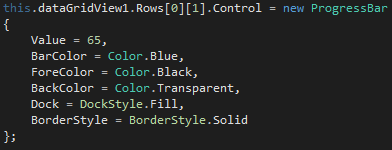
This could also be done with inline html.
Please note that the BarColor property used in my code snippet will be available with the next Wisej build.
Hope that helps.
Best regards
Frank
Hi Carina,
I´ve tested your files with a simple Upload project (see attached) and it works fine here.
Can you please describe the steps how you are trying to upload them and share some of your code ?
You can also send it to frankATiceteagroup.com if you don´t want to post it here.
Thanks in advance.
Best regards
Frank
Hi Frank, I agree with you.
Let me explain you what use we currently do with it as a ListviewPanelItem.
With a ListViewPanelItem, you can build an “inline” master-details Grid, saving screen space by not scarifying display surface for the details view. I feel it more efficient if the user doesn’t need permanent drill down.
You can fill the whole display surface as a compact grid. Once the user needs details about a row, it can click it to expand/collapse and see/hide the details Panel.
This Panel can contain anything useful to the details view without being bound to the grid columns format, but shown right under the related “compact” row.
In fact it splits the grid and displays the details view into the grid at the selected row.
This allow to present “inline” a rich set of details which are free to follow any formatting (not the grid columns format), see in our case a TabControl.
This is a presentation mode we like, but we are open to any other which results to a similar behavior.
Can you please show me how you incorporated the colored progress into your DGV sample. I can’t see a progress control as column type.
Best Regards.
Hi Eric,
as a small side note while we are checking how to improve the ListView is that from my personal experience you can often also use a DataGridView to get the task done. It offers a lot of flexibility by either using html and/or Controls to expand it.
Please fin a small screenshot of a DGV kind of similar to your Listview here:
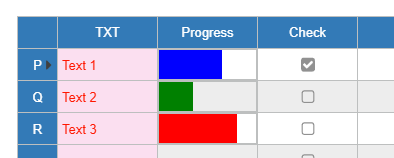
In any case, we´ll keep you updated on our progress.
Best regards
Frank
Hi Frank,
For compatibility, I presume you will mimic the VWG ListViewPanelItem, which also accepts different Listview Columns types?
Here is a sample of what I mean, creating the attached picture.
With ListView1
.SuspendLayout()
.Columns.Add(“”, 20, Gizmox.WebGUI.Forms.HorizontalAlignment.Left) ‘0 Icon
.Columns(0).Type = Gizmox.WebGUI.Forms.ListViewColumnType.Icon
.Columns.Add(“TXT”, 60, Gizmox.WebGUI.Forms.HorizontalAlignment.Left) ‘1 TextBox
.Columns(1).Type = Gizmox.WebGUI.Forms.ListViewColumnType.Text
.Columns.Add(“Progress”, 100, Gizmox.WebGUI.Forms.HorizontalAlignment.Left) ‘2 Progressbar
.Columns(2).Type = Gizmox.WebGUI.Forms.ListViewColumnType.Control
.Columns.Add(“Check”, 100, Gizmox.WebGUI.Forms.HorizontalAlignment.Left) ‘3 Checkbar
.Columns(3).Type = Gizmox.WebGUI.Forms.ListViewColumnType.Control
.ResumeLayout()
End WithDim oPanel As Gizmox.WebGUI.Forms.Panel = New Gizmox.WebGUI.Forms.Panel
oPanel.Dock = Gizmox.WebGUI.Forms.DockStyle.Fill
oPanel.Height = 200
oPanel.Visible = False ‘Start with the Panel collapsedDim LVPI As Gizmox.WebGUI.Forms.ListViewPanelItem = New ListViewPanelItem(oPanel)
With LVPI
.UseItemStyleForSubItems = False ‘To allow Styling of SubItems.SubItems.Add(New Gizmox.WebGUI.Common.Resources.IconResourceHandle(“Parking_16x16.png”).ToString)
.SubItems(1).ForeColor = Drawing.Color.Yellow
.SubItems(1).BackColor = Drawing.Color.LightPink
.SubItems.Add(“Text”)
Dim Progress As ProgressBar = New ProgressBar
Progress.Value = 10
.SubItems.Add(Progress)Dim DTPerf As CheckBox = New CheckBox
DTPerf.Checked = True
.SubItems.Add(DTPerf)
End WithListView1.Items.Add(LVPI)
By the way I’m very glad to read that Wisej accepted my proposal 🙂 , this will be of a great help.
Hi Edmond,
the method is called Abort and can be used e.g. from a button.
Please find a simple sample attached.
Hope that helps.
Best regards
Frank
So, how do you actually cancel the upload ? I upgraded to the latest Wise J version. Tried to upload a large file but I do not see an “Cancel” option anywhere.
Looked on the properties/methods of the upload control but nothing looks obvious in there either.
Thanks very much! That was truly quick. We confirm 1.4.32 fixes this issue on our side.
Hi Tobias,
WJ-8439 is fixed in release 1.4.32 (just uploaded).
Best regards
Frank
Hi David,
WJ-8450 is fixed in the latest Wisej release (1.4.32).
Best regards
Frank
Hi Romaric,
enhancement request WJ-8454 as mentioned in my first reply is included in the latest Wisej release (1.4.32).
Now Wisej widgets use an autogenerated id if no id is set explicitly.
Best regards
Frank
Hi Harald, Nic,
the fix for WJ-8455 is included in the latest Wisej release (1.4.32).
Best regards
Frank