

Hi Matthew,
I attached a sample that shows one way to use html in the title of a form.
It creates a new class in an embedded javascript file:
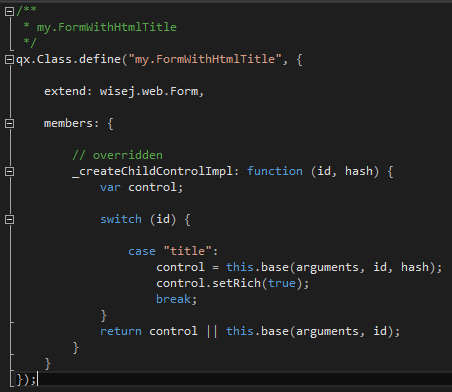
And applies that class OnWebRender:
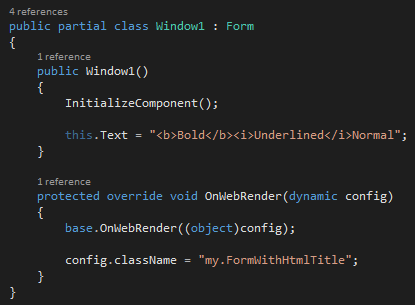
Resulting in a form title like this:
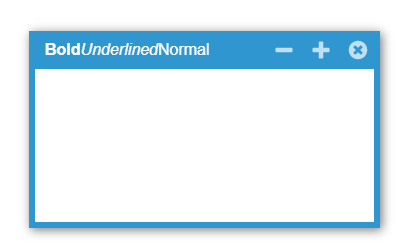
Hope that helps.
Best regards
Frank
Hi Nick,
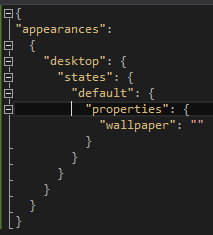
there are several ways to achieve that. One is to use a mixin. Just place a file called xxx.mixin.theme with the following content in your projects theme folder:
{
“appearances”:
{
“desktop”: {
“states”: {
“default”: {
“properties”: {
“wallpaper”: “”
}
}
}
}
}
}
Then you can use the BackColor property of your desktop to set the color you want.
Hope that helps.
Best regards
Frank
PS: Wordpress editor destroyed formatting, here is how it looks like:
When I set fillweight to 1, customusercontrols are seen like that. When I adding controls on design time again same thing.
Flow layout doesn’t fluid on mobile.
By the way, when do you publish the mobile controls?
Thanks Andrew.
It´s logged as WJ-8534, fixed and will be included in the next Wisej build.
Best regards
Frank
Hi Frank,
It turns out it wasn’t a bug after all. Sorry!
For some reason the “Focusable” property was set to false on random controls all over the Form… Not sure how/when that happened.
Regards
This problem is present again in Facebook v146.0.0.53.92 for Android, possibly iOS.
Steps to reproduce:
1. Create a WiseJ form with GeoLocation on it. ActiveWatch=True
2. Go to website in Chrome, with Android’s Location Services OFF in Android
3. GPS_PositionChanged event fires, returns GPS status of “PermissionDenied”
Now try it in Facebook browser:
(You must Share a link on a Timeline, or in a message, and then load it on an Android phone)
1. Go to same website
2. Facebook browser prompts to allow location. Click Allow
3. WiseJ form loads.
4. GPS_PositionChanged event never fires.
Since my app’s initialization is dependent on the Geolocation’s PositionChanged event being called at least once, the app fails. Every other browser seemingly makes this event fire, even if GeoLocation services are off on the device. Is it possible to override Facebook’s browser behavior by forcing this event to fire, perhaps by using something like Geolocation1.GetCurrentPosition?
I like the Shepherd library – will turn it into an extension. A component that can be dropped on any container, can create tours, start/stop, receive events, and select controls in the steps of the tour. It’s going to be cool.
Thanks Matthew.
I have logged issue WJ-8533 for it and we´ll inform you when a fix is available.
Best regards
Frank
Hi,
Flowlayout on mobile devices are not working expected. I tried and tested again attached sample like as the screen cast and sample also is not working like on the screen cast. I found a something about fillweight on another topic but I couldn’t understand how I can implement.
Thank you.
Thank you Luca – yes pls send me the test case app…
Hi Matthew,
I tried to reproduce and I did reproduce an issue related to the same session open on multiple tabs. But couldn’t reproduce the issue with the theme. And when the second tab opens is perfectly in sync with the first.
You are correct that it’s impossible to determine which tab to open when clicking on an external link. But you can force a link to create a new session by adding ?sid=new.
When you have the same session loaded on two tabs and both tabs have a modal dialog open (or a form open, or a page, etc) and one of the two closes the form/dialog/control then other tab cannot be updated automatically – you need to hit refresh. Another issue is that if say Window1 is closed on tab1, then when you click anything on Window1 on tab2 nothing happens. This is by design, because window1 is now disposed and executing code on clicks would be very wrong. There is simple javascript that you can add to a page to make it refresh when is activated.
I can send you a small test case to see if you can change it to reproduce the problem you are seeing.
/Luca
Thanks Luca – I finally got a chance to come back to this and implemented your suggestion number one. The offset property was exactly what I was looking for. I appreciate the assist – it works perfectly.
Thanks,
Matthew
Hi Chris,
I have tried it in a simple sample and it worked ok:
What browser are you using. Any chance to send me the complete code ?
You can either post it here or send it to frankATiceteagroup.com
Thanks in advance !
Best regards
Frank
Hi Shawn,
thanks. We have found a problem where MinValue and MaxValue are ignored.
It´s logged as WJ-8527 and the extension download now contains a fixed version. So please download it again to benefit from the fix.
Best regards
Frank
Hi Luca,
I tried this in 1.4.35.0 and it did not work.
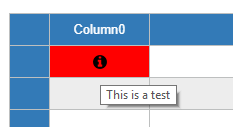
I tried to set the tool tip on a image column on individual cells in a loop as in the code below
grdProducts(0, row.Index).ToolTipText = “Stock available : ” & articles.Articles(0).TotalQuantityStockAvailable.ToString
grdProducts(0, row.Index).Style.BackColor = Drawing.Color.Red
row.Cells(0).Value = “images/box_open_24.png”
This successfully colors the cell red , and places a image in them, but will not put a tooltiptext on the cell. The grid is enabled to show cell tool tips.
Thanks
Chris
Hi Edmond,
you can see in the CodeProject sample how you can set the icon:
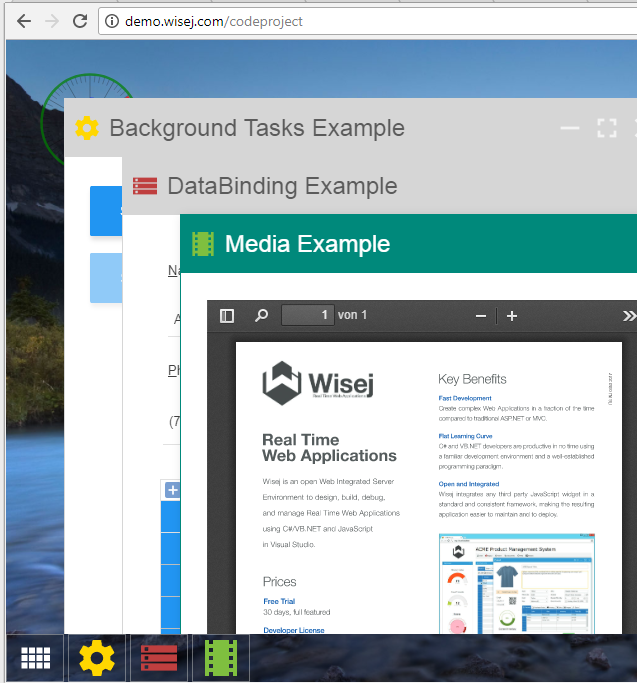
Please take a look at the forms properties:

This is from MaterialDesign, but you can have it the same way from ElegantIcons or FontAwesome.
Hope that helps.
Best regards
Frank
I have this extension work but I do have one thing that I haven’t got working.
The .MaxValue does not appear to work. If I make the .maxvalue = 100 and run the app, the max value is still variable based on the data being presented.
Am I misunderstanding how it works?
Thanks very much
Hi Tim,
I have tried to reproduce that problem but failed so far. Can you please share some more details and / or a sample that illustrate that problem ?
Are you using the latest Wisej build ?
Thanks in advance !
Best regards
Frank
You could also try Creately online diagramming and collaboration software that supports visio import. Its a free solution available in chrome store
ServiceWorkers seems to just WebWorkers registered in relation to a URL and can handle/filter network requests. You can register them using plain javascript. Wisej doesn’t stand in the way. Wisej also has a web worker extension allowing you to create and manage web workers. If you find something useful for them to do.
I don’t really know what a server-based application may do with a service worker faking a connection. But it sounds like it’s designed for client-side javascript applications.