

Hi Luca,
Any progress on this? I.e. creation of a “CaptionedTextBox” inheriting from TextBox (or more generally from Control??) and having the additional two controls (label and subtitle) attached to /bundled with it? I can’t see any easy way to do it, but you know better!!
Best,
Alex
I solve the issue about the scrolling.
I insert the touchstart event on my control (I did not write a code inside on the event) and the scrolling now is smooth
We keep going !!!!!!!!!!!
Sorry for that.
I have now fixed the download link. Please try again.
Best regards
Frank
Hi Vishal,
you need to remove the site you´re running Wisej from the list of sites for Compatibility Mode. See your screenshot:
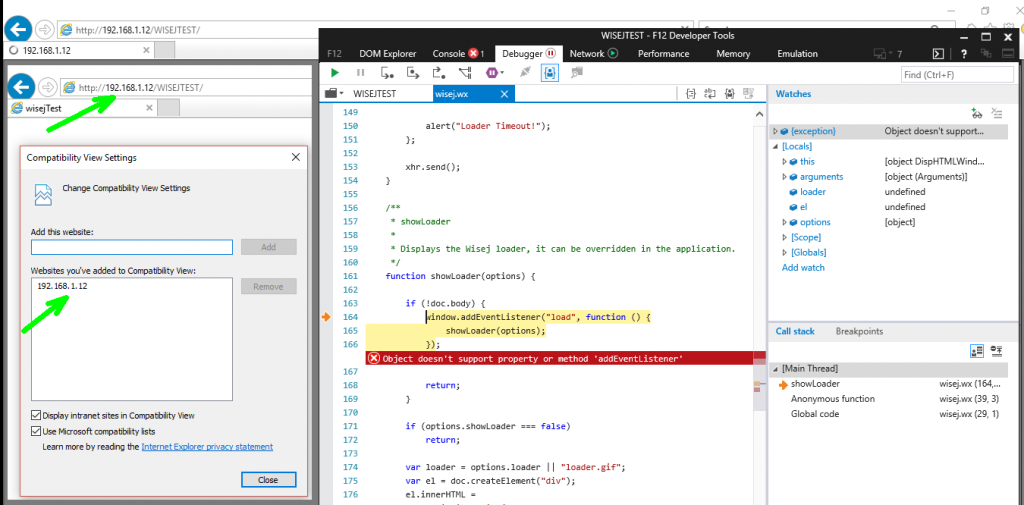
Best regards
Frank
Dear Frank,
What are minimum settings required in IE settings which i should have to check.
Thanks in advance.
P Vishal
Hi,
WJ-8266 is resolved completely in Wisej development build 1.4.41.
Best regards
Frank
Hi Mariano,
read-only property has been added to all relevant components.
It´s included in Wisej development build 1.4.41.
Best regards
Frank
Hi Matthew,
WJ-8533 is fixed and included in Wisej development build 1.4.41.
Best regards
Frank
Hi Andrew,
WJ-8534 is fixed and available in development build 1.4.41.
Best regards
Frank
Hi Andrew,
WJ-8536 is also fixed in 1.4.41. Application.UserAgent etc. are available again.
Best regards
Frank
Hi Andrew,
the fix for WJ-8540 is included in the latest development build (1.4.41).
Best regards
Frank
Hi Vishal,
there is no limit in functionality for the trial version.
From your description I assume that your IE is running in compatibility mode for specific domain(s).
Try to check your IE settings, this should resolve the problem.
Best regards
Frank
Dear Frank,
One thing i have to mention that, i am using trial version.
Is there any licensing issue..?, coz, <add key=”Wisej.LicenseKey” value=””/>
Please help.
Thanking you,
P Vishal
Dear Frank,
One thing i observed that, if i use Local Internet Explorer of IIS where application service is deployed then it is working, but when i used to access the same service within network then it throws the “Object doesn’t support property or method ‘addEventListener’” error.
One more thing i have to mention that, the same service is working with Microsoft Edge, Firefox, Chrome etc.
Please help.
Thanks in advance.
P Vishal
Hi Luca,
I use Android Mobile with Chrome Browser.
I filling a FlowLayoutpanel with labels, actualy i can scroll the list of the labels but one every time where i touch the screen, if is posible i want to scroll the list with one touch.
I tryied with all ways (panel, listview, datagridview, flowlayoutpanel) the scrolling was not Smooth
Before find your product, i was using the wgx (webgui) and the scrolling was Smooth as native android application, but, as you know, the wgx was withdraw from the market, I hope you do not do the same with you.
My opinion is : it is exquisite for pc browsers but is not the same on mobiles and tablets browsers.
I am convinced that your product covers me, and I intend to proceed to buy, in the next days.
You can use Nancy. And if you need to retrieve the state (Nancy is stateless) you can use Application.RestoreSession(HttpContext.Current); See sample below:
public class SampleModule : Nancy.NancyModule
{
public SampleModule()
{
Get[“/products/{id}”] = args =>
{
Application.RestoreSession(HttpContext.Current);
Application.OpenForms[“Window1”].Text = “Hello from Nancy!”;
return “Hello World!”;
};
}
}
This is web.config:
<handlers>
  <add name="wisej" verb="*" path="*.wx" type="Wisej.Core.HttpHandler, Wisej.Core" />
  <add name="Nancy" verb="*" path="*" type="Nancy.Hosting.Aspnet.NancyHttpRequestHandler" />
 </handlers>
And of course make sure that “/” is not a route.
Yes translates adds an offset. So if the top is 50px and you use translateY 50px the element will be at 100px. I attached an example using two techniques, one using the animation and the the using css.
Remember that translate doesn’t change the location value, so if you want to keep moving it you have to update the location as I did in the example.
I see. I think that the dev build .37 had a problem with keypress, in chrome press F12 you should see an error in the console. That is probably what you get, it’s fixed in newer dev builds (not uploaded yet).
IE11 supports addEventListener. Only IE <9 doesn’t. You either have IE11 in compatibility mode to act like IE8 or it’s in a child control which usually reverts to IE7. Wisej supports IE10 and up.
https://www.w3schools.com/jsref/met_element_addeventlistener.asp
We don’t use getPreventDefault. The browserLink SignalR thing that you see is from Visual Studio and SignalR, not related to Wisej.
The appearance warning are normal and expected to be there.
See: browserLink