

It means that WebSocket is disabled on your server. If using IIS you have to enable the WebSocket feature.
Hi Vishal,
have you enabled Winsockets on your IIS and also in your application ?
Best regards
Frank
Hi, Frank
I have downloaded the sample project of progress bar (https://wisej.com/blog/progress/) and deployed on IIS.
One thing I have observed that, once I click on start button it does not showing any progress, but if I just click on anywhere on desktop, then the object is refreshed.
Thanks in advance.
P Vishal
Hi Vishal,
it depends on how you start the long run process. Can you please share some details / code ?
Also, you might want to have a look at our progress bar blog entry:
https://wisej.com/blog/progress/
Best regards
Frank
Hi Luca,
you know when this problem will be fixed ?
Br
Nikos
Hi Edmond,
it has to be build from the extensions sources.
However we have now greatly enhanced and improved the TourPanel. We are now finalizing it for the next release.
I will send you a preview directly.
Best regards
Frank
Hi,
thanks for your message. We already fixed this bug and it will be included in the next build that we are just finalizing.
We´ll notify you when it´s available.
Best regards
Frank
Hi Andrew,
I have tested both issues using your sample and both appear to work ok with the latest build.
What Wisej build are you currently using ? I can send you a prerelease build so you can verify with your application(s) tonight.
Would that help you ?
Best regards
Frank
Hi Orel,
please find a sample here: http://wisej.s3.amazonaws.com/support/attachments/HighchartsSample.zip
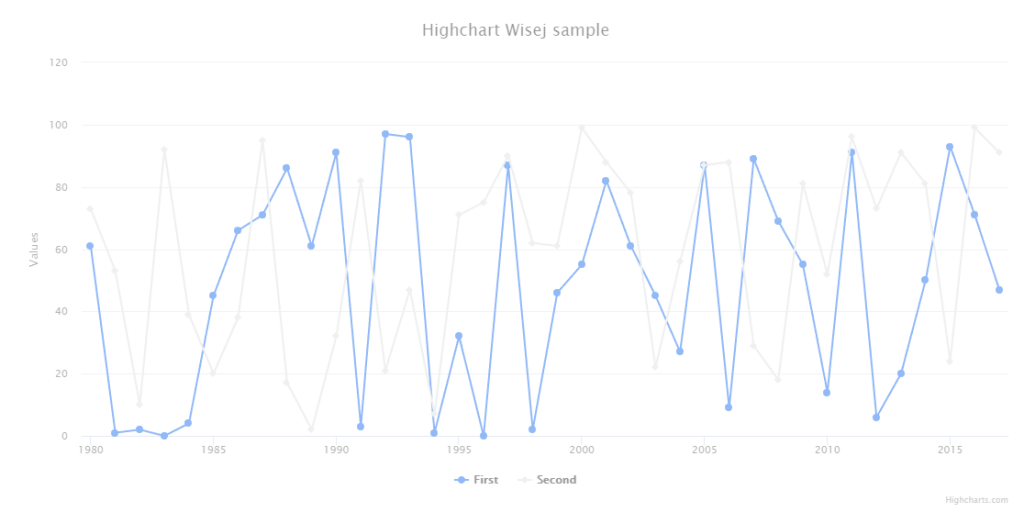
Here we supply the chart with sample data generated on the server and handle the click event on data points to fire back an event to the server
(that simply shows an alert box).
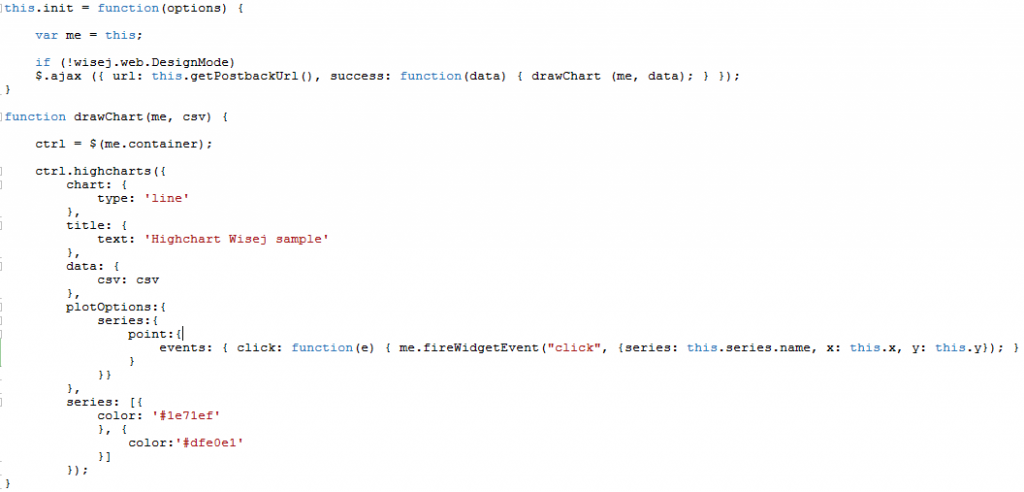
We made use of the Widget control where we set up the packages property first. Additionally we have defined the following InitScript:
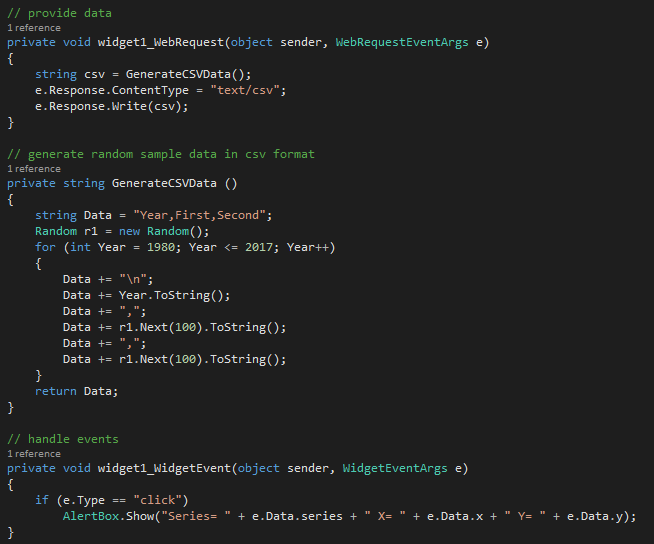
On the server side we have this code to generate random data, provide it to the widget and handle the server side click event:
Best regards
Frank
Try this:
private void button1_Click(object sender, EventArgs e)
{
this.label1.Text = this.tinyEditor1.Text;
Wisej.Base.TextUtils.MeasureTextAsync(this.label1.Text, true, this.label1.Font, (size) => {
this.label1.Size = size;
});
}
HTML text has to be measured on the client using Wisej.Base.TextUtils.MeasureTextAsync.
If you the set containing Panel to AutoSize=true and fix the Minimum and Maximum Width it will grow vertically to fit the content. May have to change the AutoSizeMode to GrowAndShrink if you want the panel to shrink.
There is also a bug with the regular AutoSize implementation of Label and Button not considering CRLF to grow vertically and not using the Min/Max constraints.
Hi Shady,
can you please check your web.config and add the following if it´s missing:
<configuration>
<system.web>
<compilation debug=”true” targetFramework=”4.6″>
</system.web>
</configuration>
Best regards
Frank
I see the problem. VS is not looking in the default paths. One Drive screwed me up. Again.
Hi Wade,
we check to see if we can reproduce that issue. In the meantime you can download the templates from the following locations:
http://setup.wisej.com/CSharpTemplates.zip
http://setup.wisej.com/VBNetTemplates.zip
Best regards
Frank
The text in the label is created by the user in page of the app – using TinyEditor, so I imagine that would be “<br>” – label is set to allowhtml.
The text in the label has CRLF?
Hello Eric,
To keep you updated on this:
But…
I have removed the rotation from your sample and the same code with thousands of controls is actually quite fast now. See quick video:
https://www.screencast.com/t/WhXnDyUc
I’m looking to see how to set the rotation globally instead of control by control. You can also simply some of the complex composite controls by consolidating them into a single control and using an html template to render the inner content.
With C# is quite easy to use string interpolation to bind data to an HTML template.
I will update this thread with the rotation solution.
/Luca
You can kill the session calling Application.Exit. Once the session is killed, the server *only* sends back to the client the information that the session is gone. You can’t have a control without a session. The client cleans up everything and calls Wisej.onExit() on the global Wisej object.
You can assign your code in onExit and decide what to do. To reload the page and create a new session, which will show a new login scree, simply to do this:
https://wisej.com/support/question/how-to-show-a-logout-page-after-application-exit
This is the reference for IWisejCacheProvider.
https://wisej.com/docs/html/T_Wisej_Core_IWisejCacheProvider.htm
It is not related to this functionality. It’s useful only if you want to use a different cache manager. By default Wisej uses HttpRuntime.Cache.
Thanks for your answer. But I have no idea what I can do with “IWisejCacheProvider”. Is there more documentation about it somewhere? Do you think option 2 would be possible to implement with this?
When you get the session timeout, the session is *about* to timeout, it hasn’t timeout yet. If you want to “kill” the session use Application.Exit(). It will cause the session to get disposed and removed from the session manager. Or, after the real session timeout (which is the session timeout se in default.json * 2), the session is removed automatically. Session don’t remain in memory more than sessionTimeout * 2.
You can also implement a custom IWisejCacheProvider by implementing Wisej.Core.IWisejCacheProvider and adding the fully qualified class name as an application key in web.config using “Wisej.CacheProvider” as the key.