

Hi Arturio,
we have already created an extension using Microsoft’s Office 365 Live Viewers that can be used to view Office documents.
It´s available at https://wisej.com/extensions
Please also find a related discussion here:
https://wisej.com/support/question/office-document-viewer
Best regards
Frank
It’s the identity for the app pool that cannot write to temp.
The .NET v4.5 seems to be using NetworkService by default. While the the DefaultAppPool uses ApplicationPoolIdentity. I always use DefaultAppPool or create a new one for the application.
Hi Felix,
Visual Studio 2017 is fully supported.
I extended your license till December 31st. Please note that this will be the last renewal.
Best regards
Frank
Hi Frank,
Would you mind helping me to renew the trial license again ? I am sorry that I was busy recently and have no time to continue to try converting a VWG application into WiseJ. I hope I can have some free time to try it in the coming long holiday.
Another quick question, can I use Visual Studio 2017 (using .NET 4.6 or .NET 4.7) ?
Thanks,
Felix
The estimate we had before has already been blown 🙁 The main reason is that the first approach didn’t work well. I’ll send a better update next week.
Like a toolbar where you can move buttons around?
Hi Orel, see attached.
Some issues:
HTH
Sorry I didn’t reply sooner. Just requesting the HTML page will not work. All you get back is the HTML page. The requester (which is usually the browser) has to execute javascript. It’s the same for all javascript web apps. If you request a page with angular or jquery all you get back is the page with the links.
It’s a lot better to start the process using server code and don’t rely on an external timer or requester. You build a simple monitor app in Wisej and launch threads or processes and manage them. The third party IIS allows you launch threads.
The only issue is that when IIS recycles it will kill the threads in the same app pool. I believe it can be turned off for a specific app pool.
Best,
Luca
Hi Luca!
thank you very much for your great answer!
I’ve tried your solution and its works.
I’ve used the ToolTip class that you attached and used the wisej js source code.
right now I’ve succeeded make it work only for the first app running.
when i press F5 and the app is reloading the _applyOpenTipValue method is called before the screen is done rendering and i’m getting an error..
how i can solve this problem?
Thanks you again!
Orel
Why not just call a url on your WiseJ site from Python with a URL parameter – different values for the different tasks
Read the parameter – there were a few examples in the posts, and depending on tthe value of the parameter – do different things.
Crystal has a Web Viewer – Used it extensively with Visual Web Gui,
What we use to do is store an object in the session with all the parameters we needed to pass to the report. Then, in an ASP box – we loaded a ASPX page that read the session object, assigned the parameters to the Crystal Report Object -and presto – displays in the ASPX box, or launches as a separate page – however you want to handle it.
Hi Edmond,
as you might guess, there a couple of ways to achieve that with Wisej.
Here is a rather simple straight forward approach using css with the StyleSheet extender.
I have added a StyleSheetExtender to the page and created some simple css:
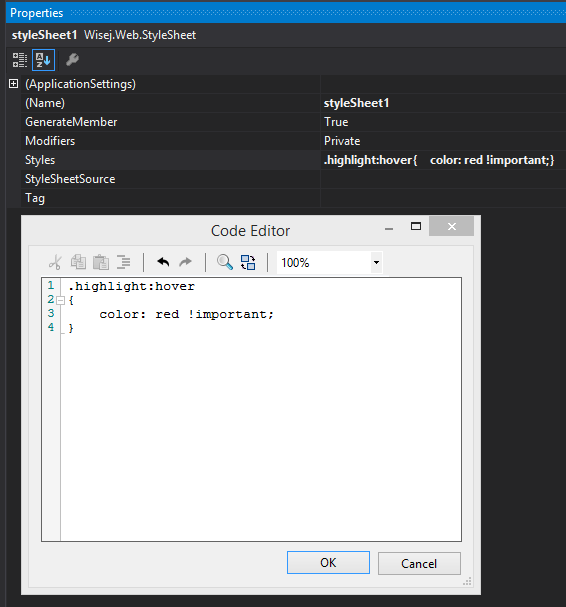
Now a CssClass property is added to all controls on that page. So you can now pick the class “highlight” and directly assign it using the designer.
(could also be done by code).
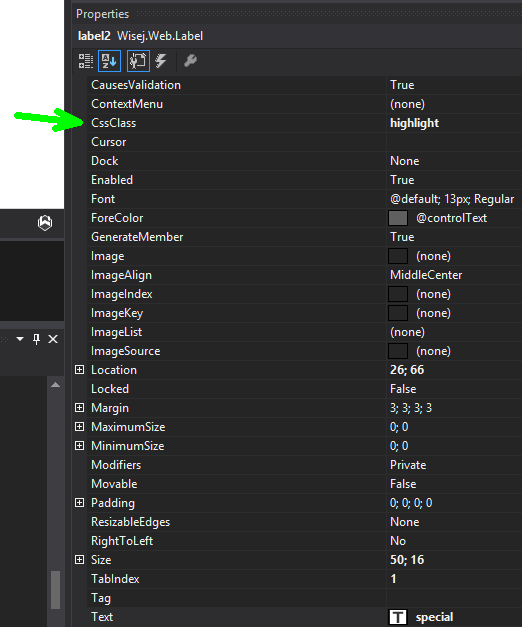
I have created a simple sample that shows you the result and helps you getting started:
http://wisej.s3.amazonaws.com/support/attachments/LabelHover.zip
Best regards
Frank
Hi Edmond,
just to make sure that I got it right:
Your custom menu is composed of standard labels ?
Will create a mixin and get back to you.
Best regards
Frank
You can create a pdf and show it using the PdfViewer control. I don’t know if Crystal Reports has a web viewer.
Hi Orel, here are the issues (easy to fix):
I would remove the IWisejControl interface from the class definition and remove the AppearanceKey change. Change the name of “_applyValue” to “_applyOpenTipValue” to avoid conflicts. Remove Multiline=true to see your extension work (it works).
Another problem is that if you want to add the opentip everywhere you can’t override all wisej controls. It should be done as an extender, so you can drop it on the container and it works for all controls. You can find the js source code using the link above, look for wisej.web.extender.ToolTip.js.
I have attached the C# source code of the ToolTip extender implementation in Wisej that you can use as a reference.
Hi Andrew,
I think a scheduled task will do as long as it runs a batch file like
“\Program Files (x86)\Google\Chrome\Application\chrome.exe” wisej.com
Hi,
I don’t know of any event (I’m sure Frank or Luca will come along and correct me) but I use the colour dialog like this:
using (ColorDialog dlg = new ColorDialog())

{

dlg.Color = Color;

if(dlg.ShowDialog() == DialogResult.OK)

{

Color = dlg.Color;

}

}
HTH
Nic
Hi Ben,
thanks we tracked it down, logged as WJ-8581 and fixed it.
It will be included in the next Wisej build.
Please let me know if you need a prerelease upfront.
Best regards
Frank
Hi Frank,
Thanks for help, I miss some information in last message,
Best regards,
Ben
Hi Ben,
tried to reproduce but failed. Can you please share the code that you are executing on dragdrop (if any) ?
Thanks in advance.
Best regards
Frank