

Hi Tung,
using Tools in DataGridView cells is similar to using Tools in TextBoxes:
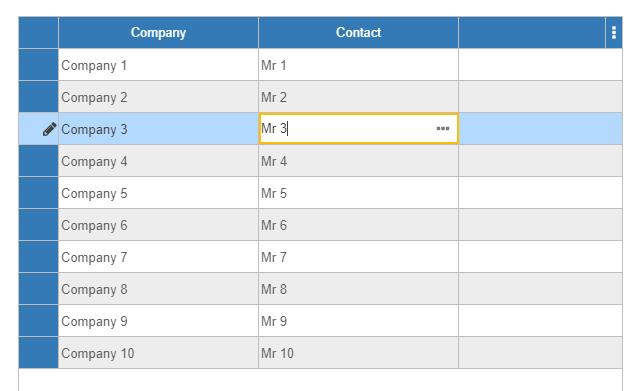
To define the tools, open the designer, Edit columns and set the properties:
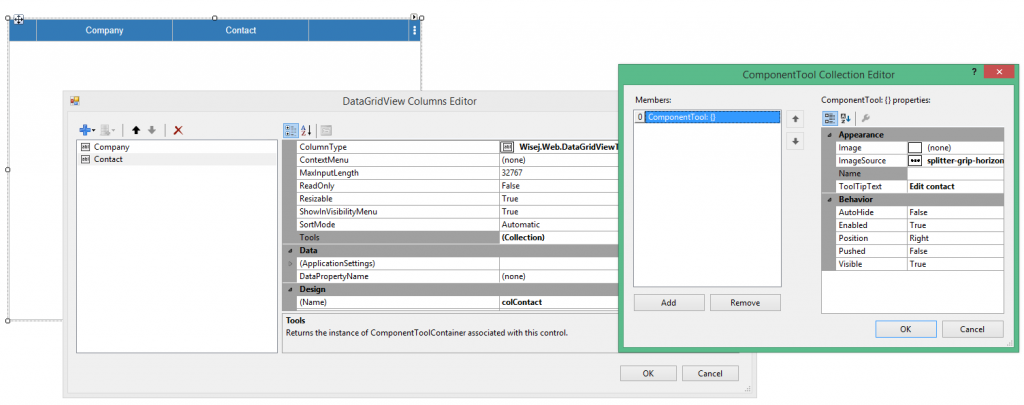
You can handle the Tool click by attaching to the CellToolClick event. ColumnIndex and RowIndex will be included in its event args.
I have put together a small sample that shows all your 3 points listed above:
http://wisej.s3.amazonaws.com/support/attachments/DGVTool.zip
Hope that helps.
Best regards
Frank
I’m not sure I understood. When you say “I go back to set ReadOnly=false” do you mean that you set the property back to false and then it disappears from the designer code? If that’s the case it’s normal since the default value is false.
I just tried to set a column ReadOnly=true by hand in InitializeComponent(), opened the designer, and the property is correctly shown to be true. Did I miss something?
Hi Shawn,
we fixed the problem with disposed controls bound to ListView items (logged as WJ-8597) and the fix will be included in the next Wisej build.
However in your scenario we recommend to precreate the items and progress bars and then just set the value instead of destroying and recreating everything on each tick.
We´ll inform you when the new release is online.
Best regards
Frank
Can you send a small test case? The code in the message seems to indicate that on every tick the controls are recreated but never disposed.
Hi Edmond,
you can host and personalize the viewer simply by copying pdf.js and use the custom option.
Use code like this:
this.pdfViewer1.ViewerType = Wisej.Web.PdfViewerType.Custom;
this.pdfViewer1.ViewerURL = “pdfjs-1.9.426/web/viewer.html?file=[source]”;
This is for the Mozilla Viewer:
MOZILLA_VIEWER_URL: “//mozilla.github.io/pdf.js/web/viewer.html”,
Hope that helps.
Best regards
Frank
This one https://mattketmo.github.io/darkroomjs/ seems to be simple.
There are many.
No guarantees, like anything else. We use Wisej in our projects, we use a lot of open source code, Wisej js is open source, and we provide the full source code to companies that license it or for free in the event we are unable to maintain it (see https://wisej.com/license-information/).
Wisej doesn’t generate the designer code, it’s the Visual Studio designer. The warning icons indicate that the html renderer didn’t respond in time for the designer to draw the control. The error you are seeing are coming from the html renderer and it may happen when wisej is trying to “stitch” together additional javascript libraries after the designer has been loaded.
The only thing to worry about is Visual Studio itself.
That is helpful thanks. So for solution 2, we call Application.StartTask with a lambda expression. I’m guessing the code can’t be in an external module then? Still figuring out lambda expressions/nested sub syntax in VB — it’s one of those things that code converters do not handle well.
When you get to step 2, the machine is processing the resize code, which means that the client is not receiving anything until it’s all done. It’s still a request/response cycle. Web workers cannot interact with the html elements at all.
Solution 1: you can add at step 1a Application.Update(this) but it will work only if the client supports WebSocket since it’s a push update and will send back every pending update.
Solution 2: you can process the file in a background task, see: http://demo.wisej.com/ProgressSample and https://wisej.com/blog/progress/, or http://demo.wisej.com/codeproject and related source code. There is also a background task example here: https://wisej.com/examples/
We also have the built-in toast boxes: AlertBox.Show().
I’d go for solution 2.
HTH
Hi Felix,
thanks we fixed that issue (logged as WJ-8591) and it will be included in the next Wisej release.
Best regards
Frank
HI Luca!
thanks again for your kind help.
I’ve checked your fixes and they are work just fine for one control.
There is a new problem when i’m adding more then one control.in that case just the last control that renders gets the tooltip value
Thanks for you help again
Orel
It’s not that easy with ASP.NET forms. It used to drive me crazy and I always ended up having to add javascript to find the submit button using a custom property and make it the default one. https://forums.asp.net/t/985791.aspx?ASP+NET+2+0+Enter+Key+Default+Submit+Button
With Wisej you can decide what to do when the user presses Return in several ways, here are two:
HTH
Session cookies are deleted when the browser is closed. Closing a tab is the same hitting refresh for the browser. There is no type of cookie that is removed when closing a browser tab. This same behavior is present with ASP.NET/MVC when using the ASP.NET session.
With Wisej you can change it in two ways:
<script>
window.onunload = function () {
document.cookie = “Wisej.SessionId=;”;
}
</script>
The downside is that a simple refresh will also delete the cookie and create a new session. Adding an argument to the URL will also be perceived by the brower as a tab being closed so the session will be lost as well with the code above.
Wisej will add the session id to the URL and ignore the cookie. A refresh will preserve the session. Closing the tab will lose it.
Solved the issue -and I should have looked here much earlier – in Windows Event Viewer – I was able to see the full stack trace. An exception was logged regarding the webconfig file.
Webconfig had an extra bracket at the end of one line.
Hi,
The problem is solved by cleaning the solution manually, remove all files having DLL / PDB extension, and delete the “.vs” subfolder.
Regards,
Felix CHAN
Also You can add a desktopTaskBarItem. On your Desktop click event do something like this:
 private void MyDesktop_ItemClick(object sender, DesktopTaskBarItemClickEventArgs e)

        {

            try

            {

                switch (e.Item.Name)

                {

                    case "desktopTaskBarItemFacturacion":

                        Facturacion.WindowFacturacion Facturacion = new WisejEscritorio.Facturacion.WindowFacturacion();

                        Facturacion.Show();

                        break;

                    case "desktopTaskBarItemCompras":
break;
default:
break;
}
}
catch (Exception ex)
{
MessageBox.Show("Error en la aplicación." + ex.Message);
}
}
Hi,
can you also extend my trial license? I´m also not able to do it by myself.
Thanks.
Hi Arturio,
if you´re using Visual Studio 2012 or 2013 you need to install this addition to compile our extension as it uses C#6 syntax:
http://alextselevich.com/2015/08/using-c-6-0-in-visual-studio-2012-and-2013/
Hope that helps.
Best regards
Frank