

Hey
THX. I found out, that when I run my Visual Studio once with Admin privileges, everything works great again.
After one time running with Admin privileges, I can run VS “normal” again, without facing any issues.
THX for your help
Hi Shawn,
I found a *very* basic demo of the TreeView:
http://wisej.s3.amazonaws.com/support/attachments/Wisej.TreeView.zip
Please let us know if you are interested in any other features of the TreeView.
Hope that helps.
Best regards
Frank
Hi Luca,
I don’t think there’s any JS error showing up in the console in latest Firefox (except for a lot of ““, but that has always been there and doesn’t appear to be linked to my issue). In Chrome, the TypeError is gone, but I can still reproduce the problem. No other errors there either.
I’m using Wisej 1.4.53, the latest dev build.
Please check the console for javascript errors. We just fixed an issue with UserPoup controls causing a client side error (not visible, just in the console) that may be connected to this. I tried your code with the last build (dev build coming up) and cannot reproduce the issue you described. I have however seen that when clicking on the Page the textbox Leave event is not fired – will log.
Hi Harald,
can you please try deinstalling Wisej and install it again ? Please make sure that Visual Studio is not running
while deinstalling / installing.
Hope that helps.
Best regards
Frank
Hi Kevin,
thanks for providing further information.
Can you please try the following steps:
Delete your wisej-server.lic from the project and from C:\ProgramData\IceTeaGroup\Wisej ?
Update to the latest Wisej build (1.4.50).
Best regards
Frank
Thanks for the response Frank. No red expired message at the moment.
WiseJ version 1.4.32.0 2017-10-03 (at last build on 2017-11-24) on both Dev machine and Server DLLS, so only 1 release version behind.
Dev Machine – Win 7 Pro 64bit, VS2013
Server Machine – Win2008 R2 Enterprise, IIS 7.5.7600.16385
Note: I had not been into the development machine for that system since November so I am unsure what the Dev machine was reporting regarding license.
Hi Kevin,
sorry for not responding earlier. I have extended your license till end of January and will examine what´s the issue here.
In general licenses are perpetual, it´s just that you can´t update anymore to the latest Wisej versions.
Can you please tell me which version of Wisej you are using as there might have been a problem in an older version
regarding the license check that could cause an invalid license warning.
Thanks in advance !
Best regards
Frank
Hi Luca,
Did you get my mail with lic files ? How’s the status now ? Thanks a lot.
Hi Tim,
we added an overload to AddMarker that supports passing a dynamic option object.
You can find a discussion and sample usage here:
https://wisej.com/support/question/google-map-marker-w-custom-icon
Best regards
Frank
The problem is that the CellStyle in the formatting event is not the style of the cell, changing the properties of the e.CellStyle doesn’t change the cell.Style value, which is correct. But when the update of a few cell values doesn’t trigger a data request, the style change in the formatting event is not “captured” by the small pushed update.
It is a bug that I’ll log.
You can overcome it by either setting the style of the cell, or by using BeginUpdate() and EndUpdate() to let the DGV know that it should reload the data page, which includes also the style values changed in the formatting event:
Application.StartTask(() =>
{
System.Threading.Thread.Sleep(2500);
this.dataGridView1.BeginUpdate();
dataGridView1.Rows[0].Cells[2].Value = “c1”;
dataGridView1.Rows[1].Cells[2].Value = “c2”;
dataGridView1.Rows[2].Cells[2].Value = “c3”;
this.dataGridView1.EndUpdate();
Application.Update(this);
});
You might find this useful.
This code limits what export formats you can use for a report. EG If you export a matrix report to csv format it deconstructs the matrix! (Bug with reporting services)
Stick the code in the OnInit section of the AspNetExtension.
//Restrict report export options
FieldInfo info;
foreach (RenderingExtension extension in viewer.ServerReport.ListRenderingExtensions())
{
info = extension.GetType().GetField(“m_isVisible”, BindingFlags.Instance | BindingFlags.NonPublic);
if (extension.Name == “EXCELOPENXML” || extension.Name == “PDF”)
{
info.SetValue(extension, true);
}
else
{
info.SetValue(extension, false);
}
}
NB there are some hidden options if you enable EXCEL you get Excel 2003 output format, to see them all set everything to true.
Hope this helps
Ewan
If you use the name of the image file (or an image in a theme) it’s only stored and cached on the browser. The only way to load it in memory is to load the image in an System.Drawing.Image object.
So – how do I add the Responsive Panel into my project – just copy it from this example ?
Thanks I’ll take a look.
Hi Bernhard,
thanks for your message. We are aware of that problem and are currently working on implementing shared rows for the virtual mode that will drastically decrease the memory consumption to about 5MB for 1 million rows (based on our early tests).
Our ETA for that enhancement is end of Februrary. We´ll keep you updated.
Best regards
Frank
Hi Luca,
I’ve sent two .lic files to gianluca [at] iceteagroup.com, please kindly check, thank you.
Thanks for reply!
The colors are defined in the theme of application, i don’t change any colors manually
———————————–
Update: i found the problem!
The problem is with the css component. If i remove my custom css class the toolbars has no problem.
It’s happen with 4 or more tabs when you click a minimum of three in the first tab the toolbars disappears.
If i click another the second tab has the same effect end the toolbars disappears, and so on.
Maybe a bug ? The css class is very easy here it is:
.toolbar-border{
border-radius: 4px;
}
Do you still need that i send you the theme ?
Thanks for help!
A panel that collapses hides its content. You need two panels next to each other, docked to the left. When the left-most collapsed (is resized) the right one will automatically reposition to the left.
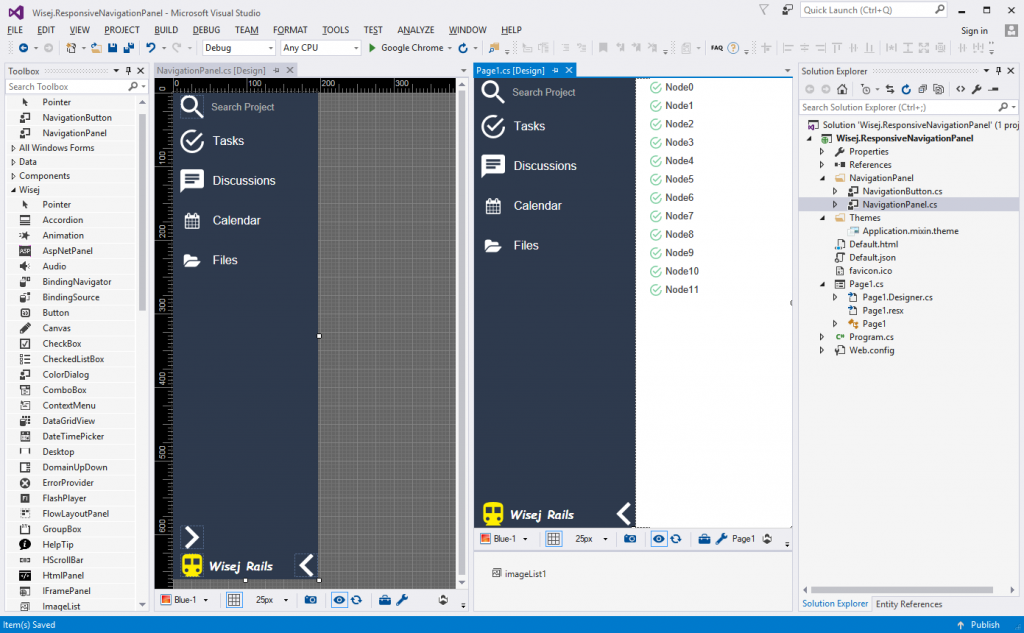
The panel on the left in your screenshot looks like a responsive navigation panel. It has to be designed and built, which is relatively simple with Wisej. I have attached a quick example to show how it can be done. There are many different approaches depending on how the application and developers using the panels interact with it.
Also notice the animation done through the transition property in the theme mixin.
This is a screenshot at design time:
Send it to gianluca [at] iceteagroup.com or support [at] iceteagroup.com.
Using 2 licenses is not the reason for the problem. However, you only need 1 server license on the server and can run unlimited applications.