

Thanks work perfect!!!
Hi all
sorry for reposting , but it is very important to us to know when there will be version with full RightToLeft support.
Thanks again
Regards
Orel
I still can’t select icon at design time(only from code), it’s normal ?
VS: 15.2.3
Wisej: 1.4.50 (then i try dev 1.4.54 but nothing)
Thanks for help
Yes, we can add an option as a feature request. I have also attached a javascript mixin that can patch the existing classes and override the __computeMoveCoordinates method. All movable widgets in Wisej use the qx.ui.core.MMovable mixin.
See attached my.MMovablePatch.js. Put it in /Platform as an embedded resource and uncomment the WisejResources attribute in AssemblyInfo.cs. If using VB.NET, rename the file to Platform.my.MMovablePath.js since VB.NET doesn’t use the folder to build the resource name.
This post as well as this one (https://wisej.com/support/question/desktop-taskbar-position) provide some internals and show how flexible the wisej/qooxdoo system is. The full source code of all the javascript classes we use is here: https://github.com/iceteagroup/wisej-qx
The data binder position is in sync with the SelectedIndex unless it’s -1. We can’t add an item 0 and make it act as -1, it would create too may potential problems.
You can also add a tool button to the ComboBox to set it to “null”, SelectedIndex = -1. See screenshot attached. Most controls in Wisej have the Tools property.
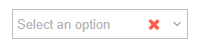
The Watermark text is shown when nothing is selected when the combo is editable.
Will add a feature request. Should be relatively easy to add. I have also attached a MyDesktop class with a javascript override of the built-in desktop class that adds a new TaskbarPosition property. You can add it to your project. If it’s C#, place the .js under /Platform as an embedded resource and uncomment the WisejResources attribute in AssemblyInfo.cs. In VB.NET rename the .js file to be Platform.my.Desktop.js.
Also, if you drop a docked (top,left,right or bottom) panel on the desktop, it will dock next to the workspace are, which basically lets you create custom panels similar to the taskbar.
Thank you for your reply.
With this solution it is not possible for the user to select null in the dropdown or am I missing something?
Hi Dino,
what kind of exception are you receiving ? NullReference ? Is it at runtime AND/OR at design time ?
Are you using a custom theme or a custom font ?
Thanks in advance !
Best regards
Frank
Hi Luca,
Thanks a lot for your kindly help, license problem solved using the latest Wisej development build (1.4.54)
When the ComboBox is DataBound you can set SelectedIndex to -1, make sure that the combobox1.FormattingEnable property is true.
I have just installed the latest Version. Bug doesn’t seem to be fixed, I can still reproduce it.
In fact, I have found another Bug: When you press and hold Tab in the TextBoxes, the Popups will eventually get stuck and not disappear.

In Chrome’s console there is a dropdown where you can enable/disable different logging level.
FF and IE have a similar selection. The javascript console recognizes: Info, Warning, Error, Debug, Log.
Hi Harald,
thanks ! We have logged that issues as WJ-8642 and already fixed it.
It will be included in the next Wisej release.
I´ll inform you when it´s available.
Best regards
Frank
Hi Corvin,
thanks for reporting that issue. It´s logged as WJ-8643, fixed and will be included in the next release.
Will inform you when it´s available.
Best regards
Frank
Thanks Edmond,
it´s a bug, logged as WJ-8633. We´ll inform you when a fix is available.
Best regards
Frank
See attached sample. There are 4 NumericUpDown. Two of then use the new appearance key “spinner-showfocus”. It shows the +/- only on focus. You can either create a new appearance in the theme mixin, or modify the original appearance “spinner” to change all spinners in the app.
The mixin sets the maxWidth of the buttons to 0 in the “default” state and resets it in the “focused” state.
You can also change the layout and make the +/- be vertically aligned. Use the Classic-2 theme or add the “buttonsLayout” property to the appearance under “default/properties”:
“properties”: {
“buttonsLayout”: “vertical”
}
If the buttons are vertical you need to use a smaller icon. It’s all in Classic-2.theme.
HTH
I didn’t understand if you want to see the +/- buttons?
I have attached a modified GoogleMaps sample. It shows two ways to do that. In general, with Wisej integrated widgets you can use any javascript api from the original widget. In this case this is the api for circles: https://developers.google.com/maps/documentation/javascript/examples/circle-simple
You can write javascript code that adds the circles and call it from Wisej, or you can add api methods to the Wisej widget either by modifying the google map extension or from your code. The sample app has a .js file that adds two methods to the google maps wisej widget: addTestCircles (copied from the api linked above) and a generic addCircle.
Using the sample, click the AddCircles button.
Remember that google maps (in general all third party javascript widgets) do not keep any state so if you refresh the page anything you set is lost and has to be reapplied.
this.googleMap1.Call("addTestCircles");

this.googleMap1.Call("addCircle", new {
 strokeColor = "#00FF00",
 strokeOpacity= 0.8,
 strokeWeight= 2,
 fillColor= "#00FF00",
 fillOpacity= 0.35,
 center= new { lat= 41.878, lng= -87.629 }, // Chicago
 radius= Math.Sqrt(2714856) * 100 // Population
 });
Hi Ben,
can you please retry with the latest Wisej development build (1.4.54) ?
Best regards
Frank
Hi Marian,
can you please retry with the latest Wisej dev build (1.4.54) that has just been uploaded ?
Thanks in advance.
Best regards
Frank