

Luca,
Thanks for showing how to use this!
One last item: Is there a way to switch the “BaseURL” in the Mixin using code?
I am trying to get to a point where the user has the option to switch the theme – and in doing so, they would also pick up a different set of icons.
Maybe there is some other technique to allow that functionality
Thanks in advance,
Mitch
Hi Luca
As the image shows the issue is when a node is selected the Arrow turns white.
I would have thought e.Node.ForeColor = System.Drawing.Color.FromName(“@windowText”); should set the Arrow icon as well.
How do I stop this happening for non leaf nodes?
What would mixin look like that didn’t change the foreground and background color when a node is selected?
The code below doesn’t work
“appearances”:
{
“tree-folder”: {
“text”: “Tree Node”,
“states:”: {
“selected”: {
“properties”: {
“textColor”: “windowText”
},
“styles”: {
“backgroundColor”: “highlightText”
}
}
}
}
}
With this I could simply set the background colour for leaf nodes
Thanks
Ewan
I just tried your mixin in a test project, I see the images in the designer and can also use them. You don’t have to set the appearance key. The image is the name of the image to set to ImageSource. See screens below.
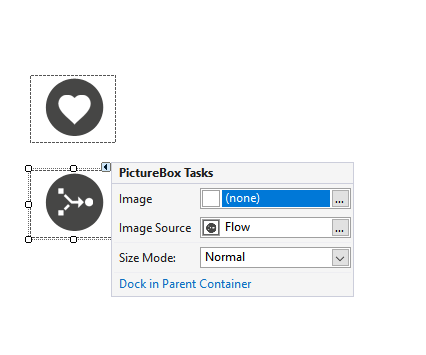
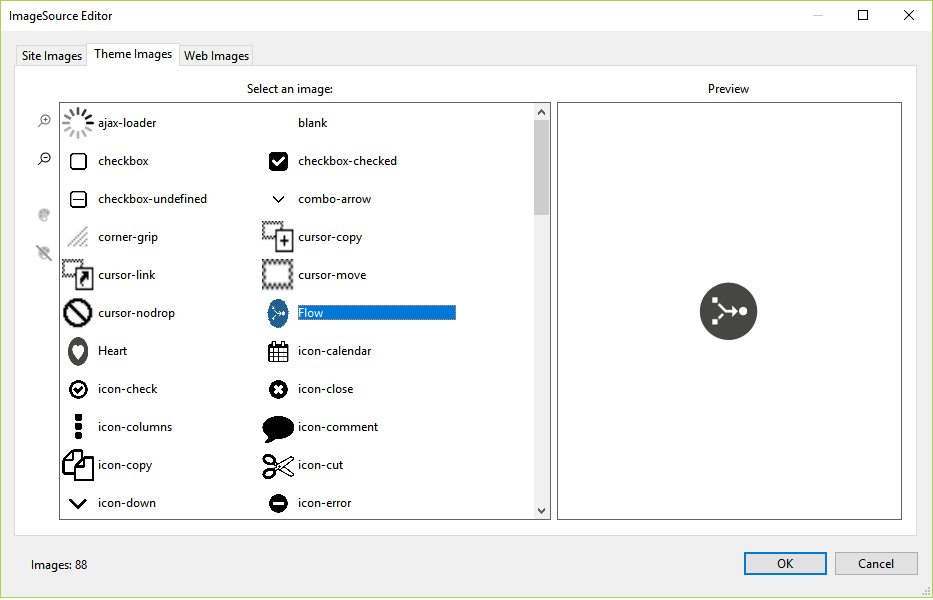
Hi Luca,
I tried you suggestion using a few combinations but was unable to get anything to work. Here is my Mixin theme:
{
“name”: “IMGs”,
“images”:
{
“baseUrl”: “https://files.hrtms.com/content/public/jdx_images/round_darkgray/”,
“Heart”: “_Heart.png”,
“Flow”: “_Flow.png”
}
}
I tried without ‘name’ but it still didn’t work.
When trying this on the background image of a form, I set the Appearance Key to the name in the mixin file, but this impacted the whole form.
If I set the ImageSource to the full URL it works fine.
Can you offer any suggestions?
Thanks
Mitch
You can use a Panel with AutoScroll = true. Add child panels using Dock = DockStyle.Top. See new video and code below.
https://www.screencast.com/t/XUAnWbeS
private void button1_Click(object sender, EventArgs e)
{
var p = new Panel() {
BorderStyle = BorderStyle.Solid,
Text = this.panel1.Controls.Count.ToString(),
ShowHeader = true,
Dock = DockStyle.Top
};
this.panel1.Controls.Add(p);
}
We have the AutoComplete property. Set it to off and it’s supposed to disable the autocomplete. I wrote “supposed” because it doesn’t work as it should (fixed in the current build). But you can also fix it with a simple workaround in your TextBox base class:
protected override OnWebRender(dynamic config) {
base.OnWebRender((object)config);
config.autoComplete = this.AutoComplete;
}
HTH
Can you send a small test app?
I don’t think I understood completely. If you only want to scroll vertically you should use a Panel with AutoScroll = true. You can decide if a new panel goes at the top or at the bottom using Controls.SetChildIndex().
The FlowPanel manages the flow layout. BottomUp starts at the lowest left-bottom corners and “stacks” the next control on top until it reaches the top, then it starts another column and restarts from the bottom, and it keeps growing horizontally.
See video:
The themes already support that, it’s the “baseUrl” property in the theme files. You could create a mixin “app-images.mixin.theme” and place the indirection in there:
{
“images”: {
“baseUrl”:”http://server/images/”,
“image1”: “something.png”,
}
}
Then ImageSource can simply be “image1”.
HTH
Where is files(0).InputStream coming from? If the stream is disposed or closed by the owner then you get an error, probably after the buffered data is read.
I was able to get it to stop jumping by telling it to includePromptsAndLiterals and it will stop the jumping.
Thanks -Tim
Pass the parameters on the URL line if they are not sensitive data. A few examples here:
https://wisej.com/support/question/url-arguments
Luca, I have read the docs regarding Mixin Themes, which from what I can tell, allow me to define appearances at design time. I understand that I can set the appearance key in the controls which will select a Mixin Theme. However, is it possible to create a dynamic mixin theme?
I am trying to replicate our form designer technology from VWG. In our tool today we allow the user to choose BorderStyle, BorderWidth and BorderColor (among other visual properties including color and font). There are many thousands of combinations of styles, width and color, so I don’t think I can pre-define all the possible combinations that may exist.
Is there a practical way to allow the user to choose some of these properties and then render the controls accordingly at run time?
Thanks
Mitch
Hello Luca,
sry for the german Version of the Exceptions, below you find the english version (Error 1).
Today I was able to solve it. I deleted some Controls and added them again. Tried the same yesterday without any Effects ?!
A snippet from the Document Outline
I deleted the last 3 Controls (TableLayoutPanel holding two DateTimePickers) and got Error 2 (haven’t got it yesterday … ):
Then restarted Visual Studio, rebuild hte Project and now its fine.
Is it possible that this is dependant on the Order I added/deleted the Controls?
Have saved the Version where Error 1 threw, if you want to take a look.
Both Errors occured only when opening the Designer, build/rebuild the Project was no Problem.
Best regards
Corvin
Error 2
To prevent possible data loss before loading the designer, the following errors must be resolved:
1 Error
Why am I seeing this page?
The given assembly name or codebase was invalid. (Exception from HRESULT: 0x80131047)
Instances of this error (1)
1. Hide Call Stack
at System.Reflection.RuntimeAssembly.GetType(RuntimeAssembly assembly, String name, Boolean throwOnError, Boolean ignoreCase, ObjectHandleOnStack type)
at System.Reflection.RuntimeAssembly.GetType(String name, Boolean throwOnError, Boolean ignoreCase)
at Microsoft.VisualStudio.Design.VSTypeResolutionService.AssemblyEntry.Search(String fullName, String typeName, Boolean ignoreTypeCase, Boolean allowPrivate, Assembly& assembly, String description)
at Microsoft.VisualStudio.Design.VSTypeResolutionService.AssemblyEntry.Search(String fullName, String typeName, Boolean ignoreTypeCase, Assembly& assembly, String description)
at Microsoft.VisualStudio.Design.VSTypeResolutionService.SearchProjectEntries(AssemblyName assemblyName, String typeName, Boolean ignoreTypeCase, Assembly& assembly)
at Microsoft.VisualStudio.Design.VSTypeResolutionService.SearchEntries(AssemblyName assemblyName, String typeName, Boolean ignoreCase, Assembly& assembly, ReferenceType refType)
at Microsoft.VisualStudio.Design.VSTypeResolutionService.GetType(String typeName, Boolean throwOnError, Boolean ignoreCase, ReferenceType refType)
at Microsoft.VisualStudio.Design.Serialization.CodeDom.AggregateTypeResolutionService.GetType(String name, Boolean throwOnError, Boolean ignoreCase)
at Microsoft.VisualStudio.Design.Serialization.CodeDom.AggregateTypeResolutionService.GetType(String name)
at System.ComponentModel.Design.Serialization.DesignerSerializationManager.GetRuntimeType(String typeName)
at System.ComponentModel.Design.Serialization.DesignerSerializationManager.GetType(String typeName)
at System.ComponentModel.Design.Serialization.DesignerSerializationManager.System.ComponentModel.Design.Serialization.IDesignerSerializationManager.GetType(String typeName)
at System.ComponentModel.Design.Serialization.TypeCodeDomSerializer.Deserialize(IDesignerSerializationManager manager, CodeTypeDeclaration declaration)
at System.ComponentModel.Design.Serialization.CodeDomDesignerLoader.PerformLoad(IDesignerSerializationManager manager)
at Microsoft.VisualStudio.Design.Serialization.CodeDom.VSCodeDomDesignerLoader.PerformLoad(IDesignerSerializationManager serializationManager)
at Microsoft.VisualStudio.Design.Serialization.CodeDom.VSCodeDomDesignerLoader.DeferredLoadHandler.Microsoft.VisualStudio.TextManager.Interop.IVsTextBufferDataEvents.OnLoadCompleted(Int32 fReload)Help with this error
Could not find an associated help topic for this error. Check Windows Forms Design-Time error list
Forum posts about this error
Search the MSDN Forums for posts related to this error
Error 1
To prevent possible data loss before loading the designer, the following errors must be resolved:
1 Error
Ignore and Continue
Why am I seeing this page?Index was outside the bounds of the array.
Instances of this error (3)
1. Hide Call Stack
at System.Windows.Forms.Layout.TableLayout.ApplyStyles(ContainerInfo containerInfo, Size proposedConstraints, Boolean measureOnly)
at System.Windows.Forms.Layout.TableLayout.LayoutCore(IArrangedElement container, LayoutEventArgs args)
at System.Windows.Forms.Layout.LayoutEngine.Layout(Object container, LayoutEventArgs layoutEventArgs)
at Wisej.Web.Layout.TableLayoutEngine.Layout(Object container, LayoutEventArgs layoutEventArgs)
at System.Windows.Forms.Control.OnLayout(LayoutEventArgs levent)
at System.Windows.Forms.ScrollableControl.OnLayout(LayoutEventArgs levent)
at Wisej.Base.ControlBase.OnLayout(LayoutEventArgs e)
at System.Windows.Forms.Control.PerformLayout(LayoutEventArgs args)
at System.Windows.Forms.Control.PerformLayout()
at Wisej.Base.ControlBase.PerformLayout()2. Hide Call Stack
at System.Windows.Forms.Layout.TableLayout.ApplyStyles(ContainerInfo containerInfo, Size proposedConstraints, Boolean measureOnly)
at System.Windows.Forms.Layout.TableLayout.LayoutCore(IArrangedElement container, LayoutEventArgs args)
at System.Windows.Forms.Layout.LayoutEngine.Layout(Object container, LayoutEventArgs layoutEventArgs)
at Wisej.Web.Layout.TableLayoutEngine.Layout(Object container, LayoutEventArgs layoutEventArgs)
at System.Windows.Forms.Control.OnLayout(LayoutEventArgs levent)
at System.Windows.Forms.ScrollableControl.OnLayout(LayoutEventArgs levent)
at Wisej.Base.ControlBase.OnLayout(LayoutEventArgs e)
at System.Windows.Forms.Control.PerformLayout(LayoutEventArgs args)
at System.Windows.Forms.Control.System.Windows.Forms.Layout.IArrangedElement.PerformLayout(IArrangedElement affectedElement, String affectedProperty)
at System.Windows.Forms.Control.OnResize(EventArgs e)
at System.Windows.Forms.Control.OnSizeChanged(EventArgs e)
at Wisej.Base.ControlBase.OnSizeChanged(EventArgs e)
at System.Windows.Forms.Control.UpdateBounds(Int32 x, Int32 y, Int32 width, Int32 height, Int32 clientWidth, Int32 clientHeight)
at System.Windows.Forms.Control.UpdateBounds(Int32 x, Int32 y, Int32 width, Int32 height)
at System.Windows.Forms.Control.SetBoundsCore(Int32 x, Int32 y, Int32 width, Int32 height, BoundsSpecified specified)
at Wisej.Web.Panel.SetBoundsCore(Int32 x, Int32 y, Int32 width, Int32 height, BoundsSpecified specified)
at Wisej.Web.Control.SetBoundsCore(Int32 x, Int32 y, Int32 width, Int32 height, BoundsSpecified specified)
at System.Windows.Forms.Control.System.Windows.Forms.Layout.IArrangedElement.SetBounds(Rectangle bounds, BoundsSpecified specified)
at System.Windows.Forms.Layout.TableLayout.SetElementBounds(ContainerInfo containerInfo, RectangleF displayRectF)
at System.Windows.Forms.Layout.TableLayout.LayoutCore(IArrangedElement container, LayoutEventArgs args)
at System.Windows.Forms.Layout.LayoutEngine.Layout(Object container, LayoutEventArgs layoutEventArgs)
at Wisej.Web.Layout.TableLayoutEngine.Layout(Object container, LayoutEventArgs layoutEventArgs)
at System.Windows.Forms.Control.OnLayout(LayoutEventArgs levent)
at System.Windows.Forms.ScrollableControl.OnLayout(LayoutEventArgs levent)
at Wisej.Base.ControlBase.OnLayout(LayoutEventArgs e)
at System.Windows.Forms.Control.PerformLayout(LayoutEventArgs args)
at System.Windows.Forms.Control.System.Windows.Forms.Layout.IArrangedElement.PerformLayout(IArrangedElement affectedElement, String affectedProperty)
at System.Windows.Forms.Control.OnResize(EventArgs e)
at System.Windows.Forms.Control.OnSizeChanged(EventArgs e)
at Wisej.Base.ControlBase.OnSizeChanged(EventArgs e)
at System.Windows.Forms.Control.UpdateBounds(Int32 x, Int32 y, Int32 width, Int32 height, Int32 clientWidth, Int32 clientHeight)
at System.Windows.Forms.Control.UpdateBounds(Int32 x, Int32 y, Int32 width, Int32 height)
at System.Windows.Forms.Control.SetBoundsCore(Int32 x, Int32 y, Int32 width, Int32 height, BoundsSpecified specified)
at Wisej.Web.Panel.SetBoundsCore(Int32 x, Int32 y, Int32 width, Int32 height, BoundsSpecified specified)
at Wisej.Web.Control.SetBoundsCore(Int32 x, Int32 y, Int32 width, Int32 height, BoundsSpecified specified)
at System.Windows.Forms.Control.System.Windows.Forms.Layout.IArrangedElement.SetBounds(Rectangle bounds, BoundsSpecified specified)
at System.Windows.Forms.Layout.DefaultLayout.xLayoutDockedControl(IArrangedElement element, Rectangle newElementBounds, Boolean measureOnly, Size& preferredSize, Rectangle& remainingBounds)
at System.Windows.Forms.Layout.DefaultLayout.LayoutDockedControls(IArrangedElement container, Boolean measureOnly)
at System.Windows.Forms.Layout.DefaultLayout.xLayout(IArrangedElement container, Boolean measureOnly, Size& preferredSize)
at System.Windows.Forms.Layout.DefaultLayout.LayoutCore(IArrangedElement container, LayoutEventArgs args)
at System.Windows.Forms.Layout.LayoutEngine.Layout(Object container, LayoutEventArgs layoutEventArgs)
at System.Windows.Forms.Control.OnLayout(LayoutEventArgs levent)
at System.Windows.Forms.ScrollableControl.OnLayout(LayoutEventArgs levent)
at Wisej.Base.ControlBase.OnLayout(LayoutEventArgs e)
at System.Windows.Forms.Control.PerformLayout(LayoutEventArgs args)
at System.Windows.Forms.Control.PerformLayout()
at System.Windows.Forms.Control.ResumeLayout(Boolean performLayout)
at Wisej.Base.ControlBase.ResumeLayout(Boolean performLayout)
at Wisej.Base.ControlBase.ResumeLayout()
at Wisej.Web.TabControl.ControlCollection.Add(Control control)
at Wisej.Web.Control.ControlCollection.Add(Control child)
at System.Windows.Forms.Design.ControlDesigner.DesignerControlCollection.Add(Control c)3. Hide Call Stack
at System.Windows.Forms.Layout.TableLayout.ApplyStyles(ContainerInfo containerInfo, Size proposedConstraints, Boolean measureOnly)
at System.Windows.Forms.Layout.TableLayout.LayoutCore(IArrangedElement container, LayoutEventArgs args)
at System.Windows.Forms.Layout.LayoutEngine.Layout(Object container, LayoutEventArgs layoutEventArgs)
at Wisej.Web.Layout.TableLayoutEngine.Layout(Object container, LayoutEventArgs layoutEventArgs)
at System.Windows.Forms.Control.OnLayout(LayoutEventArgs levent)
at System.Windows.Forms.ScrollableControl.OnLayout(LayoutEventArgs levent)
at Wisej.Base.ControlBase.OnLayout(LayoutEventArgs e)
at System.Windows.Forms.Control.PerformLayout(LayoutEventArgs args)
at System.Windows.Forms.Control.PerformLayout()
at System.Windows.Forms.Control.ResumeLayout(Boolean performLayout)
at System.Windows.Forms.Design.ControlCodeDomSerializer.Deserialize(IDesignerSerializationManager manager, Object codeObject)
at System.ComponentModel.Design.Serialization.TypeCodeDomSerializer.DeserializeName(IDesignerSerializationManager manager, String name, CodeStatementCollection statements)Help with this error
MSDN Help
Forum posts about this error
Search the MSDN Forums for posts related to this error
I need more info. Will contact you directly.
To use an extension all you need it to reference the assembly in your project.
However, the one you linked is not an extension. It was a sample app using a Wisej component to show how to interact with the local storage in the browser. I just tried that app and it works fine. To use it in your project you’d have to either copy the code (LocalStorage.cs + Platform/wisej.ext.LocalStorage.js) or convert the application into a library….
Which I have done for you. See attached. You can find the precompiled dll in /bin/Release. I have also attached the sample project modified to use the extension dll.
Could be related to this: https://wisej.com/support/question/datagridview-multiselect-not-working
What do you mean “every change of the current page”?
To navigate difference pages you only need to call page1.Show(), page2.Show(), etc. The last page (Wisej.Web.Page) shown will always be the main page (Application.MainPage). To create and show a page you can:
new Page10().Show();
No need to save it to the session. All top level windows and pages in Wisej are referenced respectively in Application.OpenForms and Application.OpenPages. You can use either a numeric indexer or the name of the page. If you use the name, the code above would be:
new Page10() {Name = “Page Ten”} .Show();
You can navigate back to Page10:
Application.OpenPages[“Page Ten”].Show();
HTH
The problem is that you are loading multiple versions of the jQuery library. They end up resetting each other.
When you load the highchart widget you load “https://ajax.googleapis.com/ajax/libs/jquery/1.12.0/jquery.min.js” using the name “jquery.min.js”, when the fullcalendar is loaded, it loads the embedded jquery-3.1.1.js using the name “jquery.js”.
Wisej uses the name and url to cache the preloaded library and avoid exactly this issue. However since “jquery.min.js” is different from “jquery.js” it ends up loading two. If you change the name of the jquery package to “jquery.js” Wisej will not load it again if it has already loaded a library named “jquery.js”.
I don’t know if the ReportViewer ASP.NET object can reach the toolbar. You can set the font in OnInit or OnLoad:
viewer.Font.Name = “Verdana”;
viewer.Font.Size = 30;
Or you can set the css class:
viewer.CssClass = “viewer-mystyle”;
To define the css simply use a css file and link it in default.html like a standard html page.