

No need to convert it. Wisej can use any third part javascript library as is. Use the Widget class to import the libraries and to create a Widget. Or use it in a IFramePanel. If you download the source code for one the simple extensions like the Panorama viewer you can see how to include a third party widget. It’s basically the same you’d have to do to include it in a plain html page.
Awesome extension!
thank you
Cristian
Hi,
Is it possible to change the wisej ajax loader? I would like it to be the same with the one in theme named “ajax-loader”.
Hi,
with Wisej 1.4.64.0 I had to add this code to MyDataGrid.cs so that the keys CTRL+C were recognized from the control.
protected override bool IsInputKey(Keys keyData)
{
if (keyData == (Keys.Control | Keys.C))
{
return false;
}
return base.IsInputKey(keyData);
}
Otherwise the override ProcessDialogKey was never executed.
Jens
The correct procedure would be to assign null to Application.Desktop and/or to dispose the main desktop:
Application.Desktop.Dispose();
Application.Desktop = null;
Application.MainPage = new Page() { BackColor = System.Drawing.Color.Red }; // test page
However, there is a bug and the new MainPage is not immediately visible because it’s created before the active desktop is updated on the client. It will be fixed in the next build. For now the workaround is to add:
Application.Navigate(“/”);
Which is also a good idea when logging out to let the client browser clear up its memory.
Hi Luca,
You wrongly understood the reason for the background process in my sample. It wasn’t intended to load the treeview, but to simulate a background long running process.
But no problem, your explanations and the modifications to the sample allowed me to solve partially the problem. It gives me a working solution, but I have to further investigate and test to develop the final optimal solution.
Your additional comments are more then welcome, even in the case it wouldn’t help me, which isn’t the case, it will help another guy from community.
I didn’t knew about the lazy mode.
Regarding the lazy load, I have the effect that a parent node without items underneath keeps the spinning when it get’s it’s triangle clicked.
I presume setting showloader=false for the clicked node solves this, but in the Buildtree I can’t find a reference to the clicked node. The selectednode is still the previous one.
Thanks for the lightning fast answer you gave to this previous post.
Regards.
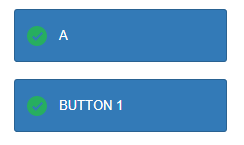
The internal button layout reproduces the winforms button layout. See https://wisej.com/support/question/bug-btn-imagealign
There are two grids with 9 positions corresponding to the layout position of the text and the image. Except for the Overlay option.
The grids adjust their size to the content proportionally. So when the text is longer it will use a larger grid. The size of the icon is set in the theme. The problem you are seeing is that the text side of the grid uses half of the button when the text is shorter than the button, which is the same in WinForms.
You can achieve what you are looking for, IIUC, see image below, but making the text portion longer. You can do that buy setting AllowHtml = true and use this text:
<div style=”width:500px; padding-left:10px”>BUTTON 1</div>
Hi Ewan,
thanks for your message. It´s not a bug though. You need to set TreeView.ShowTooltips to true.
It defaults to false, just like in WinForms.
Hope that helps.
Best regards
Frank
The first problem I see is System.Threading.Tasks.Task.Factory.StartNew. This starts a new thread but the new thread knows absolutely nothing about the wisej context so any update to the client is lost. The thread fires immediately onFinished() which ends up in BackgroundCompleted_Handler. The first line is MessageBox.Show() which exists immediately with code DialogResult.Abort because it’s run out of context (or out of bound).
The next call is Init_TreeView() which works but it cannot update the client because it’s being run from an independent thread without having restored the session.
Use Application.StartTask() instead. It starts the task within the session context. Use Application.Update(this) to push the update to the client. When the client is affected by a background thread there is no request/response so the server has to push the updates to the client, or you have to hit refresh on the browser.
Two more comments 🙂
See attached modified sample.
That’s correct. The docking order is the same as the control order in the Controls collection. Use uc.BringToFront() to move up the Fill control. The same applies to the Dock.Top and Left where they intersect and to the stack order.
Hi Cristian,
This is as designed since the client captures the mousedown to move the control. Click and MouseClick events should fire.
Best regards
Frank
Hi James,
the fix for WJ-8746 is included in our latest Wisej dev build (1.4.65) that has just been released.
Best regards
Frank
Hi Michelle,
we have added LowercaseUrl to default.json. When set to true, the URL will get rewritten to be always lowercase.
It´s logged as WJ-8757 and fixed in our latest dev build (1.4.65).
Best regards
Frank
Ok fixed it
You need to obtain the windows identity using
private Windows Identity WI = ApplicationBase.UserIdentity;
Then any calls to the ReportingService need to be made by impersonating the windows identity eg
using (WI.Impersonate())
{
LoadReports(trvReports.Nodes, “/”);
}
Where LoadReports populates a tree view using the Report Server catalog according to the user permissions
HTH
Ewan
Hi Robert,
this a generic issue with Safari, not specifically related to Wisej.
Find more information e.g. here:
https://stackoverflow.com/questions/20696041/window-openurl-blank-not-working-on-imac-safari
Best regards
Frank
Thank you – this solution works great!
Thank you.
Hi Robert,
I think the best way to store that information is using a cookie.
If you want to have a different behavior on the Desktop than on the Mobile you can use Application.Browser.Device to detect the device type.
Possible values are Desktop, Mobile, Tablet.
Hope that helps.
Best regards
Frank
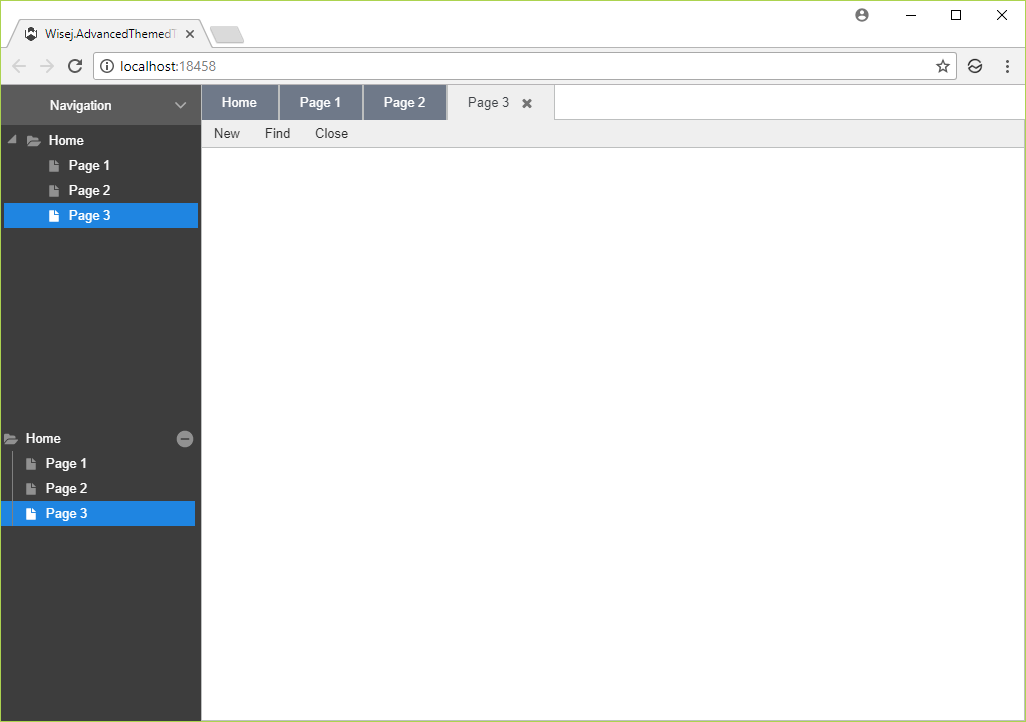
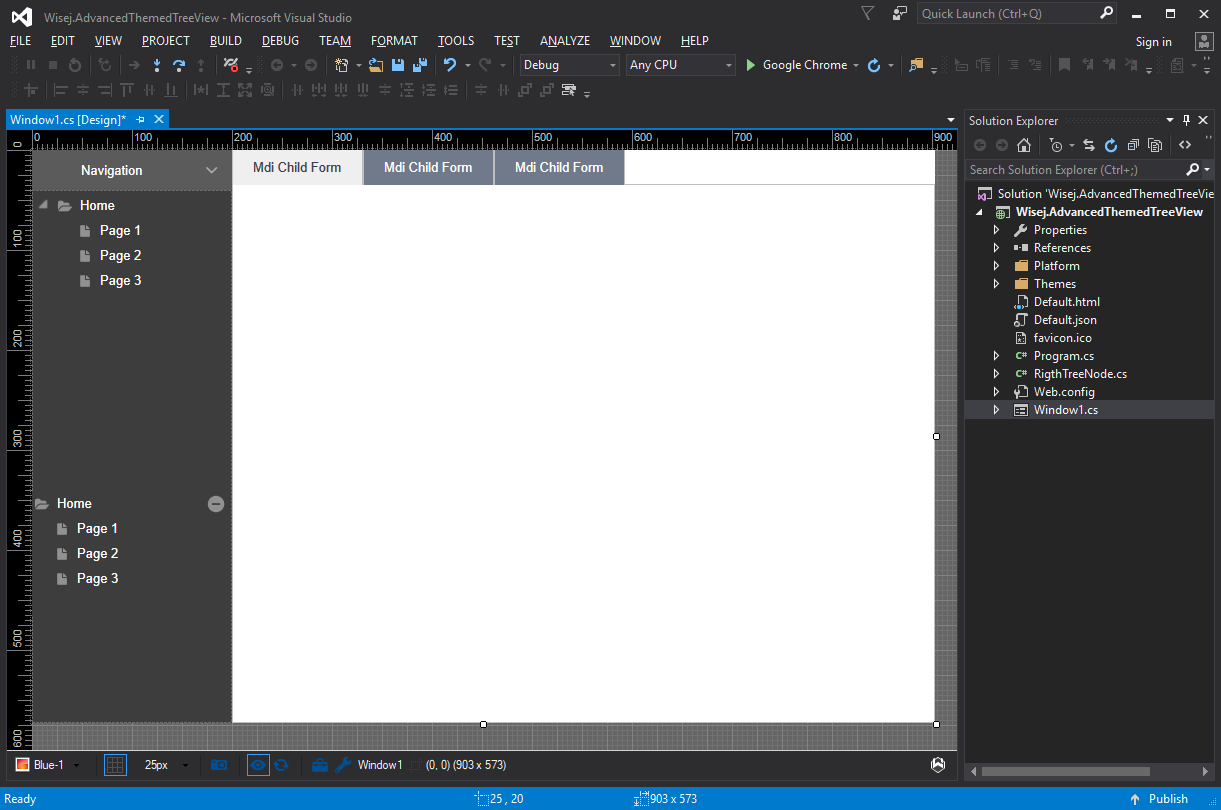
Here is a small sample. To move the mdi child menu to the tab button, select app.CustomTabbedMdi.js in the project and change it to “Embedded Resource”.
There are two tree views. One is the standard with some minor color settings. The other is also the standard tree but it uses the RightNode class that moves the open button to the right and adds the vertical line.
Runtime
Design
In this post it said that there was going to be a FilterPanel extension coming out at the end of January. Any update on this?
Thanks -Tim