

Hi Frank,
what details do you need?
Or if you want you can remote in and take a peek.
Alex
Andrew, Alex,
the missing appearance warnings are normal. There are always missing keys when a theme is resolved into css.
Starting with the next release, when debug mode is false, Wisej turns off all logging (except errors).
The missing images for Alex look like a deployment issue but it´s hard to tell without having more details or sample code.
Best regards
Frank
Just to weigh in, I have had these “missing appearance” warnings in Chrome for months now, but no “image could not be loaded” errors. I have assumed they are related to me customizing the theme, or possibly corrupting it somehow.
/resource.wx/Wisej.W…s?v=1.4.69.0:180267 002927 qx.theme.manager.Appearance[27-0]: Missing appearance: button/label
qx.js?v=1.4.69.0:180267 016610 qx.theme.manager.Appearance[27-0]: Missing appearance: button/label
qx.js?v=1.4.69.0:180267 016659 qx.theme.manager.Appearance[27-0]: Missing appearance: menu/item/label
qx.js?v=1.4.69.0:180267 016660 qx.theme.manager.Appearance[27-0]: Missing appearance: menu/item/label
qx.js?v=1.4.69.0:180267 016661 qx.theme.manager.Appearance[27-0]: Missing appearance: menu/item/label
qx.js?v=1.4.69.0:180267 016664 qx.theme.manager.Appearance[27-0]: Missing appearance: menu/item/label
Hi Luca,
if I inserti in to Default.html this script don’t run
http://www.4guysfromrolla.com/demos/OnBeforeUnloadDemo1.htm
why?
thanks
Cristian
It’s the same for both. It doesn’t get update in the theme builder right away, hit refresh and it will show the updated color.
You can’t stop the browser from unloading on the server. To attach to the unload event you can only use javascript. You can do that with Wisej like in any html page in a <script> tag or an included script.
On the server side there is the Application.ApplicationRefresh event which is fired when the application is reloaded. Browsers make no different between closing a tab, refreshing, or editing the URL.
Hi Frank,
ok no problem for the moment I don’t need this control, I wait next update
thanks
Cristian
Hi Cristian,
I remember seeing a similar issue in the past, but could not reproduce with the latest code base.
Will retest when we have the next release candidate build.
Best regards
Frank
Thanks Dino.
This issue is logged as WJ-8835 and a fix will be included in the next Wisej release.
I´ll inform you when it´s available.
Best regards
Frank
I’d suggest using CSS. Wisej controls are all html widgets. The custom painting is done using a background image. It’s meant for special cases, like a super custom control, complex information panels, etc.
Hi Andrew,
I´d rather draw on the TextBox instead of the window:
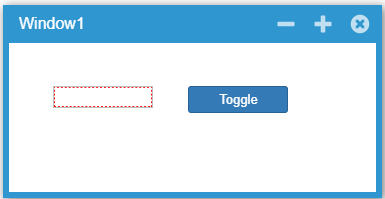
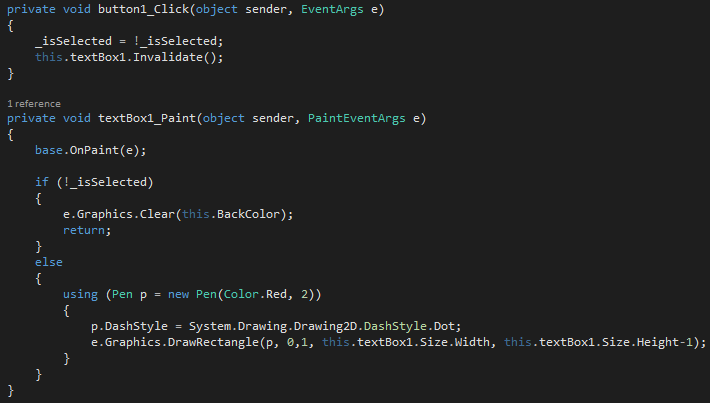
Hope that helps.
Best regards
Frank
Updated attachment.
Hi Rudy,
it´s a bit beyond the scope of Wisej but here´s a possible solution anyways:
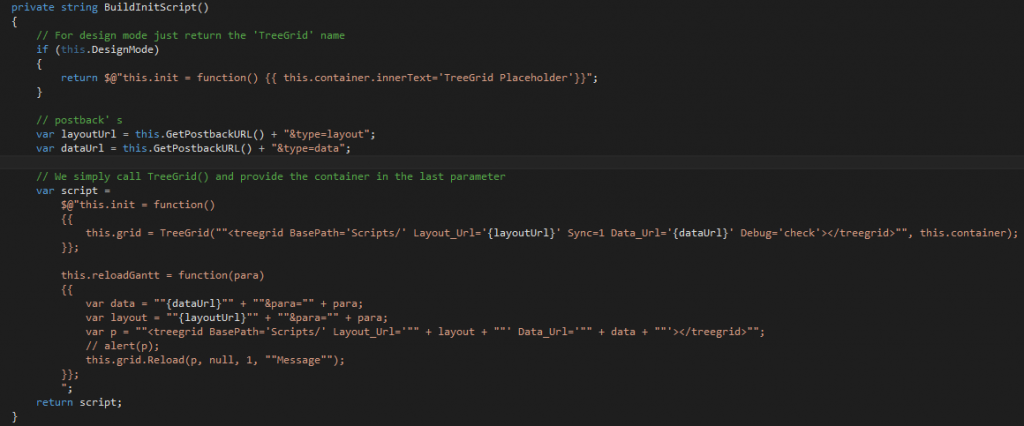
For simplification I turned the creation method of the TreeGrid into synchronously. (could also be solved with a callback)
Then you can acquire the grid handle and use it for the reload method.
Hope that helps.
Best regards
Frank
Probably related to the VB.NET compiler handling resources.
See here: https://wisej.com/support/question/allow-html-in-form-text
Hope that helps.
Best regards
Frank
Hi,
I’m try to convert it to extension, but I’m doing something wrong.
I have uncomment <Assembly: WisejResources>
I add the resources, I have verify with reflector and the file .js and .css are embedded
but for example the GetResourceString don’t read the resource
I’m doing something wrong.
can you help?
thanks
Cristian
So – for performance improvements and security reasons, is it advisable to disable the console outputs with the method suggested ?
At least on Production systems anyway.
Thanks Frank – that works perfectly.
Nic
Hi Frank,
thanks so much, I got the initial load working.
Just one other thing:
I added a reloadGantt() function that I trigger via a button in the page. The script seems to run correctly but it cannot find the ‘Reload’ function from the GridE.js package: http://www.treegrid.com/Doc/Create.htm#Reload . It comes up with an application error ‘Reload is not defined’.
Anything I have to declare additionally for the reload?
(project attached)
Best Regards
Rudy
Hi Rudy,
you´ve been pretty close. We have just applied a few modifications to your code to make it work:
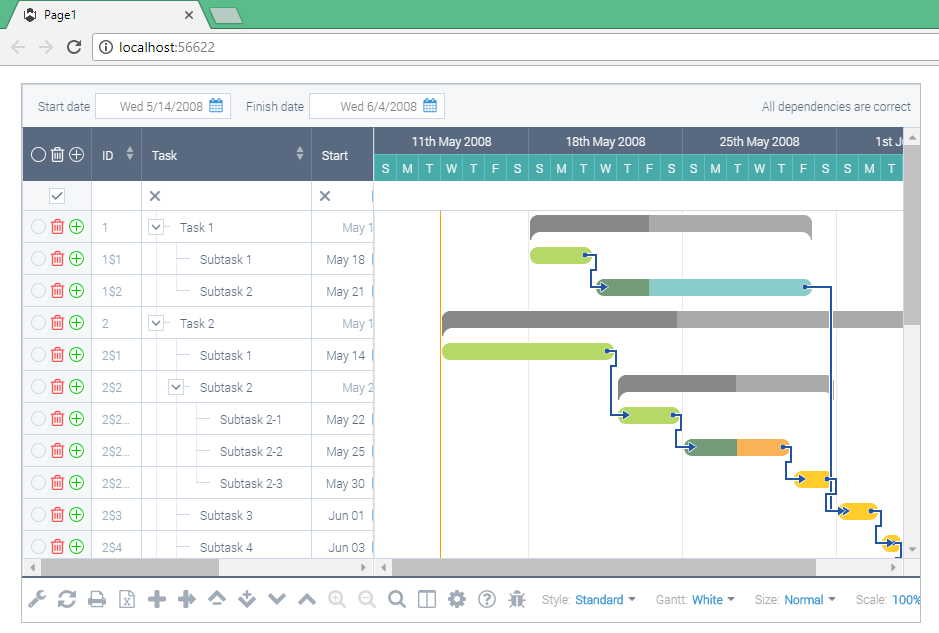
For GantWidget.cs we did the following:
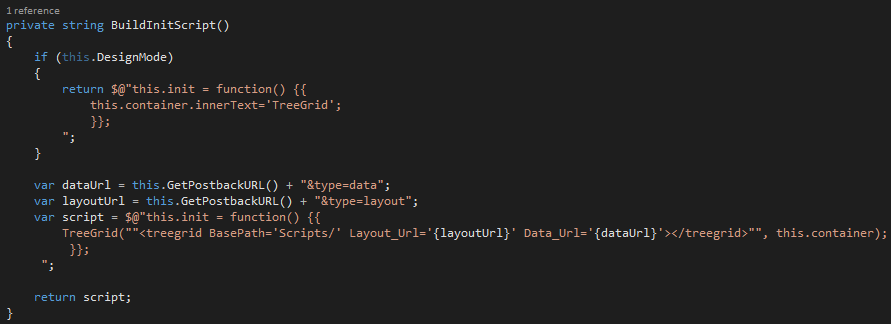
Here you can handle the WebRequest and provide whatever data you want (we took your sample data):
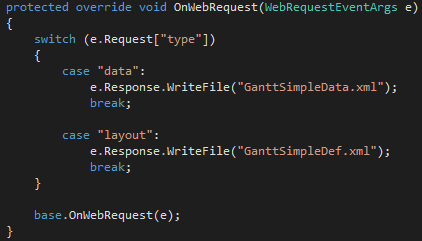
That´s it. Simple and straightforward integration with Wisej.
Best regards
Frank
Hi Nic,
this is actually quite easy and straightforward with Wisej. You can simply use the CSS property of the HtmlPanel and put some css code like this in it:
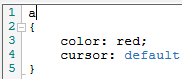
Color = red is just a test but cursor: default sets the default cursor for all <a> tags in your HtmlPanel.
Please note that Wisej ensures that this css setting is isolated and only applied to that specific HtmlPanel instance.
Find a simple example attached that has 2 HtmlPanels, one shows the default cursor, the other shows the hand cursor.
Hope that helps.
Best regards
Frank