

Hi Neil,
thanks for your message.
This bug is logged as WJ-8968 and already fixed.
It will be included in the next release.
See here: https://wisej.com/support/question/linq-error-with-version-1-4-95
Best regards
Frank
Wisej applications are ASP.NET applications. You can add any aspx page, or php or anything that the browser can load. All wisej needs is the browser to load the wisej.wx bootstrap script.
The Default.html (or Index.html, etc.) is loaded without being in the URL simply because it’s the defaultDocument in web.config. It could be anything. Otherwise you’d have to load it using http://myapp/Page1.html.
Additionally, Wisej registers a module that is able to load the page without the extension if it finds the .json file. For example, if you rename Default.html and Default.json to Admin.html and Admin.json (in the json also change the redirection to Admin.html) and you don’t change the default document, you can start Admin by using http://myapp/admin which is identical to http://myapp/admin.html.
Basically a Wisej project can run multiple wisej applications with multiple entry points.
I also tried with a sub folder, like http://myapp/test/admin but cannot reproduce the error. There must be a misconfiguration somewhere. In any case, you don’t need to create a sub directory for the html and json files.
If you still have the problem, please attach a small sample app.
Actually, I thought you were implementing a custom handler which need to be registered. But .ashx files don’t need to be registered. I just tried with a self hosted app and the sample ashx added by Visual Studio with Add->New Item->Generic Handler and it works without any registration in web.config with Wisej self hosting.
Actually, I thought you were implementing a custom handler which need to be registered. But .ashx files don’t need to be registered. I just tried with a self hosted app and the sample ashx added by Visual Studio with Add->New Item->Generic Handler and it works without any registration in web.config with Wisej self hosting.
You can set the gradient style in a css file and add it to Default.html like any css file. Looks like a class you can use is “.chartjs-render-monitor”. You can find out by inspecting the html with chrome and F12.
.chartjs-render-monitor {
background-color: red;
}
This will apply to all chartjs widgets.
The delay between the display of the element and the chart is normal. It has to receive the data. There may be ways to draw the chart after the data is received, but it requires changing the javascript initialization. The chartjs extension is open source so it can be modified and adapted to best fit the project.
The ashx handler is a good solution. See https://msdn.microsoft.com/en-us/library/bb398986.aspx. If you need our professional services we can support you with the specific requirements of your project. I believe Thomas offered to discuss licensing models. He can also discuss other options for training and support.
All handlers are supported. It also supports owin middleware modules. The handlers have to go in the classic pipeline section. https://msdn.microsoft.com/en-us/library/46c5ddfy.aspx see Classic Mode section. For owin middleware see https://www.scottbrady91.com/Katana/Creating-OWIN-Middleware-using-Microsoft-Katana
Hi Darren,
you have to set the pipeline mode to classic instead of integrated.
Should be a setting in your web.config.
Best regards
Frank
Luca,
These handlers don’t work when the app is self-hosted. Is this a bug or expected?
If expected, how do you implement the same functionality with self-host?
Thanks
Darren
Hi,
I have tried this with a small sample (attached) but could not reproduce.
After starting the test app I resized the first column using the mouse and then hit the button.
It works ok.
Can you please check if these are the correct steps and provide some test code and a detailed description
how to reproduce the problem ?
Thanks in advance.
Best regards
Frank
Hi Angelo,
please use the KeyDown event instead of the TextChanged event.
Hope that helps.
Best regards
Frank
Hi,
you can draw inside your textboxes etc. by attaching to the Paint event like you would do in Winforms.
Find some drawing code sample here:
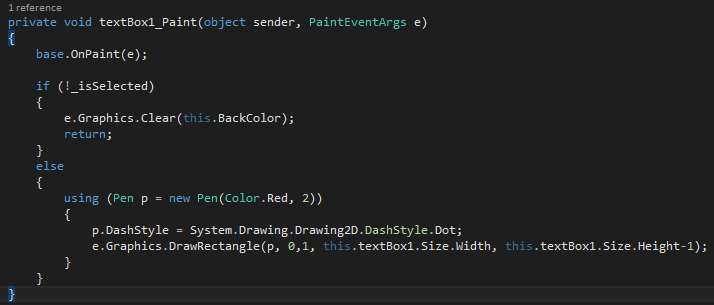
Hope that helps.
Best regards
Frank
We’re happy to announce that the Wisej Technology Partner program has just been released. It introduces…
In case you’re interested to learn more, please contact us at info@wisej.com.
Thanks
Thomas
It’s been some time since the last post and Wisej is evolving in big steps. With additional traction worldwide, we’ve added options to support different customer scenarios in a better way. Therefore we’re happy to announce that the Wisej Technology Partner program has just been released. It introduces…
In case you’re interested to learn more, please contact us at info@wisej.com.
Thanks
Thomas
It’s been some time since the last post and Wisej is evolving in big steps. I wanted to give you a brief update on licensing options.
We’re happy to announce that the Wisej Technology Partner program has just been released. It introduces…
In case you’re interested to learn more, please contact us at info@wisej.com.
Thanks
Thomas
It’s been some time since the last post and Wisej is evolving in big steps. One of these is that we are seeing a lot of traction worldwide and have now been adding a new licensing & support option that will provide additional assurance options. We’re happy to announce that the Wisej Technology Partner program has just been released. It introduces…
In case you’re interested to learn more, please contact us at info@wisej.com.
Thanks
Thomas
As a little update to your post:
We’re happy to announce that the Wisej Technology Partner program has just been released. It introduces…
In case you’re interested to learn more, please contact us at info@wisej.com.
Thanks
Thomas
It’s been some time since the last post and Wisej is evolving in big steps. I wanted to give you a brief update on licensing options.
We’re happy to announce that the Wisej Technology Partner program has just been released. It introduces…
In case you’re interested to learn more, please contact us at info@wisej.com.
Thanks
Thomas
Hi Darren,
that depends on your requirements and your application. We have just released the Technology Partner Program which introduces competitive deployment options starting at 29 USD per server/year. Licenses can be centrally managed and invoiced on a pay per use model.
Please contact me directly at info@wisej.com to work out a setup that meets your needs.
Thanks, Thomas
OK,
managed to find solution.
So there is option to add the separate Wisej Application to the same project. I have modev <app>.cs, <app>.json and <app>.html to a new folder. Renamed <app>.html to Default.html and Wisej app is now loading.
But look like there is issue with license (license is added to web.config) but i am getting the error – see attachment.
Regards,
DiNo