

Hi Kemal,
we currently only support frozen columns, not rows.
In any case “freezing” rows in a cell formatting event does not appear to make that much sense to me.
Best regards
Frank
Hi,
you can find a few options discussed here:
https://wisej.com/support/question/to-excel
Best regards
Frank
Hi Frank,
now it works correctly.
Tahnks
Thank you!
As for one (1) it is not exactly the way for me. My scenario: I select row – open custom editing form – do some editing – close editing form – reread grid content – navigate to row being selected and edited. And immediately after grid gets focus it sets the first row as selected (deselecting my being edited row). Why?
If i handle event of ENTER for the grid and select my row again in the best case I will got flickering of rows being selected and deselected. Grid should not decide by itself which row to be selected.
I need my being edited row to stay selected. Not just to clear all selections.
Best regards!
Mario
Hello Andrew, the latest trial expired last year. I have extended it to 6/30/2018. You can find your licenses in the /account page by logging in with your email.
Hi Harald,
please take a look at this blog that explains various ways to achieve this:

Sample code:

Hope that helps.
Best regards
Frank
Hi Angelo,
you need to cast the dataset to the appropriate Charttype. Then you can either set one color for all bars
or individual colors. See sample code here:
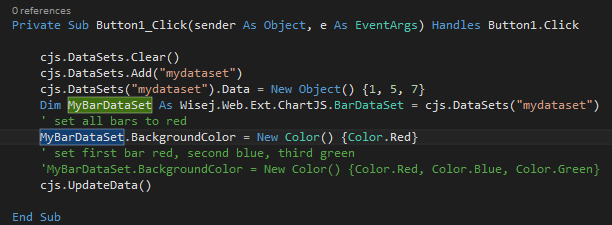
Best regards
Frank
Hi Angelo,
I`m contacting you by private mail to resolve this issue.
Best regards
Frank
Hi Sergio,
I can confirm this regression. It´s logged as WJ-8996.
I´ll inform you when it´s fixed.
Best regards
Frank
Hi,
Best regards
Frank
I noticed a regression in 1.4.95. AfterCheck always returns – TreeViewAction.Unknown
Should I do anything else in my code?
Where I can see full properties list and values in order to know how to set each property and value.
Thank you!
Thank you Luca – I will give this a try…
You can edit any of the theme, or simply add a mixin.theme file under the /Themes directory. Use this as an example. Name it Application.mixin.theme. It must be in /Themes.
{
 "name": "Application",

"colors": {
 "focusFrame": "red"
 },

"appearances": {
 "textbox": {
 "inherit": "textbox",
 "states": {
 "focused": {
 "styles": {
 "width": 3
 }
 }
 }
 },
 "button": {
 "inherit": "button",
 "states": {
 "focused": {
 "styles": {
 "width": 3
 }
 }
 }
 },
 "table-scroller/focus-indicator": {
 "states": {
 "default": {
 "styles": {
 "width": 3,
 "color": "focusFrame"
 }
 }
 }
 }
 }
}
Add the attached file as an embedded resource, it will replace wisej.web.PdfViewer.
What was the previous version?
Could be many handled exceptions (see in VS by enabling exceptions Debug->Exception Settings), check also the console (Chrome, F12). Set debug mode to true in Default.json and web.config. If you have a link we can look at send it to support@wisej.com.
We can also send you the latest dev build in case it’s caused by a regression.
In general the loader means that the server has not responded in time.
Thank you. It’s a weird issue, it happens only when there are other controls. Logged as WJ-8991, it’s fixed in the upcoming build.
Currently I am developing a new LOB application and need to say my words of praise, because the library is mature and stable and support is excellent.
Will warmly recommend enterprise people to give it a try.
I am very much interested in delivering fast results and do not want to spend any time dealing with implementation details of current JS frameworks.
With WiseJ everything (front and back) is well thought-through, works out-of-box, it takes all my pain away.
I have tried several LOB frameworks before (e.g. ExtJS, DotVVM) but was never satisfied about the front/back integration and the JavaScript debugging work efforts need to be done to put something working in place.
After having discovered WiseJ few months ago, happily stopped looking for any alternatives, because in the meanwhile I have already solved all my business problems with WiseJ.
Please consider your application needs. I have only few corporate users (data entry) with rather complex input forms with extended validation logic, cascading drop down lists, big master-detail tables (many columns and rows) , attachment uploads, DB concurrency checks.
WiseJ is perfectly scalable for complexity, e.g. 100’s of controls in one input form: labels, text boxes, combo boxes, grids, tabs, buttons, toolbars, …
WiseJ is most suitable for LOB applications, because I can develop a form in one day, no thrills.
Perhaps the app will not scale well for many simultaneous users, as it keeps per-user sessions on the server. I would use other frameworks for consuming-only popular public sites.
Kizaemon
Hi Luca,
Here’s the form in question … I reimplemented the “buggy” behavior and zipped … you should be able to drop this into a new app – you will need to mock the bound object, I have added the class used as a guide.
I hope this helps.
Cheers,
Neil