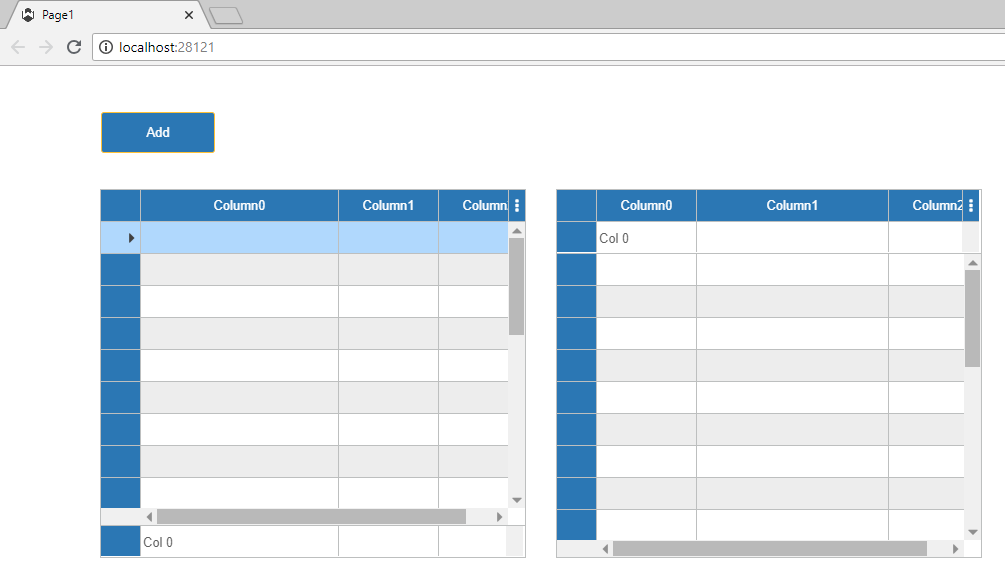
Hi Kevin,
Contact email sent. Thanks.
Hi Alex,
A TreeGrid sample was added to GitHub Wisej-Examples repository. Besides the data bound data table example, there is also an unbound example that uses POC objects.
It’s a paid add on: https://fullcalendar.io/docs/timeline-view and https://fullcalendar.io/scheduler/purchase
The timeline view is not supported in the free version.
I’d suggest an Azure free account: https://azure.microsoft.com/en-us/free/?v=18.23
There is a step by step post here: https://wisej.com/support/question/deploy-wisej-on-azure
But you can use any tutorial related to VS Web application publishing.
It needs ASP.NET support in full trust.
HTH
Hi Kevin,
Please have a look at 3. Rules for finding the .json file at GitHub as there was a small change in Wisej 1.5.4
Hi,
Thanks for your post. I tried as below and it looks all right.
Snippet
using System.ComponentModel;

namespace UIExtensions
{
    public class DataGridViewExt : Wisej.Web.DataGridView
    {
        public DataGridViewExt()
        {
            base.ShowColumnVisibilityMenu = false;
            base.AllowUserToResizeRows = false;
            base.AutoGenerateColumns = false;
        }

        [DefaultValue(false)]
        public new bool ShowColumnVisibilityMenu
        {
            set
            {
                base.ShowColumnVisibilityMenu = value;
                Invalidate();
            }
            get { return base.ShowColumnVisibilityMenu; }
        }

        [DefaultValue(false)]
        public new bool AllowUserToResizeRows
        {
            set
            {
                base.AllowUserToResizeRows = value;
                Invalidate();
            }
            get { return base.AllowUserToResizeRows; }
        }

        [DefaultValue(false)]
        public new bool AutoGenerateColumns
        {
            set
            {
                base.AutoGenerateColumns = value;
                Invalidate();
            }
            get { return base.AutoGenerateColumns; }
        }
    }
}
Hi,
you can modify the distance by Setting the margin property of your icon labels.
Best regards
Frank
You need to add a file system to the Roots property. Otherwise the file dialog would show your server’s content. You can have multiple roots, as simple as “C:\\” to anything you want to show to the user. The file system can be local, or can be a cloud drive like Amazon S3, OneDrive, GoogleDrive, or even a database. You can implement a custom file system by implementing the IFileSystemProvider interface.
We provide 2 so far, the default one is the file system and Amazon S3 (with full source code) here: https://github.com/iceteagroup/wisej-extensions/tree/master/Wisej.FileSystem.AmazonS3.
Simple sample:
using (var openFile = new OpenFileDialog())
{
openFile.Roots.Add(new FileSystemProvider(“C:\\UserFiles\\User1”, “My Files”));
openFile.ShowDialog();
}
Notice that in this way you can show different directories to different users and still use the name “My Files” for all. The File name will “My Files\\…”. You will have to map it to the root using openFile.FileSystem which returns the file system that corresponds to the file picked by the user.
Wisej is operating in a shared environment and it needs to be able to separate resources by user.
Hi Luca,
Yes, using
treeView.Nodes.Clear();
treeView.ExpandAll();
before load nodes works as intended.
Is it will be corrected in nest release ?
Regards.
Unfortunately yes, it’s a regression in Nodes.Clear() it makes the parent node’s property IsExpanded false, which is correct. Before calling Nodes.Clear() on an expanded node it left the property IsExpanded true. But… it also collapses the root node, the bug. You can simply do this as a workaround (as you have found out):
treeView.Nodes.Clear();
treeView.ExpandAll(); // doesn’t have to be after adding nodes.
Currently the mixin cannot remove the inheritance of child components (will add an enhancement request). But you can create a new appearance “my-radiobutton”, for example, and copy the states from a theme then override. This gives you total control. You can then change the AppearanceKey of your RadioButton class. If you override the AppearanceKey property, add [DefaultValue(“my-button”)] to prevent the new from being serialized.
If your image is using the SVG format you will need to specify a size since most SVGs are designed in a scalable much larger canvas, usually larger than 254×254, and Wisej changes their canvas size to match the size of the target element (cannot be the other way around other it would be a circular reference).
A bit more in depth about properties and Visual Studio designer serialization:
private bool ShouldSerializeShowHeader()
{
    return this._showHeaderCount > 3; // just to make it weird.
}

private void ResetShowHeader()
{
    this._showHeaderCount = 0;
}

* The accessor can be private, protected or public. Makes no different to VS, it will still use these methods because the pattern is in System.ComponentModel. For property extenders, simply add the Control target argument.
EOM, HTH
Hi Sergio,
please find related question and solution here:
https://wisej.com/support/question/override-application-invalidsession-error-message
Best regards
Frank
To share my findings.
Decorating with MetadataType attribute does not yield the expected behavior.
Shadowing properties seem to work well. I am not sure if call to Invalidate() is required.
I will go for shadowing the properties.
using System;
using Wisej.Web;
using System.ComponentModel;
using System.ComponentModel.DataAnnotations;

namespace UI.Controls
{
    [MetadataType(typeof(DataGridViewExtMetaData))]
    public partial class DataGridViewExt
        : Wisej.Web.DataGridView
    {
        public DataGridViewExt()
        {
            this.AllowUserToResizeRows = false;
            this.AutoGenerateColumns = false;
        }

        // works
        [DefaultValue(false)]
        public new bool AutoGenerateColumns {
            set { base.AutoGenerateColumns = value; Invalidate(); }
            get { return base.AutoGenerateColumns; }
        }
    }

    public class DataGridViewExtMetaData
    {
        // does not work
        [DefaultValue(false)]
        public bool AllowUserToResizeRows { get; set; }
    }
}
Hi,
For anyone else facing this issue, the following run from a cmd prompt (as admin.) worked for me on my home network:
CheckNetIsolation LoopbackExempt -a -n=Microsoft.MicrosoftEdge_8wekyb3d8bbwe
Hi Sergio,
with Wisej release 1.5.4 we have added Appearance “Switch” to checkboxes.
Best regards
Frank
Hi Neil,
issue WJ-9036 is fixed in the latest Wisej release (1.5.4).
Best regards
Frank
Hi Edmond,
WJ-9034 is now fixed in the latest Wisej release (1.5.4).
Best regards
Frank
Hi Saul,
WJ-9020 is fixed in the latest Wisej release (1.5.4).
Best regards
Frank
Handling scroll events on the server is never a good idea. They are fine as information, but I wouldn’t do it as part of a widget functionality.
See attached sample. It shows a few things:
HTH