

.OImageList.Images.Add(System.Drawing.Image.FromFile(Wisej.Base.ApplicationBase.StartupPath & “…/Resources/Images/01Base_Valuti24.png”))
This code works. It is a platform problem.
Best regards!
Mario
Hi Guadalupe,
Following Wisej release 1.5.12, the ComponentMixin example at GitHub repository was updated with ListBox item theming.
Hi Sergio,
WJ-9134 is fixed in Wisej build 1.5.12.
Best regards
Frank
Hi Edmond,
WJ-9133 is fixed in the latest Wisej build (1.5.12)
Best regards
Frank
Hi Kizaemon,
the fix for WJ-9131 is included in Wisej build 1.5.12
Best regards
Frank
Hi Matthew,
WJ-9126 is fixed in our latest Wisej dev build (1.5.12).
Best regards
Frank
Hi Eric,
the fix for WJ-9123 is included in our latest Wisej dev build (1.5.12).
Best regards
Frank
Hi Cristian,
it´s fixed in Wisej build 1.5.12.
Best regards
Frank
Hi Nic,
The extension source code was published and is available at Wisej-Extensions repository at GitHub.
The updated examle was also published and is available at Wisej-Examples repository at GitHub.
Thanks again for your collaboration.
Hi Guadalupe,
I attach back your sample fixed. Luca pointed out what was wrong. As referred previously in this thread, please have a look at the mixin example at GitHub as it documents the steps needed to make a mixin.
Hi Luca,
Yes exactly that.
The example is perfect, showing all needed Colspan and indentation possibilities and also different cell filling through either control or Html.
It highlights the power and flexibility of the product.
Thanks.
Hello!
I am currently trying to reply the example of the component mixin here show, but I have not been successful.
I would like to know what I am doing wrong, thanks.
Adjunct my sample.
Hi there,
You’ll see the colour changes if you refresh the page.
There’s a workaround as follows:
private void dataGridView1_CellDoubleClick(object sender, DataGridViewCellEventArgs e)
{
byte j;
for(j=0;j<dataGridView1.ColumnCount;j++)
{
dataGridView1.Rows[e.RowIndex].Cells[j].Style.ForeColor = System.Drawing.Color.Red;
}
}
The client clipboard is not transferred to the server automatically – browsers don’t let javascript read the content of the clipboard.
It would have to be done when pressing Ctrl-C in an editable field. Wisej does it for the DataGridView depending on the value of DGV.ClipboardCopyMode. Doesn’t do it for the TextBox because it doesn’t receive the key events by default. If you enable (handle) KeyPress then you can handle Ctrl-C and copy the value of textBox1.SelectedText to the server side clipboard.
HTH
Could be the file format or browser version. Wisej simply uses the HTML5 audio tag. See https://stackoverflow.com/questions/24881807/html5-audio-on-safari-ios.
Hi,
Can reproduce. Logged as WJ-9134.
Something like this?
There are 3 different indentation for the content row, comments in code.
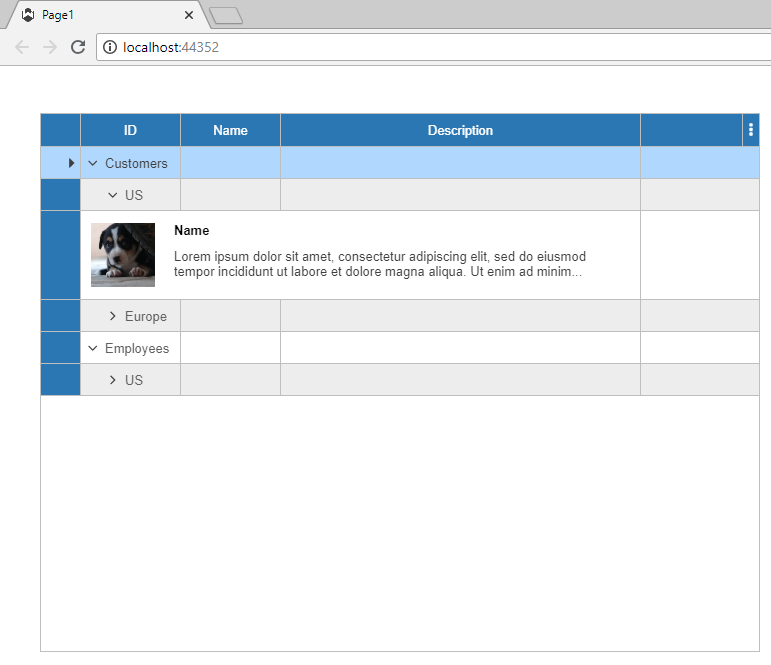
Hi Edmond,
thanks for putting together that sample. It helped us to reproduce the problem.
It´s logged as WJ-9133 and a fix will be included in the next Wisej release.
Best regards
Frank
Test case attached
Hi Kizaemon,
thanks for reporting this. I have logged it as WJ-9131.
We´ll inform you when it´s fixed.
Best regards
Frank