

Hi Roni,
As you can confirm at Support => Current Issues this is a known issue logged as #1578 DataGridView Application Error “isEditing”. It’s fixed and will be on our next public build.
Hi,
As you can confirm at Support => Current Issues this was logged as #1578 DataGridView Application Error “isEditing”. It’s fixed and will be on our next public build.
Hi Ricardo,
I tryed the the sample you published and clicking on a day works smoothly in Chrome, Firefox, Opera, Edge and of course, Internet Explorer. So I guess this must be about IE configurations. Please attach screen shots of Internet Options, namely the Advanced tab. Concerning Security tab, I thnik there is no need to send screen shots of the concerned zones, provided you are using the Default Level (menaing the Default Level button is grayed).
Hello again Tiago,
Yesterday i tryed the fullcalendar control in another pc, and got the same error.
A i’ve made a small teste project and put it online, so i wonder if you can try it in ie11 to see if you get the same error.
http://azisq20165332.cloudapp.net/wisej/
I’m still evaluating the trial version, but beside this “little problem”, i’m really liking this product!
Thanks.
Hi Johann,
Image rotation is handled on the browser side as you can see at https://github.com/iceteagroup/wisej-extensions/blob/master/Wisej.Web.Ext.BingWallpaper/Platform/BingWallpaper.js
If you comment the following lines, no image are shown
line 93 this.__setNextImage();
and
line 218 me.__setNextImage();
Please try the application deployed on IIS 8.5 (on production server Win 2012) on a browser on your own computer.
Thank you Tiago for you fast response,
I used the fullcalendar example, downloaded from GitHub, and it was pretty straight forward with compile and run (iis express).
As i said before, no event assotiated with the calendar control worked without getting that error, but i will try it in another set up and i’ll came back with the feed-back
Hi Ricardo,
I did try this example in Firefox, Chrome and IE11 (Compatibility View off).
On all 3 browser makes, I only found an issue when extending the duration of all day events (see attached screen shot), So I can’t reproduce the Application Error you report. Please provide the reproduction steps or even a small clip showing exactly how you get this error.
Hi Johann,
What are the exact issues you find on your browser?
Hello,
it’s ok i manage to solve the issue for pages/windows
example windows:
Public iID As String
Private Sub Button2_Click(sender As Object, e As EventArgs) Handles Button2.Click
Dim window2 As New Window2
iID = me.textbox1.text
window2.TextBox5.Text = iID
window2.ShowDialog()
End Sub
example pages:
Public iID As String
Private Sub Button2_Click(sender As Object, e As EventArgs) Handles Button2.Click
Dim page2 As New Page2
iID = Me.TextBox1.Text
page2.TextBox2.Text = iID
Application.MainPage = page2
End Sub
regards,
bjorn
Hi Ahmad,
can you please provide us with a test case ? What version of Wisej are you using ?
Best regards
Frank
Collapse the row after having added the child rows.
Don’t need to set IsParent = true when assigning child rows. That flag makes a row look like a parent row when it doesn’t have any child row loaded and lets you implement lazy loading: add child rows when the row is expanded.
You can use either Collapse() or CollapseAll() to collapse also child parent rows.
Hi Guadalupe,
Please confirm you are referring to the same feature Orel Gabay mentions on the thread Accordion panels dock position
This feature is logged as Add option to AccordionPanel to fill and leave a gap at the bottom but with no estimated date of delivery.
Hi Christian,
NuGet packages are published only for (production) releases and 1.5.17 is a development build.
Hi Tiago,
the debug mode was already enabled in default.json, and the error was same:
Cannot read property ‘isEditing’ of undefined
in Wisej.Base.ApplicationBase.ProcessCallbackWebEvent(WisejEventArgs e)
in Wisej.Base.ApplicationBase.OnWebEvent(WisejEventArgs e)
in Wisej.Web.Application.OnWebEvent(WisejEventArgs e)
in Wisej.Base.ApplicationBase.Wisej.Core.IWisejComponent.Event(WisejEventArgs e)
in Wisej.Core.ComponentManager.DispatchEvents(Session session, ICollection events)
in CallSite.Target(Closure , CallSite , ComponentManager , Session , Object )
in Wisej.Core.ResponseManager.<>c__DisplayClass27_0.b__0()
in Wisej.Core.IWisejSynchronizedImplementation.Lock(IWisejSynchronized target, Action action)
in Wisej.Core.ResponseManager.OnEvent(Session session, Object message)
in CallSite.Target(Closure , CallSite , ResponseManager , Session , Object )
in Wisej.Core.ResponseManager.ProcessRequest(ServiceType service, Object message)
Attaching some image of error by chrome inspection.
Row color is not change for 1.5.16
foreach (DataGridViewRow row in dataGridView1.Rows)
if (Convert.ToString(row.Cells[1].Value) == “C”)
{
row.DefaultCellStyle.ForeColor = System.Drawing.Color.Red;
}
else
{
row.DefaultCellStyle.BackColor = System.Drawing.Color.GreenYellow;
}
dataGridView1.Update();
Application.Update(this);
Hi Guadalupe,
What version of Wisej are you running?
Hi Tiago,
The ReadOnly appearance that I can see is equal to the Enable state. I attach a picture.
Hi,
Please add “debug”:true in default.json You will get a stack trace in the message and send it to us.
Hi Guadalupe,
Please confirm that running the example you can see the ReadOnly appearance is equal to the Disabled state, as you can see in the attached picture. The difference is that the disabled state doesn’t allow sellection while ReadOnly state does allow selection.
Concerning Mixin editing, please refer to EditMixins. You should change styles and properties for state readonly.
Hi Edmond,
we checked again and it can be achieved by using the drop state that will be available to ListView items with the next Wisej build.
Then you can add a theme mixin and use virtually any highlight option.
In this sample I am highlighting the left border in red:
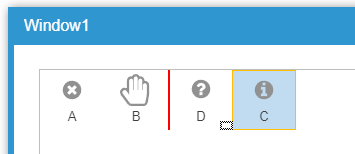
The drop state is available for any widget that you can drop onto, e.g. also DataGridView cells etc.
Since it´s themeable there is almost no limit to what can be done here.
Will notify you when the new Wisej build will be available.
Best regards
Frank