

Hi Ricardo,
It makes sense but I’m not sure it can be done. Will get back to you about this.
Hi Tiago,
Just another thought…
I can “protect” the calendar with a transparent panel over it “trick”, but that takes away all the interaction with the callendar. One event that could really be disabled is the drag-drop built-in event, since it make visual changes that are not intended (nor objective)
Hi Tiago,
I found a case when this problem appears every time.
It appears when set ‘AutoSizeColumnsMode = DataGridViewAutoSizeColumnsMode.ColumnHeader‘ with ‘ShowColumnVisibilityMenu = false‘.
I tell you because I don’t know if you test this case and if it will be fixed in the next release.
Hi Tiago,
when the v1.5.21 will be released?
See image.
Set the height of the DGV to contain the desired number of rows + header height.
Yes. In three different ways:
Didn’t change. The ButtonPosition property is not related to the parent container, it’s sets the position of the upload button relative to the file name field. I just tried the different positions and they all work. To show the Upload control at the bottom of the container you need to set the docking or anchoring or location. Can you attach a reproducible app showing the code you are using?
Re-tested using Wisej 1.5.21 and it doesn’t show.
Hi Andrew,
Please send a sample so we can analyze the issue.
Sorry,
ClassName does Work!
Hi Tiago,
i use the prerealese v1.5.19, and that error appears when I click on button 1 then 2 and so on, the error appears immediately or a couple of clicks later.
Of course Tiago, should have written Windows Phone 10. 🙂
Joe,
I am using a programmer license on my pc and the server license on an azure server. The point is that I have more than one development machine where I would like to have access to Wesej projects. Can I use the same license key at all? Is there any limit to this?
Thanks.
Rnogueira.
Hi Andrew,
Please confirm you are running Safari on a Macintosh system.
Hi Andrew,
Digging a bit further, it turns out that by design, native context menu is supported only in a small number of controls, mainly the ones where you can copy & paste:
All of these show the native (browser’s) context menu except for the ComboBox. So I can’t reproduce the problem you mention with TextBox.
Please ignore the previous logged issue I referred.
The issue #1595 ComboBox doesn’t show Native context menu was created and is already fixed in our internal build. It will be part of the next public release.
Hi Andrew,
EnableNativeContextMenu works in lots of controls but it doesn’t show on a small number of controls like Page, Panel, ComboBox and a few others.
Logged as #1593 Native Context Menu doesn’t show on some controls
EnableNativeContextMenu does not work for me in 1.5.19. I’ve tried setting it on a form itself, a google map, an htmlpanel, and a regular panel. None of them work.
Hi Luca
In which case, what is the best way to get the DGV to display X rows before showing a scroll bar?
What is the best way to get the DGV to auto resize dependant on the number of rows? (if there is less than x)
Thanks
Ewan
Hi Edmond,
you can use a theme mixin to fully customize your message box:
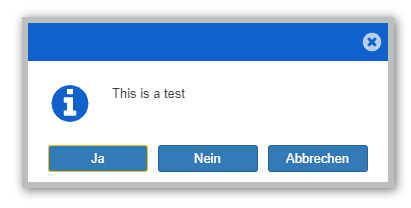
Sample mixin:
{
	"appearances": {
		"messagebox/buttonsPane/button": {
			"inherit": "button",
			"states": {
				"default": {
					"properties": {
						"padding": [ 5, 8, 5, 8 ],
						"width": 100
					}
				}
			}
		}
	}
}

Best regards,
Frank