

I have installed ver 2.0.1 and now i dont get error up on closing windows but couple of new issues found. 1) Duplicate project templates 2) Error in ribbon design (see pics).
I have also notice VB project template folder missing “j” in name “Wise 2” (before update it was wisej 2) unlike C# project template folder name.
VB template web.config issue still not fixed!
Hi Filippo,
can´t reproduce the problem with disappearing filters when sorting a column.
Could you please share an example ?
Thanks in advance,
Frank
Hi Sergio,
thanks, this is issue should be the same that is now fixed in the latest beta build.
You should receive the download link by mail shortly.
Best regards
Frank
Browser console issue details on attached image
Hi on wisej 2 beta, everytime I close any form shows an error message for a microseconds and then the page reload (attached image)
– “this platform is undefined”
Im on win10 pro and vs2017. Everything is ok on version 1.3.6.
I just open the default WebDesktopApp and try to run immediately without making any changes to proj or code and after a bit of waiting I got this error. (see stack trace img). This same issue on all default project templates. (I am using VB.NET)
Server Error in ‘/’ Application.
Could not load file or assembly ‘Wisej.Core’ or one of its dependencies. The system cannot find the file specified.
Hi Hitesh,
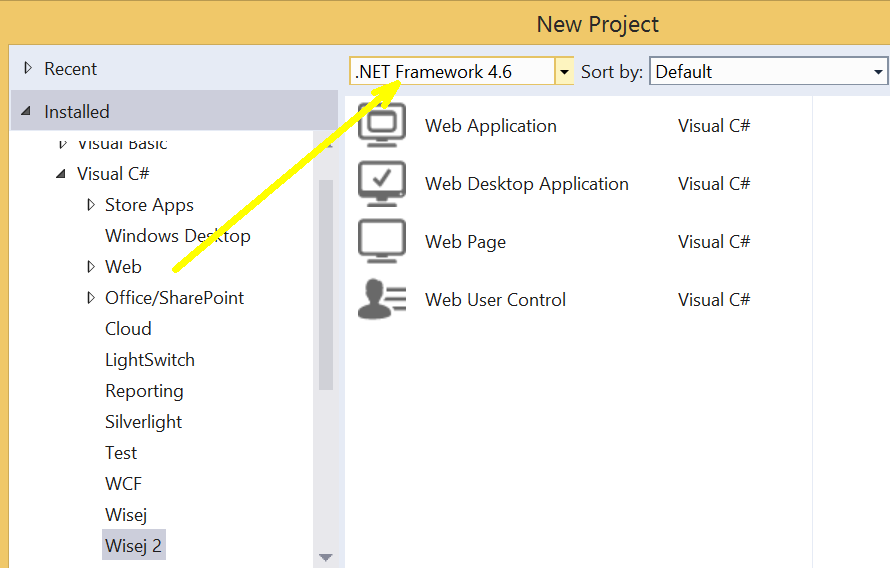
Wisej 2.0 (and its templates) require .NET framework 4.6.
You can dowload the targeting pack for Visual Studio 2013 here:
https://www.microsoft.com/en-us/download/details.aspx?id=48136
(and also install the .NET framework 4.6. itself if you don´t have it already).
Then you need to make sure to select the correct framework when the template files are listed:
Best regards
Frank
Even after running devenv /installvstemplates from an elevated VS command prompt, templates options are not appearing. Not sure this templates are supported on VS2013 version.
Please let me add a couple of hints to avoid some problems with the beta:
For more information please refer to the readme file and chapter 10 in the what´s new doc.
Hope that helps.
If you still encounter problems with the beta please don´t hesitate to contact us.
Best regards
Frank
I think I found the reason for the drag&drop problem. First I tried to drag&drop a v1.5.x Wisej control to a Wisej 2 form. Then this error occured. After that it seems it is not possible to use even Wisej 2 controls any more.
With a v1.5 Wisej control the references WiseJ.Core and WiseJ.Web are added to the project which cause the problem. After deleting them everything seems to be ok again…
Hi all,
i made some other adjustment to my work on Wisej.Web.Ext.FullCalendar.
I tested options like “eventDurationEditable” and “eventStartEditable” to make events of FullCalendar like “readOnly” (no event resize, no event move).
I also noted in my master working project that use Wisej.Web.Ext.FullCalendar with other Widget cause some problem. To make new fullCalendar in startup.js there is something like this:
this.calendar = new $.fullCalendar.Calendar($(this.container), options);
The problem is that some time $.fullCalendar is undefined, it’s happen when another Widget is used.
I solved this replacing “$.fullCalendar” with function offered by embedded js “JavaScript/fullcalendar-3.9.0.js -> FullCalendar()..” and the problem seems to be gone.
Hi Tung,
this should have been resolved with 1.5.16 already. Sorry for not informing you about it.
Have you retried with the latest build ?
Best regards
Frank
Hello,
Any update on this ticket? If not, is there any work-around?
Thanks
Looks like they have a plug in for that:
https://ckeditor.com/cke4/addon/uploadimage
You can add plugins to the CKEditor.ExternalPlugins property: https://wisej.com/docs/html/N_Wisej_Web_Ext_CKEditor.htm
For the server side upload handler you have to follow their documentation and examples.
HTH
Hi Julian,
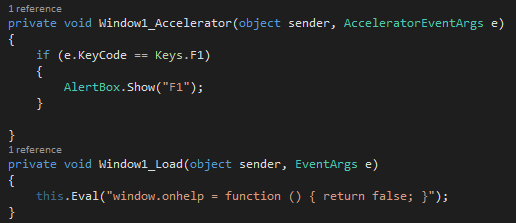
I just tried the following and it seems to do the trick.
Does need some more testing though and maybe only remove the onhelp handler for IE:
Hope that helps.
Best regards
Frank
Hi Ricardo,
do you mean something like that?
Snippet
grid.Rows[0][0].Control = new UserControl1();
While UserControl1 can be any Control, also a Panel.
Here https://wisej.com/support/question/datagridview-cell-merge
you can find an example.
Best,
Jens<
Hi Simone,
#1669 is fixed in Wisej release (1.5.36).
Best regards
Frank
Hi Ulisses,
this should be finally fixed in our latest release (1.5.36).
Best regards
Frank