

Hi Simone,
the textColor has to be set on the upload control, not on the child component
since the Upload container overrides it, because it´s the one that receives the color from the app:
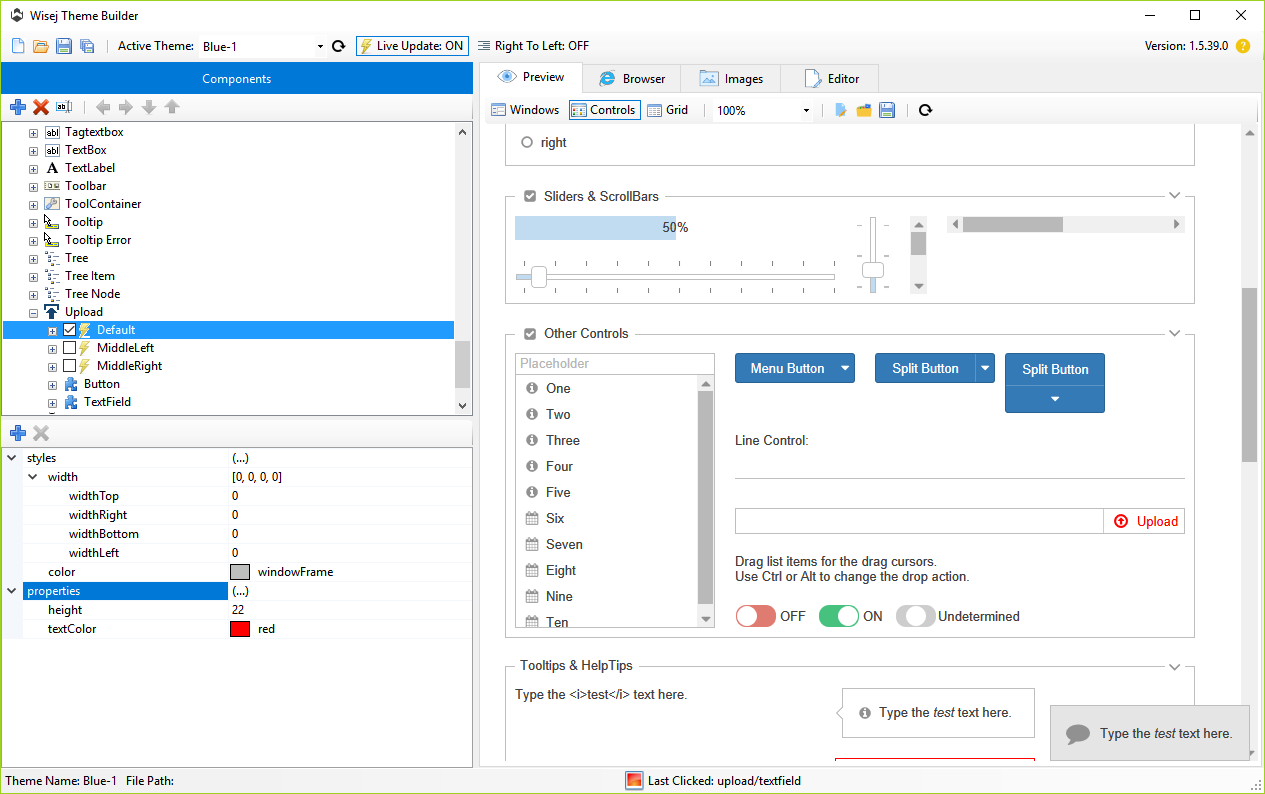
The missing states are logged as #1715 and will be fixed in the next build.
Please note that it does not mean that the widget does not support it, it´s just a suggestion.
You can basically type any any state. It´s up to the js implementation and states can also be added by code at any time.
Best regards
Frank
Hi Arturo,
the link uses 1.5.38 ? Works for me.
What browser do you use ? Do you get any error in the console ?
Best regards
Frank
sorry for kept you waiting , i’ve used the source code on the official documentation i hope is ok if i used this
thanks
hi, thanks for the quick answer, i created an example with the same page as my main so this is the same method i’ve used there, but i can’t find website code with ui-grid, but if you want you can check the website : http://ui-grid.info/
I continue till i find a working website with ui-grid or i create a website, but it will take a while, sorry for not finding a good html source
Please attach
1. the wisej integration project that you tried and
2. a working html project using the Angular JS ui-grid that works
We can try to help.
Thanks Luca,
Lazy loading sounds interesting too. I’m not sure I have 500,000 nodes but I have enough that loading them on demand would be very beneficial.
Look forward to the sample and the fix.
Thanks again
Nic
Looks like a regression. I will updated you when logged and fixed.
It’s probably timing out.
There is a bug with the VirtualScrolling and selection. It’s fixed and will be in the next dev or release build. I tried with half a million nodes using VirtualScroling and LazyLoading and it works very well now. In general, LazyLoading lets you populate nodes when they are expanded the first time. Virtual scrolling limits the rendering to the visible area of the control.
Wisej already sends to the client only the nodes that are made visible (the parent has been expanded) but when everything has to be rendered it becomes too heavy for the browser unless virtual scrolling is used. I’ll upload a sample here that shows the differences, that’s the one I used to test the 500,000 nodes.
You may find that this is the Winform browser control – its very old. Many javascript based sites will not work in this control. In a similar situation we switched to the Chromium embedded browser which is up to date and resolved all our issues. There are several commercial offerings and open source using CEF.
HTH
Nic
Hello,
I’m trying to display a Wisej Application from a WINFORM containing a standard VStudio WebBrowser component.
The Winform is displaying “Sorry, this browser is not supported”
The winform has been developped on Win10 VS2015 and VS2017, but both are showing the same error.
I tried adding <meta http-equiv=”X-UA-Compatible” content=”IE=11″ /> to the Wisej App default.html without success.
Changing the underlying internet explorer browser setting (through a separate IE instance) doesn’t solve it.
All suggestions are welcome.
Thanks.
Will log. You can also move an item to top or bottom of the list using right click Bring to Front or Send to Back.
You can use it at runtime. It’s just a way to call a method that returns a collection. In Wisej you can bind to any collection or use any ORM, including ER5 and ER6.
Padding in the button or padding in the cell to increase the space around the button?
If you are using the DataGridViewButtonColumn you can set the Padding in the column.DefaultCellStyle. It applies to all the cells. Or you can set the Padding of each cell’s Style.
If you want to increase the space around the button, it’s a theme property since the buttons on DataGridViewButtonColumn are not actually button controls. Cells are rendered as HTML content. Try with the Theme Builder, you can set the margin property and reduce the height of the buttons usnig “calc(100% – 10px)”, if the margins are 5.
Wisej uses (must use, you can’t make an unsecure ajax request from a secure page) the protocol used to load the page. If the page is https then the data loads and all ajax requests are https. The websocket requests also become wss.
You can also enforce a wisej app to always use https by setting “secure”: true in default.json.
Hi John,
this is currently not possible. You have to select an item first before dragging it.
I have logged an enhancement request to automatically select an item on DragStart (#1705).
Best regards
Frank
Hi Tobias,
actually the problem is different. The themes are created in c:\users\<user>\documents\Wisej\Themes
when you first open the ThemeBuilder and they are not present.
Please let me know if that fails for you.
We just noticed a problem with the Blue-2 Theme and this one will be fixed in the next build.
Regards
Frank
Hi Tobias,
this problem will be fixed with the next build, thanks.
In the meantime please download the theme files “manually”.
Best regards
Frank
Hi Edmond,
please try starting the installer directly, choose repair and check Visual Studio 2015 and Visual Studio 2017.
Best regards
Frank
Firefox supports Brotli on HTTPS only: https://www.mozilla.org/en-US/firefox/44.0/releasenotes/
This is how it works in Wisej 2 once you add the Brotli assembly:
How to check?
For HTTP just look at the network using dev tools, and if it shows “br” in accept encoding then look at the size of the response with and without the brotli assembly.
For WebSocket you need to look at the “frames”. In Chrome use F12, in the Network make sure WS is selected, then click on the app.wx initial request, you should see “Frames”, select it and you should see all outgoing and incoming websocket messages. The compressed ones show as [Binary Frame]. Look at the size with and without the Brotli dll.
We tested by creating 2000 buttons. The response was 1.2M without compression, 35K with Gzip and 15K with Brotli.
HTH
Hi Hitesh,
minimized windows don´t go anywhere, they are just hidden.
In your application you can handle the WindowStateChanged event and decide how to represent minimized windows.
There aren´t any limits to how an app can manage those minimized windows.
Wisej already provides the Desktop view with a built in taskbar. The desktop control can also be used as a child of a page
to restrict the floating window management.
You can find a sample of a custom implementation here:
http://wisej.s3.amazonaws.com/support/attachments/Wisej.CustomMinimizedWindowsTray.zip
Please use it as a guideline as there are virtually infinites ways to implement it.
Best regards
Frank