

Hi Diwakar,
Sorry for the late reply.
You´re talking about app.config settings. What about web.config ? Or are you referring to this ?
What Wisej version have you been using before 1.5.41 ?
Any chance to provide a test case of your environment and send it to frankATiceteagroup.com ?
Thanks in advance.
Best regards
Frank
Hi,
I found ResponsiveProfileChangedEventArgs is now under “Wisej.Web” and it works ok, thank you for your inputs. Also the ‘Application’ object is now part of the ‘Wisej.Web’ namespace but I could not find ‘RestoreSession‘ method in ‘Application’ object and hence not sure if there is any work around to restore the session in the new Wisej 2.0:
Usage example:
Wisej.Web.Application.RestoreSession(HttpContext.Current);
Does this method exist or any work around? Your help is much appreciated.
Best regards,
Diwakar
Added the enhancement #1728.
Use Application instead of ApplicationBase. See section 10 in the Wisej-WhatsNew-2.0.pdf installed with Wisej 2.
Hi Vishal,
there are a couple of points that prevent your sample from working:
A different approach to having Wisej bundle the resources can be to included it in default.html with simple html <include src …. directives
Finally you could also use the JavaScript extender and reference your JavaScript file there.
Hope that helps.
Best regards
Frank
Dear Team,
I have tried first case with resources adding, but its not working.
I have attached the project here.
Please let me know where is the issue.
Thanking you,
P Vishal
Hi Mariano,
thanks for sharing the sample.
I could reproduce with Chrome and logged issue #1729 for it.
As a temporary workaround you could use:

Best regards
Frank
Thanks Frank for your suggest.
I saw the discussion, but as I wrote, every attempt to set up padding did not work.
Probably I wrong some thing, but I do not understand where.
I am attaching a small example for greater clarity on what I have done.
Ttank you in advance
Hi Gabriel,
thanks for your interest in Wisej 2 and the NavigationBar.
The sample and the blog article that explains it are still in the works.
We hope to have it done and published in a few days.
Best regards
Frank
Hi Frank,
Here is the sample attached, some more info:
Now i test with some browsers, on Explorer and Opera was ok but on Chrome (my only test on previous post) the problem appear.
Chrome 71.0.3578.98 tested with Hardware Acceleration on & off
Thanks,
Mariano
Hi Angelo,
you might want to refer to this discussion and the solution that Luca suggested:
https://wisej.com/support/question/datagridview-buttoncolumn-question
Hope that helps.
Best regards
Frank
Hi Hakik,
you can activate on a machine with full access to internet and the programData directory and copy
the license file to the server when you copy your project files there.
Hope that helps.
Best regards
Frank
Hi Mariano,
can you please attach the sample or send it to frankATiceteagroup.com ?
Thanks in advance.
Best regards
Frank
Hi Vishal,
there are a couple of options in Wisej.
Here are a few:
Please refer to https://wisej.com/docs/html/JavaScript.htm
Then you can either attach to the server side click event and call your code on the client:

Or use the JavaScript extender (drop it on the container of your button) and edit the JavaScriptEvents property:
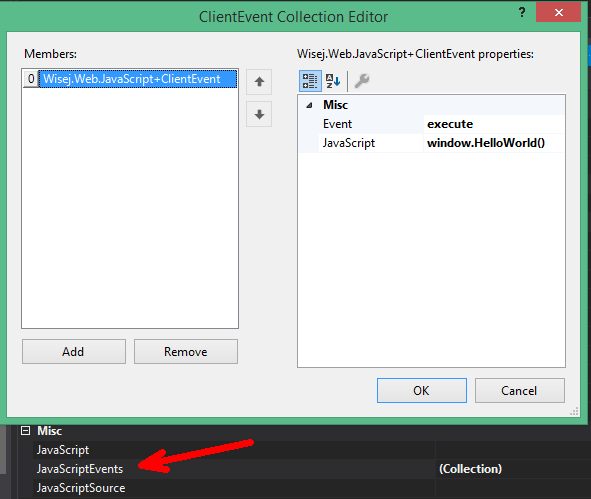
Please note that our upcoming Wisej 2 release does not need the JavaScript extender for this anymore.
All components have those 3 javascript properties by default allowing a very tight and easy integration
of server and client code.
Hope that helps.
Best regards
Frank
Hi Andrew,
Maybe using Nancy is an option for you ?
See Luca´s answer here:
https://wisej.com/support/question/some-advice-to-have-restful-service-in-wisej
Hope that helps.
Best regards
Frank
Hi,
you need at least IE 10 to use a Wisej application.
Best regards
Frank
Hi Preecha,
could not reproduce. Are you maybe using the 1.5 template to create the new window ?
Can you please make sure to use the 2.0 template instead ?
If that´s not the case, any chance to send the code ? You can send it to frankATiceteagroup.com
Thanks in advance.
Best regards
Frank
Hi Edmundo,
can you please share a sample or some test code so we can reproduce it ?
Thanks in advance.
Best regards
Frank
Just saw you were able to reproduce it. If you have virtual scroll set to true then the error happens. I have attached an example with the find button.