

Hi Nic,
thanks for reporting this. I am not sure if it´s related to the 2.0 installation.
At least I could not yet find anything causing that behavior.
In any case you can check
C:\users\<your user>\Documents\Visual Studio 2012|2013|2015|2017\ Templates
and see if the templates are on your harddisk.
If they are you can run devenv /installvstemplates from an elevated VS command prompt.
If they are missing, you can download them here (for 1.5):
http://wisej.s3.amazonaws.com/downloads/Templates/1_5/CSharpTemplates.zip
http://wisej.s3.amazonaws.com/downloads/Templates/1_5/VBNetTemplates.zip
Best regards
Frank
Hi Frank,
The problem is not to disable it, is that also if we set loaderTimeout to 1000ms the loader is showed after 5000ms (default value). So the value in the json is completely ignored.
We wait for fix.
Thank you!
Hi Simone,
it´s a bug. As a workaround set it to a high number if you want to disable it.
We´ll inform you when it´s fixed.
Best regards
Frank
Hi Bernard,
yes, there are several ways to achieve this. One is to handle the CellClick event
which carries the RowIndex in its EventArgs.
Then you could iterate through the columns of your DataGridview and concatenate them to a string.
Simple code sample:
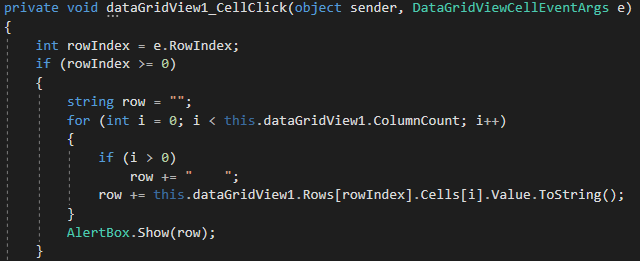
Hope that answers your question.
Best regards
Frank
Hi Frank,
I have found the problem, solved!!! The file web.config
I realized that the problems were many more, for example it did not stop at the messagebox.
OLD web.config
<modules>
<add name=”Wisej” type=”Wisej.Core.HttpModule, Wisej.Core”/>
</modules>
<handlers>
<add name=”json” verb=”*” path=”*.json” type=”System.Web.HttpForbiddenHandler”/>
<add name=”wisej” verb=”*” path=”*.wx” type=”Wisej.Core.HttpHandler, Wisej.Core”/>
</handlers>
NEW web.config
<modules>
<add name=”Wisej” type=”Wisej.Core.HttpModule, Wisej.Framework”/>
</modules>
<handlers>
<add name=”json” verb=”*” path=”*.json” type=”System.Web.HttpForbiddenHandler” />
<add name=”wisej” verb=”*” path=”*.wx” type=”Wisej.Core.HttpHandler, Wisej.Framework”/>
</handlers>
when we migrate a project we need to edit web.config file
regards
Cristian
Hi Frank,
your are right, with the old project migrated from 1.5.x to wisej 2.x I have the problem, but if I do a new wisj2 project there is no problem.
I’m investigating, the project is large
thank you
Cristian
Hi Christian,
where is Application.StartupPath empty for you ? In 1.5. or 2.0 ?
Can´t reproduce here.
Can you please share a code snippet how you use it, when and where it is working and where it fails ?
Thanks in advance.
Best regards
Frank
UPDATE
Hi Frank.
I have uninstalled wisej and reinstalled. Now there is it!
reagards
Cristian
Hi Cristian,
the best way to configure your Client Profiles is with a ClientProfiles.Json file (see sample attached).
I just noticed, that it seems to be missing from the documentation. We´ll add it.
Hope that helps.
Best regards
Frank
Thank you Frank
you forgot the attachments, please upload it 🙂
Hi Frank,
did you have a express suggestions for use push notifications in wisej pwa for mobile?
Hi Ewan,
the behavior in WinForms is the same.
If you don´t want to handle a click when it´s actually a double click,
check e.Clicks. If it´s >1 it´s a double click.
See: https://www.codeproject.com/Questions/441087/how-to-restrict-to-fire-datagridviewRowHeaderMouse
Best regards
Frank
Hi Cristian,
if your server and client support websockets there is no special action required for Wisej to support push updates.
Any change on the server is automatically pushed to the client and vice versa.
Just make sure not to explicitly turn off web sockets in your default.json (see enableWebSocket setting, default is true).
If you are starting a task on the server you need to call Application.Update(this) after it´s done to push any changes of it.
Please note that if you´re running on http you can also emulate push updates by using the pollingInterval setting in default. json.
Find more information here: https://wisej.com/docs/1.5/html/Configuration.htm
Hope that helps.
Best regards
Frank
Hi Edmond,
I just contacted you by private mail to resolve that issue.
Best regards
Frank
I changed the tooltip message on the button and the message changes in the odd places – it’s definitely coming from the button’s tool tip. See screenshots.
Server is running 1.5.43 – Visual studio is the same.
Hi Edmond,
we could reproduce on our side. It´s logged as #1781.
Thanks,
Frank
Thanks Edmond.
Using a zoom level > 100% is the missing key and we could now reproduce.
It´s logged as #1780. We´ll inform you when a fix is available.
Best regards
Frank
I figured out what is causing this.
I’m using Chrome -see screenshots. If the Zoom level of the browser is not 100% these messageboxes do not render the text correctly
Possibly this is a bug
We use ClosedXML, it also supports Excel Report Templates – its probably more stable on servers and most likely faster.
It’s in a few of our WiseJ applications and we have seen no issues at all.
https://github.com/ClosedXML/ClosedXML
What can you do with this?
ClosedXML allows you to create Excel files without the Excel application. The typical example is creating Excel reports on a web server.
Check out the Extension for Excel reports:
https://github.com/ClosedXML/ClosedXML.Report
ClosedXML.Report is a tool for report generation and data analysis in .NET applications through the use of Microsoft Excel. It is a .NET-library for report generation Microsoft Excel without requiring Excel to be installed on the machine that’s running the code. With ClosedXML.Report, you can easily export any data from your .NET classes to Excel using the XLSX-template.
Hi Angelo,
looks like a security issue.
You might want to check out this discussion at StackOverflow:
Best regards
Frank