

This appears to be fixed in 1.5.49 (first issue). Haven’t confirmed that the 2nd issue is fixed yet. Thank you.
Hi Simone,
issue #1786 is also fixed in both 1.5.49 and 2.0.12
Best regards
Frank
Hi Cristian,
issue #1788 is fixed in 1.5.49 and 2.0.12
Best regards
Frank
Hi Simone,
it´s fixed in 1.5.49 and 2.0.12
Best regards
Frank
Hi Wilfred,
issue #1794 is fixed in 1.5.49 and 2.0.12.
Best regards
Frank
Hi Pavel,
thanks. It turned out to be a problem with the theme mixin.
It´s fixed in GitHub, please update the ribbon bar extension from there.
Best regards
Frank
I think I got the answer,
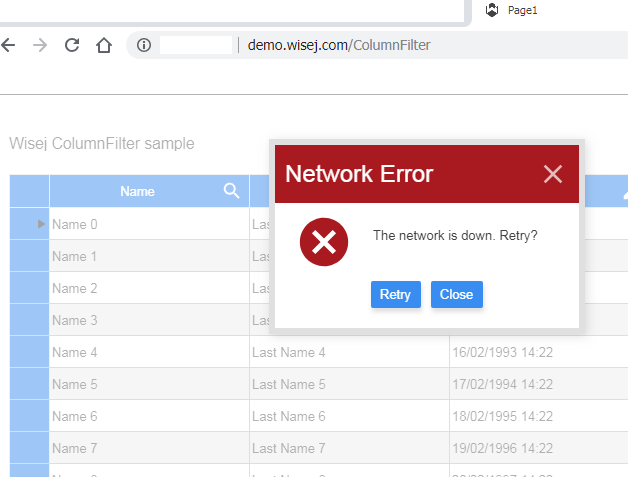
While testing this example: http://demo.wisej.com/ColumnFilter
I disconnected my network cable and I gave this message: “The network is down, retry?”
Hi Johann,
it depends. If the .Net CAD viewer supports drawing/exporting to a bitmap you might be able to attach to a drawing event.
Otherwise you might be better off with integrating a ASP.NET or Javascript viewer.
Hope that helps.
Best regards
Frank
So if he clicks Yes (or No) while disconnected from the Internet, is there a way to tell him that he is disconnected and pass some instructions?
Nothing happens, if the user regains the connection before the session expires they will find the same messagebox and can continue working. If the session expires, the thread will be aborted and nothing after the MessageBox is executed – unless you have a generic try/catch/finally wrapping the messages box, in which case code in the generic catch or finally will execute.
If you have the try/catch/finally, you can check for ThreadAbortException and ignore it. ThreadAbortExceptions cannot escape the try/catch/finally block. See https://docs.microsoft.com/en-us/dotnet/api/system.threading.threadabortexception?view=netframework-4.7.2
Ciao Cristian,
effettivamente ora funziona tutto!
Grazie!
Ciao Simone,
non so perchè ma con la tua versione di Wisej.Ext.FontAwesome.dll non funziona nemmeno a me, ti allego la mia, sostituendola ho visto che funziona.
ciao
Cristian
Hi Luca,
I’m also interested in this feature, but in VBNET I’m not eable to do it work, I use WiseJ 2.
Please can you attach a simple project?
Regards
Cristian
OpenFileDialog or any dialog or any javascript code cannot browse files on the client. The OpenFileDialog can browse files on the server, or on any file system that your application can provide, see OpenFileDialog.Roots.
There is only one way in any browser to open a client side browser OS dialog – through the upload input element. Additionally, you cannot simulate a click on the element because all browsers block any event that is not directly initiated by the user.
You can create a hidden upload control and then call this.upload1.Call(“upload”). Some browsers may block you, in which case you need to handle the client on the client side using the JavaScript extender or the new ClientEvents in Wisej 2.
The mixin works well once you move the “table-row-header” appearance in appearances and place it in \Themes.
{
 "name": "Application.mixin",
  "appearances": {
    "table-row-header": {
     "inherit": "table-row-header",
     "states": {
       "focused": {
         "styles": {
           "backgroundImage": null
         }
      },
      "new": {
        "styles": {
            "backgroundImage": null
        }
      },
      "new-selected": {
        "styles": {
           "backgroundImage": null
        }
      },
      "editing": {
        "styles": {
            "backgroundImage": null
          }
        }
      }
    }
  }
}
I can’t get the following mixin to work which should not show the row header glyphs.
I have uncommented
// Add the WisejResources attribute to
// merge js and css embedded resources with the wisej package.
[assembly: Wisej.Core.WisejResources(ExcludeList: “”)]
Mixin is as below and is in the main folder not the \Themes folder
{
“name”: “Application.mixin”,
“table-row-header”: {
“states”: {
“default”: {
“styles”: {
“widthRight”: 1,
“colorRight”: “windowFrame”,
“backgroundColor”: “buttonFace”,
“backgroundRepeat”: “no-repeat”,
“backgroundPosition”: [ “center”, “right” ],
“backgroundSize”: “16px 16px”,
“fillColor”: “windowText”
},
“properties”: {
“padding”: [ 2, 2, 2, 2 ],
“textColor”: “buttonText”
}
},
“selected”: {
“styles”: {
“backgroundColor”: “table-row-background-selected”
},
“properties”: {
“textColor”: “table-row-selected”
}
},
“focused”: {
“styles”: {
//”backgroundImage”: “table-row-indicator”
},
“properties”: {
}
},
“new”: {
“styles”: {
//”backgroundImage”: “table-row-new”,
“fillColor”: “iconLight”
},
“properties”: {
}
},
“new-selected”: {
“styles”: {
//”backgroundImage”: “table-row-new”,
“fillColor”: “windowText”
},
“properties”: {
}
},
“editing”: {
“styles”: {
//”backgroundImage”: “table-row-editing”
},
“properties”: {
}
},
“rightToLeft”: {
“styles”: {
“transform”: “rotateZ(180deg)”
},
“properties”: {
}
}
},
“components”: {
“content”: {
“states”: {
“default”: {
“styles”: {
“backgroundRepeat”: “no-repeat”,
“backgroundPosition”: [ “center”, “left” ],
“backgroundSize”: “20px”
},
“properties”: {
“padding”: [ 0, 2, 0, 2 ]
}
}
}
},
“error”: {
“states”: {
“default”: {
“styles”: {
“backgroundImage”: “icon-error”,
“fillColor”: “invalid”,
“backgroundRepeat”: “no-repeat”,
“backgroundPosition”: [ “center”, “center” ],
“backgroundSize”: “16px”
},
“properties”: {
“padding”: [ 0, 8, 0, 8 ]
}
}
}
}
}
}
}
Thanks for your hekp
Ewan
Hi Andrew,
thanks for reporting this. It´s a side effect of a fix we introduced for a different problem.
It will be fixed in the next releases for 1.5 and 2.0.
As a workaround you can add this to default.html
Wisej.onExit = Wisej.onExit || function () {

  if (Wisej.Core.session.autoReload) {
    location.reload();
  }
  else {
    window.close();
  }
};
Best regards
Frank
Hi Tim,
did you try to use the latest version of the Brotli extension from GitHub ?
It was upgraded recently due to a bug we fixed.
Can you please share some details about the server that is not working correctly ?
Is it a 64 bit machine ? Which OS, version etc. ?
Any differences in that regard to the server that works fine ?
Thanks in advance.
Best regards
Frank
Hi Cristian,
it´s not 100% clear to me what you are intending to achieve, but I feel that indeed that CustomPaint sample
available in GitHub should give you the right pointers.
Please let us know if you have any specific questions if you implemented that solution.
Best regards
Frank
Thank you!
I will study your solution.
Do you have a working sample wrapping for ASPxSpreadsheet wiht most functions of ASPxSpreadsheet working. I will be happy to see it.
Thank you again!