

Hi Ulisses,
you can use for example a mixin theme and set the height of the header to 0.
In attached example you can toogle between the 2 opened windows with the help of ComponentTools.
Best,
Jens
Hi Angelo,
did you read our blog article about IconPacks ?
https://wisej.com/blog/visualstudio_iconpack/
It should answer your question.
Best regards
Frank
Hi Frank,
thank you, it works!
Regards
Cristian
Hi Ewan,
thanks. This issue is logged as #1826.
Best regards
Frank
Hi Cristian,
you have to use the latest web.config as included in the project templates of Wisej 2.
You can add the following to your web.config:
<system.web>
<httpModules>
<add name=”Wisej” type=”Wisej.Core.HttpModule, Wisej.Framework”/>
</httpModules>
</system.web>
And
<system.webServer>
<validation validateIntegratedModeConfiguration=”false”/>
…
Best regards
Frank
Hi Simone,
thanks, this issue is logged as #1819 and a fix will be included in the next Wisej release.
Best regards
Frank
Hi Ewan,
I added some basic support for ComboBox cols, see updated versions in GitHub.
Best regards
Frank
Hi Frank,
thanks for your sample!
I have apply your workaround to the main project and seems to work.
If you have any update, please let me know.
Hi Simone,
please find attached a reworked version of your code.
In general the following construct ensures that the code is run in context and the client is updated when the code finished:
Application.Update(this, () =>
{
}
We´ll investigate your code closer to see why the session is cleared.
Best regards
Frank
Hi Frank
The issue occurs when you attempt to use the where version of the filter.
It also occurs if you attempt to use a filter col with a custom column such as a multi combo column, with both versions of the filter.
See attached image which is now using the value column instead of the display column
Also the system.linq.dynamic.dll needs added to the DLLs in the Wise J build otherwise you have to get a copy of it to reference.
Thanks for Your Help Ewan
Hi Ewan,
I am not sure I understand your question/issue.
Please find attached a small sample with a ComboBox column and a simple column filter attached to it:
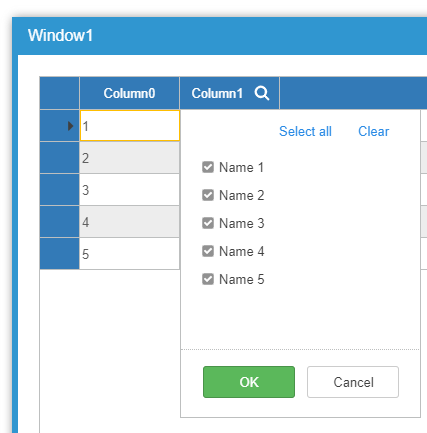
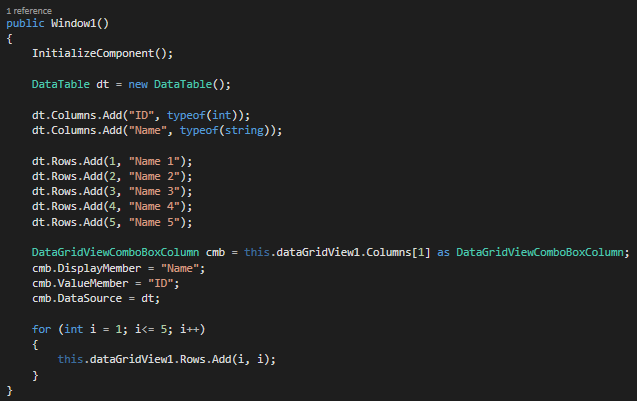
Best regards
Frank
Thanks Eric,
this issue is logged as #1810 and will be fixed in the next release.
Best regards
Frank
Add this to Default.html. It will abandon the session when navigating, closing the tab, refreshing, hitting F5, or editing the URL. The alert behavior is different for different browser and some may or may not show the alert when refreshing. I think this is the wrong thing to do for a web application, but in Wisej you can do anything you’d like to do using standard browser functionality…
 <script>
   window.addEventListener("beforeunload", function (e) {
     e.preventDefault();
     e.returnValue = false;
     return "Are you sure?"; // this shows only in IE.
   });
   window.addEventListener("unload", function (e) {
    Wisej.Core.exit();
    Wisej.Core.removeSession();
   });
 </script>
Hi Andrew,
you can create modal dialogs and modal messageboxes setting modal:false.
Then they act modal only on the client.
Apart from that there is no way to get a reference to the message box instance.
Hope that helps.
Best regards
Frank
Hi Joe,
it is not possible for Wisej and also for any other application which runs in a browser to determine when user closes the browser.
One way to show up a warning, when the user tries to leave the page is described here.
The problem in this solution is, that the unload event is also fired when the user refreshes the browser. And on server you cannot distinguish if the browser was closed or the user just hit F5.
But you can add for example a button to your app which will call Appliaction.Exit(), this will terminate the application and the corresponding session.
When the user leaves the page or closes the browser, Wisej will also terminate the App and the session after twice of SessionTimeout. SessionTimeout you can configure in Default.json.
Best,
Jens
Thank you Nic Adams, I’m sorry, that’s not what I want to know. I reformulated my question, please, could you answer again?
Hi Jeo,
If you mean what happens when a user closes their browser then eventually you should get the Application.Exit event fire if you want to do something specific, otherwise you can leave it to WiseJ to clean up the users session.
HTH
Nic
Currently using WiseJ with DryIOC. I’ve used the Winforms pattern but created some factory classes for UserControls and Forms.
I see Luca has been and fixed this.
Thanks
Nic
Use the WinForms or WPF samples. I’m assuming the Container implementation is synchronized since they always declare it as static.
One error in the samples in the link is that it replaces the parameterless constructor. You can add and overload the constructor with the parameters receiving the different implementations, but always keep the parameterless constructor for inheritance and the designer.
And you have to be careful if you register a singleton since it will be reused by different sessions. Another way would be to create the container as a session instance instead of a static. In this case the singleton will be recreated in each session.