

Hi Eric,
what kind of form/page are you opening in the designer ?
Any chance to create a test app for us and send it to frankATiceteagroup.com ?
Thanks in advance !
Best regards
Frank
Here is a sample.
I don’t have a sample for you at this time but this is related:
If I call .RemoveAt, it calls listview.SelectedIndexChanged.
The visual representation shows the next item selected, however, listview.SelectedItems.Count = 0.
Why would it show the selected item but still have Count = 0?
I upgraded to the latest 1.5.56 and the problem appears to be resolved.
Hi Alexandru,
You should be able to handle the completion of the packages load through the “init” event of the widget. With this event (in InitScript property) you can call something like:
this.fireWidgetEvent(“ready”);
You might find this documentation useful: https://wisej.com/docs/2.0/html/P_Wisej_Web_Widget_InitScript.htm
I hope this helps, please let me know if you need any clarification or have any mores questions!
Best,
Levie
Hi Stephane,
thanks for reporting this change of behavior in Firefox 66.
It will be fixed with the next Wisej release.
Best regards
Frank
Hi Cristian,
yes, no need an embedded server license.
We offer several options that depend on your applications and planned deployment.
Please contact us at SalesATwisej.com so we can discuss this further.
Best regards
Frank
I had to remove runat=”server” from <head> and now the page loads. I think maybe it was my failure to update default.json with the new pagename the first time … but I’m not sure. Going to test things now, thanks for the help.
Thanks for the quick response.
The default.aspx does have that formatting, it is the same as default.html
I also tried using “Pages/Default.aspx” in web.config
The requests themselves still seem to be asking for default.html (see attached)
After updating references of default.html to default.aspx in manifest.json and Default.json, and restarting the server again, it seems to want to load. But now I have errors that did not exist on dev machine (BC30456: ‘this’ is not a member of ‘ASP.default_aspx’)
on this line:
<link rel="preload" href="https://cdnjs.cloudflare.com/ajax/libs/fancybox/3.2.1/jquery.fancybox.min.css" as="style" onload="this.rel='stylesheet'">
Hi Andrew,
A few things.
First, make sure you are running WiseJ in your new .aspx file like the following:
<head runat=”server”>
<title></title>
<script src=”wisej.wx”></script>
</head>
Next, in web.config you will need to use “Pages/Default.aspx” instead of just “Default.aspx” (make sure your file is not hidden in any subfolders until you get this working)
This should work even if the HTML file still exists in the project.
Please let me know if this works for you!
Best,
Levie
Hi Andrew,
I have tried this with our latest internal build, but I cannot get the error. What version of WiseJ are you running?
Would you mind wrapping up a sample project so I can test it for you?
Let me know,
Best,
Levie
Hi Gabriele,
internally Url and PageSource have the same effect.
But Url is a hidden property while for PageSource you can use an editor.
Find a simple sample that shows how to interact with the DOM attached.
Please note that this only works if the page is from the same origin.
Otherwise you would have to rely on iFrame postMessage calls.
Hope that helps.
Best regards
Frank
Unfortunately when there are no line-breaks present, textBox.Lines.Length is always 1, even when lines are wrapped. A good solution should account for a single piece of long-wrapped text, and also multi-line comments that have breaks in them (vbBreak).
To handle this I also used MeasureText to calculate the number of lines required to render a long string that is absent of breaks, and will be wrapped. Then we use the larger of the 2 values. It seems to work — thank you for the nudge in the right direction:
Public Sub AdjustDescriptionHeight()
Const padding As Integer = 3
Dim numLines As Integer = Me.txtDescription.Lines.Length
‘calculate lines in case of one-long piece of text, considering textbox width
Dim s As Size = Wisej.Base.TextUtils.MeasureText(txtDescription.Text, txtDescription.Font)
Dim intLinesRequiredToRender = Math.Ceiling(s.Width / txtDescription.Width)
numLines = Math.Max(numLines, intLinesRequiredToRender) ‘use whatever value is larger.
Dim border As Integer = 1
txtDescription.Height = txtDescription.Font.Height * numLines + padding + border
End Sub
Hi Andrew,
you could follow the approach that David Sherret suggess here:
https://stackoverflow.com/questions/2893059/autoresize-textbox-control-vertically
instead of GetLineFromCharIndex you can use this.txtBody.Lines.Length
You might want to fine tune the formula a bit also depending on the device.
Hope that helps.
Best regards
Frank
Hi Angelo,
thanks for preparing the sample.
I have tested it with the latest internal build and the problem does not seem to appear.
I will inform you when the new build is released so you can retest on your end.
Best regards
Frank
Hi Frank,
I’ve attached an example.
I think the issue is when the textbox have focus.
Afetr this event the keydown button set only the cursor positon at the end of the textbox.
Thanks
Frank,
By mistake I send a licensed version of SpreadJS in the sample.
Could you please delete the zip file ?
Regards,
Marcelo Blank
Hi Mark,
the fix for #1838 will be included in the next Wisej build.
Please note that to force a refresh instead of using
		this.dataGridView1.Rows.Clear();
		this.dataGridView1.RowCount = this.Values.Count;
It is better to use
		this.dataGridView1.BeginUpdate();

                    ... sort ...

		this.dataGridView1.EndUpdate();
Best regards
Frank
Marcelo,
2 things that should get you on the right track:
a [WebMethod] should be declared as public, not private.
As you define it on the window1 level you should call it as
this.getParent().GetValues(“Ok”);
Best regards,
Frank
Hi Ulisses,
please find a sample attached. It defines the color in a theme mixin:
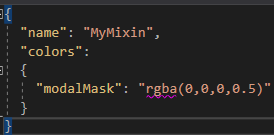
Best regards
Frank