

Thanks Luca,
Tried this for combobox but no result, should it work for combo’s?
cb_quota.AddClientEventListener(“keypress”, ”var e = arguments[0];if (‘0123456789’.indexOf(e.getKeyIdentifier()) === -1 && e.getKeyIdentifier() != ‘Backspace’)e.stop();”)
Looks like a bug. Writing the cookie applies an additional escaping of the json string. You see it only on a new session because that’s the only time the cookies are reloaded from the browser. When you add the cookie it stays in the collection. It was probably added to solve (but it doesn’t) a general bug with ASP.NET cookies not being able to contain the semicolon as part of the string.
As a temporary workaround use this:
  Public Function JavaScriptStringDecode(source As String) As String
      Return source.Replace("\'", "'").Replace("\""", """").Replace("\/", "/").Replace("\t", "\t").Replace("\n", "\n")
  End Function
Logged as #1924, will be fixed in the upcoming (overdue) update.
That’s because you are not setting the DisplayMember so Wisej displays the result of ToString().
In your sample you set the DisplayMember on the Column but don’t set the data source, then when the control is shown you set the datasource directly on the combobox used in the cell without the DisplayMember. Change your code like this:
The error is down message is caused by the network being disconnected. VWG didn’t support WebSocket so you’d get an unresponsive app if the network was disconnected during an http request only. Wisej supports both models: real time (WebSocket) and pull (HTTP). If you have something in between that is causing the websocket to be dropped then you get this message until Wisej automatically reconnects.
You can turn off websocket in Default.json.
You can’t control the user browser keyboard from the server. You need to attach a javascript event.
I am attaching a video
Thanks Glenn.
However I could not yet reproduce the error here.
Can you please describe the steps until where it fails ?
Best regards
Frank
Thank you for the answer!
Do you think is safe to ignore this message? WebGUI didn’t have this kind of error messages…
Please see attached project.
Please see sample project.
Hi David,
network down errors cannot be handled on the server side,
but on the clients side.
See
https://wisej.com/support/question/network-errors-dialogs
Best regards
Frank
Hi Arturo,
you want to change the font size of the DataLabel ?
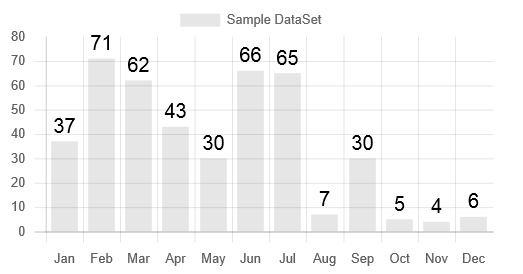
See here:
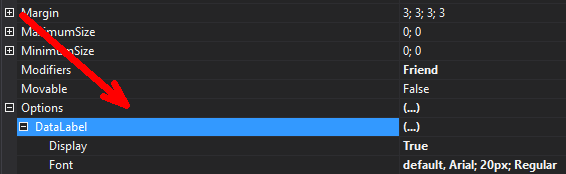
Best regards
Frank
Hi,
this usually indicates that something is taking too long to load for the designer.
Are you using any custom font ? Can you please share some details about the code where this is happening ?
Thanks in advance,
Frank
Björn,
please try without the quotes:
“responseTimeout”: 1800,
Best regards
Frank
I also tried creating a new project, drop the ribbonbar control from toolbox, then created some pages, then groups, but the same issue when I reached to creating item , please see attached screenshot.
Thank you.
Hi,
I have installed a new VM, and VS 2019, then Wisej 2.0.28, and tried to open your sample project Ribbonbar from wise-examples-2.0, but it’s the same issue, please see attached screenshot.
Hope this can be resolved.
Thanks.
Can somebody show me the code for vb.net and where to place, during form load?
It’s not a Wisej error. It’s probably coming from your database. It seems to be an EF error.
using System;
using System.Collections.Generic;
using System.Drawing;
using System.Linq;
namespace ChartJS_Issue
{
class AlertChartData
{
public int OpenAlerts;
public int ClosedAlerts;
public DateTime Date;
}
public class OverviewSubPanel
{
public OverviewSubPanel()
{
Wisej.Web.Ext.ChartJS.BarOptions barOptions1 = new Wisej.Web.Ext.ChartJS.BarOptions();
Wisej.Web.Ext.ChartJS.OptionScalesAxesX optionScalesAxesX1 = new Wisej.Web.Ext.ChartJS.OptionScalesAxesX();
Wisej.Web.Ext.ChartJS.OptionScalesAxesY optionScalesAxesY1 = new Wisej.Web.Ext.ChartJS.OptionScalesAxesY();
this.chartOverTime.ChartType = Wisej.Web.Ext.ChartJS.ChartType.Bar;
this.chartOverTime.Dock = Wisej.Web.DockStyle.Fill;
this.chartOverTime.Location = new System.Drawing.Point(0, 40);
this.chartOverTime.Name = “chartOverTime”;
barOptions1.DataLabel.Display = true;
barOptions1.Legend.Position = Wisej.Web.HeaderPosition.Bottom;
optionScalesAxesX1.Stacked = true;
barOptions1.Scales.xAxes = new Wisej.Web.Ext.ChartJS.OptionScalesAxesX[] { optionScalesAxesX1 };
optionScalesAxesY1.Stacked = true;
barOptions1.Scales.yAxes = new Wisej.Web.Ext.ChartJS.OptionScalesAxesY[] { optionScalesAxesY1 };
this.chartOverTime.Options = barOptions1;
this.chartOverTime.Size = new System.Drawing.Size(680, 215);
}
private Wisej.Web.Ext.ChartJS.ChartJS chartOverTime;
public void LoadChart()
{
this.chartOverTime = new Wisej.Web.Ext.ChartJS.ChartJS();
this.chartOverTime.DataSets.Clear();
var openAlertsDataset = new Wisej.Web.Ext.ChartJS.BarDataSet();
openAlertsDataset.BackgroundColor = new Color[] { System.Drawing.Color.FromArgb(128, Color.Red) };
openAlertsDataset.HoverBackgroundColor = null;
openAlertsDataset.Label = “Opened Alerts”;
this.chartOverTime.DataSets.Add(openAlertsDataset);
var closedAlertsDataset = new Wisej.Web.Ext.ChartJS.BarDataSet();
closedAlertsDataset.BackgroundColor = new Color[] { System.Drawing.Color.FromArgb(128, Color.Blue) };
closedAlertsDataset.HoverBackgroundColor = null;
closedAlertsDataset.Label = “Closed Alerts”;
this.chartOverTime.DataSets.Add(closedAlertsDataset);
var list = new List<AlertChartData>()
{
new AlertChartData
{
Date = DateTime.Now,
OpenAlerts = 1,
ClosedAlerts = 0
},
new AlertChartData
{
Date = DateTime.Now,
OpenAlerts = 1,
ClosedAlerts = 0
},
new AlertChartData
{
Date = DateTime.Now,
OpenAlerts = 0,
ClosedAlerts = 1
},
new AlertChartData
{
Date = DateTime.Now,
OpenAlerts = 0,
ClosedAlerts = 0
},
new AlertChartData
{
Date = DateTime.Now,
OpenAlerts = 1,
ClosedAlerts = 1
},
new AlertChartData
{
Date = DateTime.Now,
OpenAlerts = 0,
ClosedAlerts = 1
},
new AlertChartData
{
Date = DateTime.Now,
OpenAlerts = 1,
ClosedAlerts = 1
},
new AlertChartData
{
Date = DateTime.Now,
OpenAlerts = 0,
ClosedAlerts = 0
}
};
openAlertsDataset.Data = list.Select(n => (object)n.OpenAlerts).ToArray();
closedAlertsDataset.Data = list.Select(n => (object)n.ClosedAlerts).ToArray();
chartOverTime.Labels = list.Select(n => n.Date.ToString(“yyyy-MM-dd”)).ToArray();
}
}
}
Checked 1.3, 1.4, 1.5 and 2.0 and don’t see an HeaderText property in the jQueryKnob extension. You need to attach some code please.