

Hi Glenn,
#1927 is fixed in our latest Wisej build (2.0.32).
Best regards
Frank
Hi Andrew,
#1931 is fixed in latest Wisej build (2.0.32).
Best regards
Frank
Huynh,
it´s fixed in GitHub and the updated extension will also be included in the next Wisej build.
Best regards
Frank
I want to show both numbers like it is shown on a screenshot attached.
Andrew,
logged as #1931.
Workaround is to set the UserPopup.AutoValidate to Disable.
We´ll inform when a fix is available.
Best regards
Frank
Dmitry,
you only want to show a single number ?
Which one ? The sum ?
Best regards
Frank
Hi Dmitry,
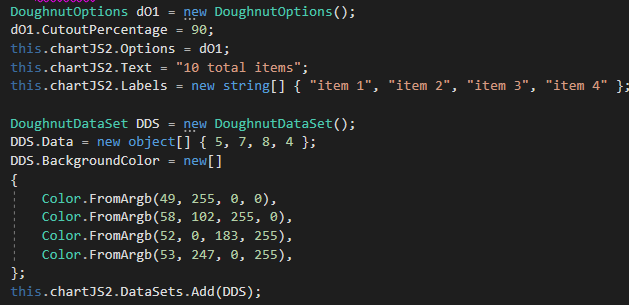
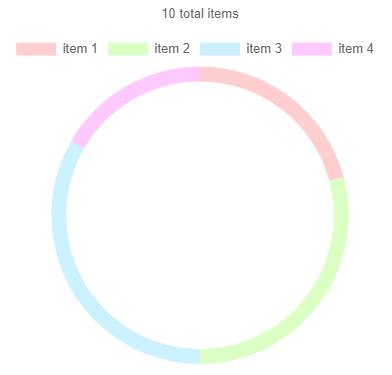
it´s a DoughnutDataSet, not a DataSet that you should create and use
it for example like this:
Best regards
Frank
Thanks Huynh.
It´s a bug, logged as #1931.
As a temporary workaround you can handle the NavigationBar´s ItemClick event.
I´ll inform you when a fix is available.
Best regards
Frank
Hi Frank
You can test my demo
Thank you
Hi,
I don´t see a generic problem with the NavigationBarItem click event.
Can you please wrap up a test case ?
Thanks in advance,
Frank
Ok, thank you for the answer!
So I should disable websocket in my Default.json?
And disable KeepAliveInterval too?
Thanks in advance
You can’t control the browser animation from the server. The animation extension is designed to add animation properties to controls. In the sample it’s created on Windows1 and used on a UserPopup. Do this:
Wisej takes care of the rest on the client side in the browser.
However, the “disappear” animation will still not work for a UserPopup 🙂 because in order to show the panel as a popup it has to be wrapped in a popup container which is the one “disappearing” first so the inner UserPoup is already gone when the animation kicks in.
Will log the issue and send you a fixed sample once the Animation fix is in.
With or without Wisej?
With Wisej you can add the [WebMethod] attribute to any method and call it directly from javascript. See https://wisej.com/docs/2.0/html/JavaScriptObjectModel.htm.
Without Wisej you’d have to pick one of the many web service libraries, host the server code, handle the session if you need it, etc.
Yes in several ways:
Option 1 is the easiest and best.
Wisej sends a keep alive also during long tasks so it’s not the Wisej session expiring. Could be the IIS inactivity timer that shuts down the app pool.
I don’t understand where/when you get the error – IIS7 doesn’t support WebSocket so there is no connection outside of a HTTP request/response.
In general, long running operations can be done asynchronously.
Unfortunately the second problem you mentioned is a bug/regression (#1927). This is a quick workaround.
private void DataGridView1_CellParsing(object sender, DataGridViewCellParsingEventArgs e)
{
   e.ParsingApplied = true;
}

private void DataGridView1_DataError(object sender, DataGridViewDataErrorEventArgs e)
{
   e.Cancel = false;
}
Th fix will be available in this upcoming build (early next week).
Hello,
thanks seems to work, application is still working after restarting the iis server and no time out so far after 5minutes.
Best regards,
bjorn
Thanks, but I have another problem, when I type in a value that is not in the list, it gives me an error “new value” cannot be converted to system.string.
Thanks.
Yes it works fine, the widgets all use the same infrastructure. I just tried this:
 private void Window1_Load(object sender, EventArgs e)
 {
     this.comboBox1.AddClientEventListener("keypress", "var e = arguments[0]; if ('0123456789'.indexOf(e.getKeyIdentifier()) === -1 && e.getKeyIdentifier() != 'Backspace')e.stop();");
 }
You can also attach javascript events in the designer.
Hi Arturo,
we have just extended our ChartJS extension in Github (for Wisej 2).
Now you can set a second collection of type string in parallel with your object[].dataSet.Data
It´s called dataSet.Formatted.
Here you can format your data as you wish, e.g. adding decimal separators, currency symbols etc.
It will then be used to display the formatted data string.
Best regards
Frank