

Yes, add “impersonate”: true in Default.json then the thread on the server will impersonate the user. You need to configure IIS appropriately. Basically Wisej supports anything you can do with .NET. We use it in several large projects, including using Kerberos impersonation.
Rudy,
does your LinkMenuItem include an HREF ? If that´s not what you intended to use,
please go for a regular MenuItem.
Otherwise please provide a full test case so we can see your Menu definition.
Thanks in advance.
Best regards
Frank
Thanks Angelo.
This issue is logged as #2134.
We´ll inform you when it´s fixed.
Best regards
Frank
sorry I forgot the attachment
Hi HSoft,
If you’re using Wisej 2.1, you should use Application.Play() when trying to play audio in the browser. It creates a new JS Audio object (see https://developer.mozilla.org/en-US/docs/Web/API/HTMLAudioElement) and plays the audio on the client that way.
The SystemSounds class is related directly to the Control Panel configuration for sounds, so if you use that, you’ll hear the sound on your server, but not the clients accessing through the browser.
Alternatively, you can import Wisej.Web.VisualBasic and use “this.Beep()” to play audio on the client as well!
HTH,
Levie
Frank,
Not sure if it was already one of the 2.1x, but i think it was the beta, or the latest 2.0x.
I just removed the updated from the server, and still doesn’t show, could it be something with wisej?
now fx version is again:
Version Information: Microsoft .NET Framework Version:4.0.30319; ASP.NET Version:4.6.81.0
Jorge,
what version was working before you upgraded ?
Best regards
Frank
Ciao Angelo,
I can reproduce. It’s a regression and it’s caused by a fix in the application termination code. The ThreadAbortException should not make it to the app. You can workaround it like this:
in Main
Application.ThreadException += Application_ThreadException;


 private static void Application_ThreadException(object sender, System.Threading.ThreadExceptionEventArgs e)
 {
   if (e.Exception is ThreadAbortException)
   {
     // do nothing.
   }
   else
   {
    // display exception?
   }
}
Having a global exception handler in the app is a good thing in general since it lets your app manage any exception.
HTH
Roni,
as an alternative you might also want to check out our free Barcode extension:
https://github.com/iceteagroup/wisej-extensions/tree/2.1/Wisej.Web.Ext.Barcode
It generates the Barcode image on the server thus saving a Client Server round trip.
Best regards
Frank
I included the Integration3 project in my solution; now I have the problem with the picture generation
also with the App.Window1 version it gives the same problem
Hi Roni,
thinking some more about this, there is also a more elegant and flexible solution available:
Instead or hardcoding App.Window1 in the javascript, you can also pass a reference to your form:

Then change your function in InitScript to this:
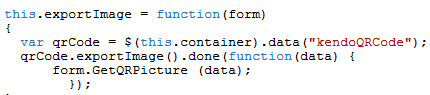
Here you can benefit from the beauty and flexibility of Wisej 🙂
When you are using Call() Wisej can automatically convert a widget reference to a string id and then back to a widget on the client.
The same happens when sending an event with data from the client or calling a web method.
You can pass a widget reference back to the server and it automatically becomes a control.
Quite nice, isn´t it ?
Best regards
Frank
Hi Roni,
I started by using the sample file from this blog entry:
Then I looked up the Telerik Kendo UI API for that control:
https://docs.telerik.com/kendo-ui/api/javascript/dataviz/ui/qrcode/methods/exportimage
Following this, I added an Export method in the InitScript:
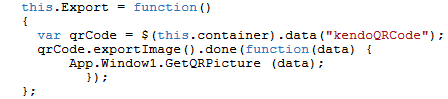
this.Export = function() { var qrCode = $(this.container).data(“kendoQRCode”); qrCode.exportImage().done(function(data) { App.Window1.GetQRPicture (data); }); };
Then I defined a WebMethod and a helper method in Window1:
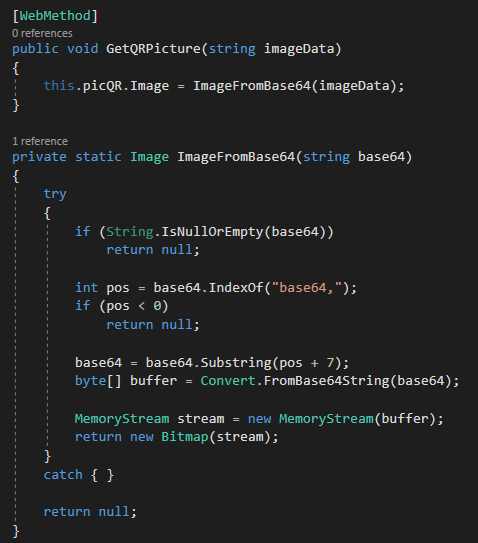
And finally added a button that calls the Export function to test it:
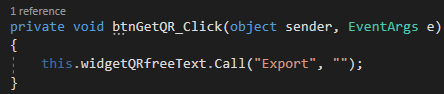
Hope these steps help you get started.
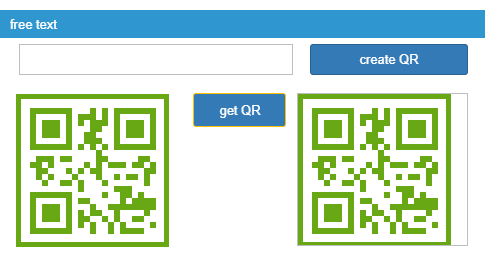
Please also find the complete extended blog sample code attached.
Best regards
Frank
Hi Edmond,
that depends on your UserPopup control.
Please find an older sample attached.
It uses a ListBox in a UserPopup and updates the owning TextBox on SelectedIndexChanged
You could also attach to its Close event.
Hopet that helps.
Best regards
Frank
Jorge,
digging a bit deeper and also considering that such keyboard filtering should better be done on the client side
than on the server side, you could also try the following with your TextBox:
InitScript = "this.getChildControl("textfield").setFilter(/\d/);"
Find more information about the regular expression used here:
https:/regex101.com/
Best regards,
Frank
Jorge,
please take a look at the MaskedTextBox class.
It´s a way better approach than handling keypress events on the server side:
https://wisej.com/docs/2.1/html/T_Wisej_Web_MaskedTextBox.htm
Best regards
Frank
Frank,
To allow only digits in a textbox, i have this in the addeventhandler
var e = arguments[0]; if (‘0123456789’.indexOf(e.getKeyIdentifier()) === -1 && e.getKeyIdentifier() != ‘Backspace’)e.stop();
But i’d like to have a code to allow only the following format: “12541,33”
And another one to allow only letters from A to Z
Would it be possible?
Jorge,
I am not sure, what you are trying to achieve and what is the question.
Please provide a complete test case even though I doubt that this is really a Wisej specific topic/question.
Best regards
Frank
Hi Ulisses,
thank you. I have logged it as issue #2125.
Best regards
Frank
Hi,
Oh nice!
Tell me, i’d like that, when i write, it auto-suggest me what it has filled, that part isn’t working, am i doing something wrong?
Sql = “select * from tab_fabricantes order by codigo”
cb_fabricantes.DataSource = SqlDataTable(Sql) ‘ <= this returns a datatable
cb_fabricantes.ValueMember = “codigo”
cb_fabricantes.DisplayMember = “descricao”
cb_fabricantes.SelectedIndex = -1
Hi Jorge,
for the ComboBox populated from a DataSource you can use any WinForms sample like this one:
http://vb.net-informations.com/dataset/bind-combobox.htm
For Autocompletion you could then take a look at the various AutoCompleteMode settings.
Best regards
Frank