

Hi Wim,
yes, you can handle the ColumnStateChanged event and check for e.StateChanged == Visible.
Best regards
Frank
There are 2 properties in the DataItem class. If the first value is false, the second is hidden. If true, then the second property becomes visible.
Hi Dmitry,
#2234 is fixed in our latest release (2.1.58).
Best regards
Frank
Hi Davide,
Sorry for the delay. Here is the sample project! Please take a look and let us know if you have any questions.
Best,
Levie
this is my attempt. I’m using InitScript of windof class,
But.
Yes i0m trying it with other vds.
Do you think loco.js in necessary or it can be ported in some way to your framework using your canvas widget.
Hi Davide,
Is this what you’re trying to accomplish with Wisej? http://demo.wisej.com/3dviewer/. I’ll post the code shortly.
Do you have some more .vds files we can use to test it out?
Best,
Levie
Thanks for your reply! I’ll try to make changes according to your recommendations. But the same code works fine in a WinForms application.
The System.ComponentModel library in .NET doesn’t let you change a property attribute. You’d have to implement the ICustomTypeDescriptor interface to return the kind of PropertyDescriptor you need.
But… Since the System.ComponentModel system can get quite complicated, the PropertyGrid in Wisej provides additional events and overloadable methods that allow for a certain degree of customization without having to deal with the TypeDescriptors. You can derive from PropertyGrid and overload GetProperties(), it lets you filter the properties to display.
In VirtualMode the rows are provided on demand by the app, so sorting is delegated to the data source: could be done in code or by the database or only for the loaded page, etc. If you get the rows from a database, I’d let the db server sort the data, if you have some sort of list, I’d use Linq.
See also:
You can also bind directly to the controls:
Best,
Levie
Add this to Default.html:
 <style>
   @-moz-document url-prefix() {
     div {
       letter-spacing: -0.03em;
    }
 }
 </style>
Firefox always has differences with font rendering. We already have line-height:1.2 in wisej.css, will probably add the letter-spacing normalization too.
Hi,
I see the issue, i’m attaching some experimental code that will let you test firing the event after a specific timeout. It prevents the normal selectionChanged and focusCellChanged events from firing to the server and replaces them with events that fire 250ms after the last selection change. If this code works for you, we’ll add it to the DataGridView as an optional property for future builds.
Let me know!
Best,
Levie
Hi Paul,
thank you for letting me know.
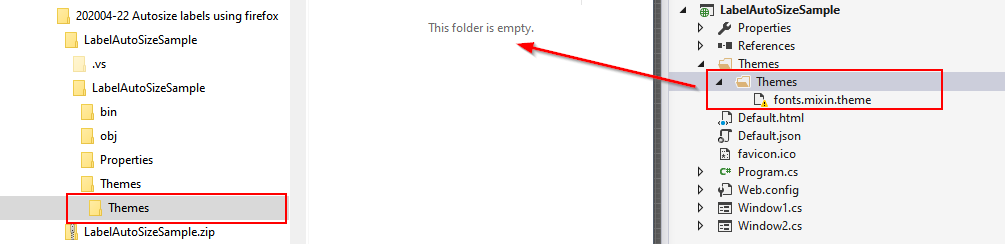
That was my bad i moved the theme file to the themes folder above, but did not update the project file.
Please find the updated sample project attached to this message
Hi Florian
Thanks for reports this issue
In the project sample, is missing the file fonts.mixin.theme
¿Could be possible that you attach them?
Regards and happy coding
It’s fixed in the upcoming release.
Hi Dmitry,
We were actually able to replicate the issue and it’s been logged as issue #2234. The issue has been fixed and will be available in the next build!
Best,
Levie
Multiline TextBox can accept Enter or Tab by setting
  textBox1.AcceptsReturn = true;
  textBox1.AcceptsTab = true;
But… when in a custom combobox dropdown looks like the dropdown intercepts the Enter to close before the textarea. Will log as an issue.
Also, in your sample app you can set/get the value like this:
 var ctrl = new ButtonTextBox();
 ctrl.Value = Convert.ToString(value);
 service.DropDownControl(ctrl);
 value = ctrl.Value;
and you can close the dropdown without registering an additional event, although that works too:
 private void OK_Click(object sender, EventArgs e)
 {
    ((UserComboBox)this.Parent).DroppedDown = false;
 }
HTH
You can turn of the expandable option, it’s all part of System.ComponentModel. Expandable objects have the ExpandableObjectConverter: https://docs.microsoft.com/en-us/dotnet/api/system.componentmodel.expandableobjectconverter?view=netframework-4.8
You can change the TypeConverter using the [TypeConverter] attribute and set the default one or your own custom one and even decide which child properties to show and in what order, etc… System.ComponentModel is a huge world in .NET and most of it is supported in Wisej.
Hi Ulises
Thanks for report the issue !
I’ll inform to developer team and confirm you when be corrected
Regards and happy coding